GPU Cost Calculator
ML compute pricing & cloud GPU analysis • 2026 edition
GPU Cost Formula:
Show Calculator\( \text{Total Cost} = \text{Hourly Rate} \times \text{Hours Used} \times (1 + \text{Overhead}) \)
Where:
- \( \text{Hourly Rate} \) = Price per hour for selected GPU instance
- \( \text{Hours Used} \) = Total runtime of computation
- \( \text{Overhead} \) = Additional costs (storage, networking, management)
For different pricing models:
- On-demand: \( \text{Cost} = \text{Rate} \times \text{Hours} \)
- Reserved: \( \text{Cost} = \text{Reservation Fee} + (\text{Discounted Rate} \times \text{Hours}) \)
- Spot: \( \text{Cost} = \text{Variable Spot Rate} \times \text{Hours} \)
- Preemptible: Similar to spot but with forced termination
Example: For a 24-hour training job on an NVIDIA V100 instance ($1.20/hour) with 10% overhead:
\( \text{Total Cost} = 1.20 \times 24 \times (1 + 0.10) = 1.20 \times 24 \times 1.10 = \$31.68 \)
The total cost would be $31.68 for the 24-hour training session.
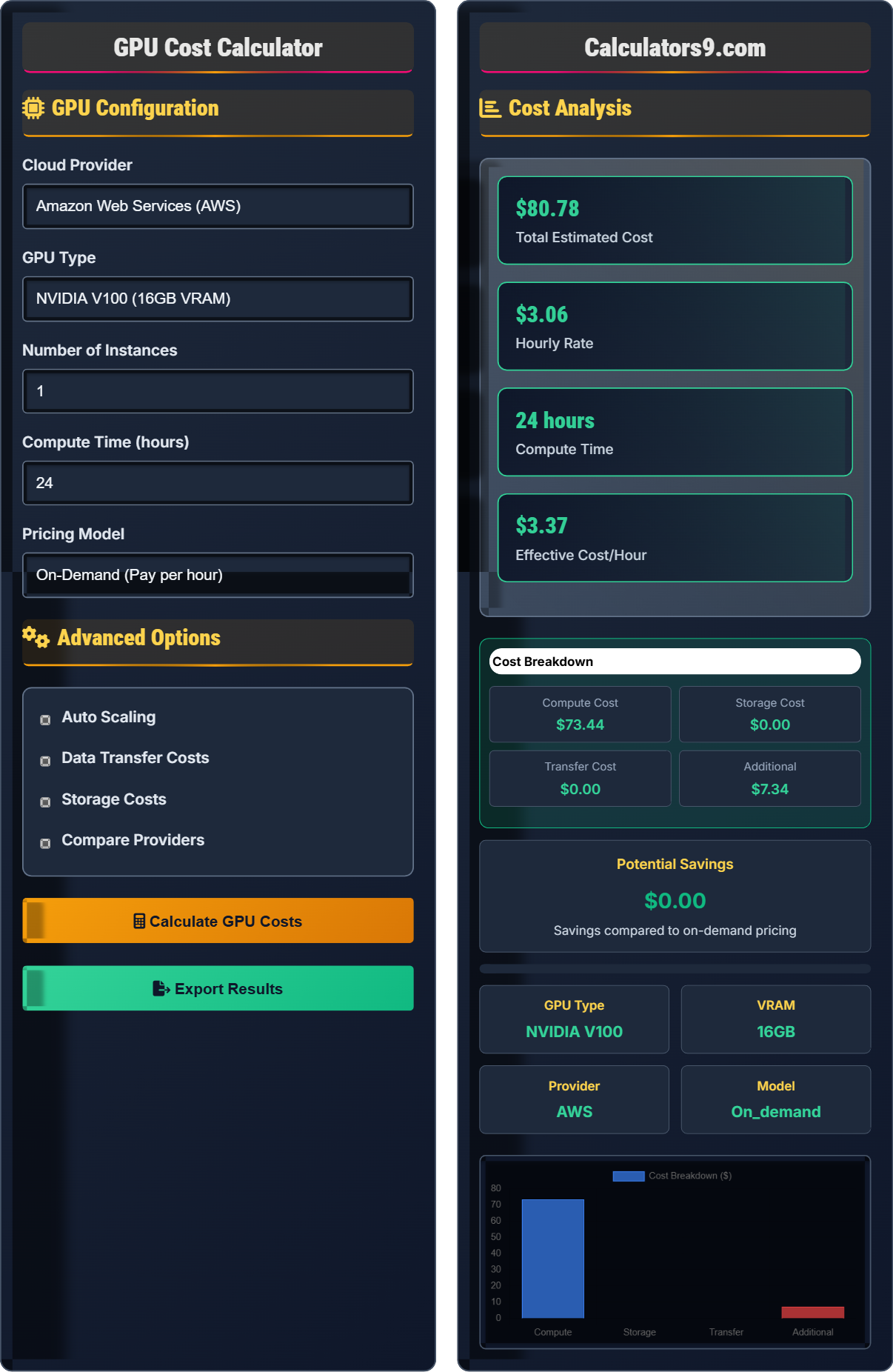
GPU Configuration
Advanced Options
Cost Analysis
| Component | Value | Cost |
|---|---|---|
| GPU Instance | 1 × V100 | $28.80 |
| Runtime | 24 hours | $28.80 |
| Storage | 500GB | $0.00 |
| Transfer | 100GB out | $0.00 |
Comprehensive GPU Cost Optimization Guide
GPU cost optimization involves selecting the most cost-effective computing resources for machine learning workloads. This includes choosing appropriate GPU types, leveraging different pricing models, and implementing efficient resource management strategies. Proper optimization can reduce compute costs by 50-90% while maintaining performance requirements.
The basic cost calculation follows:
Where overhead includes storage, networking, and management costs.
Key considerations for GPU selection:
- Memory Requirements: VRAM needed for model size
- Compute Power: TFLOPS for training speed
- Cost per TFLOPS: Performance efficiency
- Availability: Region and quota limits
- Compatibility: Framework support
- Right-sizing: Choose GPU with appropriate specifications
- Auto-scaling: Scale resources based on demand
- Spot instances: Use for fault-tolerant workloads
- Reserved capacity: Commit for significant discounts
- Efficient training: Optimize batch sizes and precision
Cost Fundamentals
Strategic approach to minimizing compute expenses.
\( \text{Total Cost} = \text{Hourly Rate} \times \text{Hours Used} \times (1 + \text{Overhead}) \)
Where overhead includes additional services and management.
- Match GPU to workload requirements
- Consider pricing models for cost savings
- Optimize usage patterns
Model Development
Strategic approach to ML resource allocation and cost management.
- Estimate compute requirements
- Select appropriate GPU type
- Choose pricing model
- Implement cost monitoring
- Training time constraints
- Budget limitations
- Performance requirements
- Resource availability
GPU Cost Optimization Learning Quiz
Which pricing model typically offers the highest cost savings for long-running ML training jobs?
The answer is B) Reserved Instances. Reserved instances offer the highest guaranteed cost savings (typically 30-70%) for long-running workloads by requiring a commitment to use specific resources over a period (usually 1 or 3 years). While spot/preemptible instances can offer up to 90% savings, they come with the risk of interruption. Reserved instances provide consistent, predictable cost savings for steady-state workloads like long training runs.
Students must understand the trade-offs between different pricing models. On-demand provides flexibility but highest cost. Reserved requires commitment but offers guaranteed savings. Spot provides maximum savings but with interruption risk. The choice depends on workload characteristics: critical workloads need reserved, fault-tolerant workloads can use spot.
Reserved Instances: Commit to resource usage for discount
Spot Instances: Discounted instances subject to termination
On-Demand: Pay-per-use without commitment• Reserved = Commitment for guaranteed savings
• Spot = Maximum savings with interruption risk
• Match model to workload characteristics
• Use reserved for predictable workloads
• Use spot for fault-tolerant training
• Consider convertible reservations for flexibility
• Using on-demand for all workloads without optimization
• Not considering spot instances for interruptible work
• Forgetting to account for storage and transfer costs
Calculate the total cost for running a 48-hour training job on an AWS p3.2xlarge instance (NVIDIA V100) with hourly rate of $3.06, including 15% overhead for storage and networking. Show your work.
Given values:
- Hourly rate = $3.06
- Hours used = 48
- Overhead = 15% = 0.15
Step 1: Calculate base compute cost
\( \text{Base Cost} = \text{Hourly Rate} \times \text{Hours Used} \)
\( \text{Base Cost} = 3.06 \times 48 = \$146.88 \)
Step 2: Calculate total cost with overhead
\( \text{Total Cost} = \text{Base Cost} \times (1 + \text{Overhead}) \)
\( \text{Total Cost} = 146.88 \times (1 + 0.15) = 146.88 \times 1.15 = \$168.91 \)
The total cost for the 48-hour training job would be $168.91.
This calculation demonstrates how overhead costs can significantly impact total compute expenses. The 15% overhead increased the cost from $146.88 to $168.91, a $22.03 increase. Students should remember that GPU instance costs are just one component of total cloud spending, and storage, networking, and other services can add substantial overhead.
Base Compute Cost: Direct GPU instance charges
Overhead: Additional costs beyond core compute
Total Cost: Complete cost including all components
• Always account for overhead costs
• Storage and transfer costs add up
• Network egress can be expensive
• Estimate total cost including all components
• Consider data transfer costs for large datasets
• Use cost calculators to verify estimates
• Forgetting to include overhead costs
• Not accounting for storage requirements
• Underestimating network transfer costs
A research team needs to train a model for 100 hours. They can choose between AWS p3.2xlarge ($3.06/hour) or GCP n1-standard-16 with Tesla V100 ($2.83/hour). If they commit to a 1-year reserved instance, AWS offers 60% savings and GCP offers 52% savings. Calculate the total cost for each option and determine the best choice.
AWS Option:
- On-demand rate: $3.06/hour
- Reservation discount: 60%
- Discounted rate: $3.06 × (1 - 0.60) = $3.06 × 0.40 = $1.224/hour
- Total cost: $1.224 × 100 = $122.40
GCP Option:
- On-demand rate: $2.83/hour
- Reservation discount: 52%
- Discounted rate: $2.83 × (1 - 0.52) = $2.83 × 0.48 = $1.358/hour
- Total cost: $1.358 × 100 = $135.80
Comparison:
- AWS: $122.40
- GCP: $135.80
- Difference: $135.80 - $122.40 = $13.40
The AWS option is $13.40 cheaper for the 100-hour training job with reserved instances.
This example demonstrates the importance of comparing cloud providers and pricing models. Even though GCP's on-demand rate was lower ($2.83 vs $3.06), AWS's higher reservation discount (60% vs 52%) made it the better deal. This highlights why it's crucial to consider both base rates and discount structures when making cost comparisons.
Reservation Discount: Cost reduction for committed usage
Cost Comparison: Evaluating multiple options
Provider Pricing: Different rates across cloud providers
• Compare total costs, not just base rates
• Consider reservation discounts for long jobs
• Factor in commitment requirements
• Calculate effective rates with discounts
• Consider minimum commitment periods
• Account for early termination penalties
• Only comparing base on-demand rates
• Not considering reservation discounts
• Forgetting commitment requirements
A startup needs to train multiple models with a budget of $500. Using AWS p3.2xlarge spot instances (average price $0.31/hour) instead of on-demand ($3.06/hour), calculate how many additional hours of training they can get with the same budget. If their training jobs can be interrupted and restarted, what is the percentage improvement in training capacity?
On-demand calculation:
- Budget: $500
- On-demand rate: $3.06/hour
- Hours available: $500 ÷ $3.06/hour = 163.4 hours
Spot instance calculation:
- Budget: $500
- Spot rate: $0.31/hour
- Hours available: $500 ÷ $0.31/hour = 1,612.9 hours
Additional hours calculation:
- Additional hours: 1,612.9 - 163.4 = 1,449.5 hours
- Percentage improvement: (1,612.9 ÷ 163.4 - 1) × 100 = (9.87 - 1) × 100 = 887%
With spot instances, the startup can get 1,449.5 additional hours of training, representing an 887% improvement in training capacity for the same budget.
This dramatic example shows the power of spot instances for cost optimization. The 887% improvement means the startup can run almost 10 times more training for the same cost. However, this assumes training jobs can handle interruptions, which requires checkpointing and restart capabilities. This is why spot instances are particularly valuable for fault-tolerant ML workloads.
Spot Instances: Discounted instances subject to termination
Training Capacity: Total available compute time
Cost Efficiency: Maximizing work per dollar spent
• Spot instances offer massive cost savings
• Jobs must be interruptible for spot use
• Implement checkpointing for spot reliability
• Use spot for fault-tolerant workloads
• Implement frequent checkpoints
• Set bid prices slightly above spot rates
• Not considering spot instances for cost savings
• Using spot for critical, non-interruptible work
• Forgetting to implement checkpointing mechanisms
For training a large transformer model (175B parameters) that requires 80GB of VRAM, which GPU type would be most cost-effective?
The answer is B) Single NVIDIA H100 (80GB VRAM). The H100 provides the required 80GB of VRAM in a single GPU, eliminating the need for model parallelism which adds complexity and communication overhead. While the H100 is more expensive per hour than A100s, using a single H100 is more cost-effective than managing multiple GPUs with model parallelism. Options A and D don't provide enough VRAM, and option C introduces unnecessary complexity and cost compared to a single H100.
Students must understand that cost-effectiveness isn't just about the cheapest GPU per hour. It's about total cost of ownership including complexity, development time, and performance. Single-GPU solutions are typically more cost-effective than multi-GPU setups for the same VRAM requirements, as they avoid communication overhead and implementation complexity. This principle applies to VRAM-bound workloads.
VRAM Requirements: Memory needed for model parameters
Model Parallelism: Splitting model across multiple GPUs
Communication Overhead: Performance cost of multi-GPU coordination
• Match VRAM to model requirements
• Single GPU preferred over multi-GPU when possible
• Consider total cost including complexity overhead
• Calculate exact VRAM requirements
• Prefer single GPU solutions when VRAM is sufficient
• Consider mixed precision to reduce memory usage
• Choosing GPUs based only on cost per hour
• Not considering VRAM requirements
• Overlooking the complexity of multi-GPU setups
FAQ
Q: How do I choose between different GPU types for my ML workloads?
A: GPU selection depends on several factors:
Memory Requirements:
- NVIDIA T4 (16GB): Small to medium models, inference workloads
- NVIDIA V100 (16-32GB): Medium-large models, most training workloads
- NVIDIA A100 (40-80GB): Large models, high-performance training
- NVIDIA H100 (80GB): Very large models, cutting-edge research
Performance Factors:
- TFLOPS: For compute-intensive operations
- Memory Bandwidth: For data transfer-intensive models
- Tensor Cores: For mixed precision training
- Multi-GPU Support: For distributed training
Cost Considerations:
- On-demand vs Reserved: Reserve for predictable workloads
- Spot vs On-demand: Use spot for fault-tolerant jobs
- Region Pricing: Costs vary by geographic region
- Commitment Discounts: 1-year vs 3-year reserved instances
For large transformer models (10B+ parameters), A100 or H100 are typically required. For smaller models or inference, T4 or V100 may suffice.
Q: What strategies can I use to minimize GPU costs for ML training?
A: Here are the most effective GPU cost optimization strategies:
1. Right-sizing:
- Match GPU memory to model requirements exactly
- Avoid over-provisioning VRAM
- Consider mixed precision training to reduce memory usage
2. Pricing Model Optimization:
- Reserved Instances: 30-70% savings for predictable workloads
- Spot/Preemptible: Up to 90% savings for fault-tolerant work
- Committed Use: Monthly commitments for consistent discounts
3. Workload Optimization:
- Batch Size Optimization: Maximize GPU utilization
- Learning Rate Scheduling: Reduce training time
- Early Stopping: Prevent overfitting and waste
- Model Pruning: Reduce model size and training time
4. Infrastructure:
- Auto-scaling: Scale down when not in use
- Scheduling: Run during off-peak hours
- Checkpoints: Enable resumption after interruptions
- Monitoring: Track and eliminate waste
5. Architecture:
- Knowledge Distillation: Train smaller, faster models
- Progressive Training: Start with smaller models
- Transfer Learning: Reduce training requirements
Combining these strategies can reduce GPU costs by 50-90% while maintaining performance.