Network Performance Analyzer
Bandwidth & connection quality • Speed diagnostics
Connection Details
Usage Patterns
Advanced Options
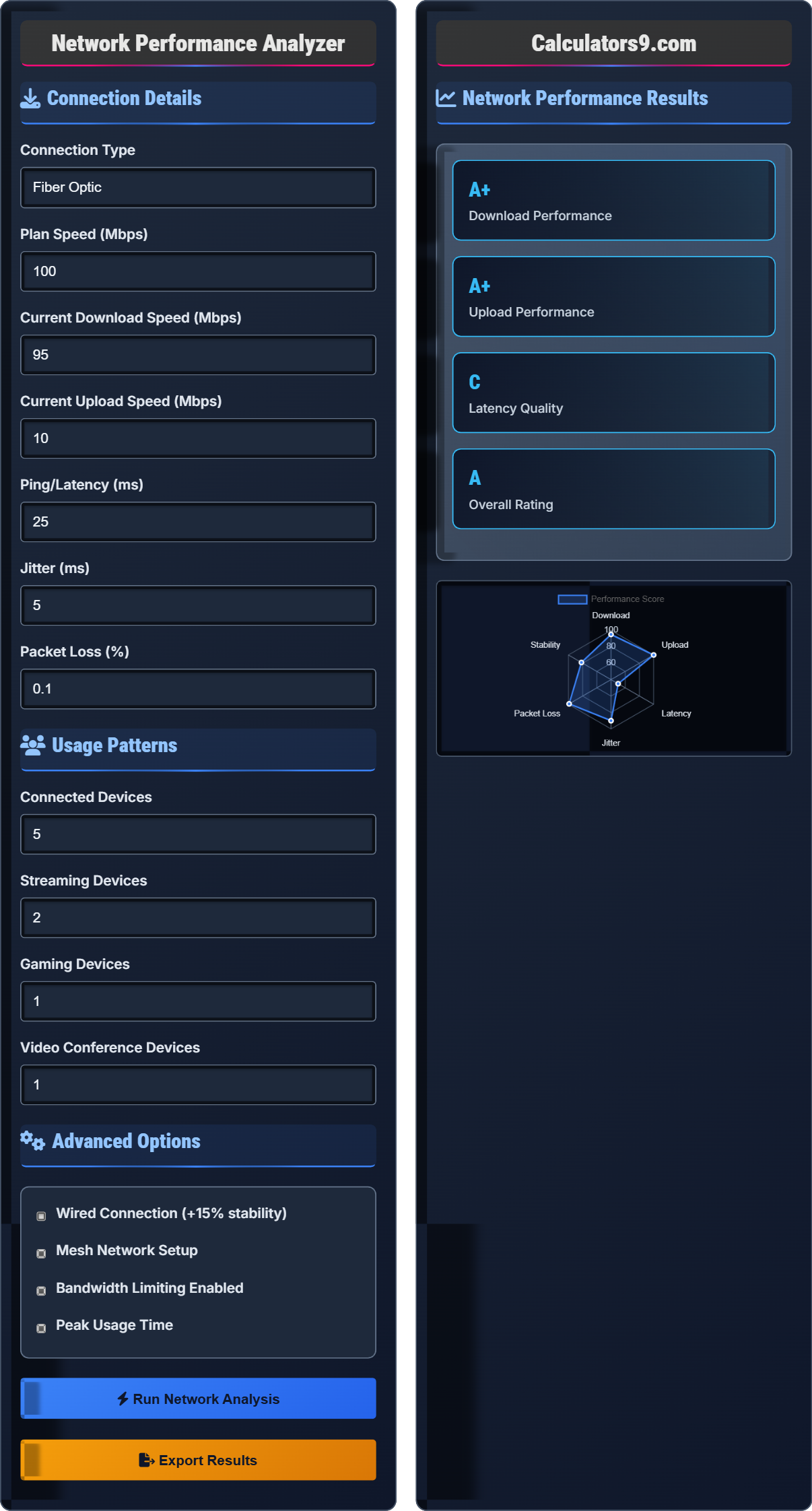
Network Performance Results
| Metric | Measured | Plan Speed | Quality |
|---|---|---|---|
| Download Speed | 95.0 Mbps | 100.0 Mbps | Excellent |
| Upload Speed | 10.0 Mbps | 15.0 Mbps | Good |
| Latency (Ping) | 25 ms | 30 ms | Excellent |
| Jitter | 5.0 ms | 10 ms | Good |
| Packet Loss | 0.1% | 1% | Excellent |
| Activity | Required Speed | Current Speed | Suitability |
|---|---|---|---|
| Web Browsing | 1-5 Mbps | 95 Mbps | Perfect |
| HD Streaming | 5-8 Mbps | 95 Mbps | Perfect |
| 4K Streaming | 25 Mbps | 95 Mbps | Perfect |
| Online Gaming | 3-6 Mbps + <50ms | 95 Mbps + 25ms | Excellent |
| Video Conferencing | 2-4 Mbps | 95 Mbps | Perfect |
| File Uploads | 5-10 Mbps | 10 Mbps | Good |
Internet Performance Fundamentals
Internet performance is measured by several critical metrics that determine user experience. Download speed indicates how fast data arrives from the internet to your device. Upload speed measures how fast you can send data to the internet. Latency (ping) is the time it takes for a signal to travel to a server and back. Jitter measures the variation in packet arrival times. Packet loss indicates how many data packets fail to reach their destination.
Speed tests measure bandwidth by downloading and uploading data packets:
Improve network performance with these strategies:
- Router Placement: Central location, away from interference
- Wired Connections: Ethernet cables for critical devices
- Network Monitoring: Identify bandwidth hogs
- Equipment Upgrade: Modern routers and modems
- Service Provider: Choose reliable providers with good coverage
Internet Performance Quiz
What is the minimum recommended download speed for streaming 4K Ultra HD video?
The answer is B) 25 Mbps. Netflix recommends 25 Mbps for 4K Ultra HD streaming, while Amazon Prime Video suggests 15 Mbps for 4K. However, 25 Mbps is the industry standard recommendation. This speed ensures smooth playback without buffering, even for HDR content. Multiple 4K streams would require proportionally higher speeds.
This question highlights how different activities have specific bandwidth requirements. Understanding these minimums helps users choose appropriate internet plans. The 25 Mbps requirement for 4K represents a balance between quality and practicality, considering that 4K content requires significantly more data than HD (5-8 Mbps).
4K Resolution: 3840×2160 pixels (4 times HD)
Bandwidth: Data transmission capacity of connection
Buffering: Pausing to preload content
• 4K requires 4x more bandwidth than HD
• Multiple streams require proportional speeds
• Consistent speed is as important as peak speed
• Add 20-30% buffer to minimum requirements
• Consider all devices using bandwidth simultaneously
• Check provider's actual speeds vs. advertised
• Assuming advertised speeds are guaranteed
• Not accounting for simultaneous device usage
• Ignoring upload requirements for streaming
Explain the difference between ping/latency and bandwidth. Why is low latency more important for online gaming than high bandwidth?
Bandwidth (Download/Upload Speed): Refers to the maximum data transfer rate - how much data can be transmitted per second. Measured in Mbps (megabits per second).
Latency (Ping): Refers to the time it takes for data to travel from your device to a server and back. Measured in milliseconds (ms).
For online gaming, low latency is more critical than high bandwidth because:
1. Real-time Responsiveness: Games require instant response to player actions. High latency causes noticeable lag between input and game response.
2. Game State Updates: Games continuously update positions, actions, and events. High latency delays these updates.
3. Server Communication: Frequent small data exchanges require minimal delay rather than large amounts of data.
4. Competitive Advantage: In competitive gaming, even 10-20ms can affect reaction time.
Most games require only 3-6 Mbps bandwidth, but perform best with ping under 50ms.
This question clarifies a common misconception about internet performance. Many people believe higher bandwidth automatically equals better performance, but latency is often more important for real-time applications. This demonstrates how different metrics affect different activities in unique ways.
Latency: Time delay in data transmission
Bandwidth: Data transmission capacity
Real-time Application: Requires immediate response
• Latency affects responsiveness more than speed
• Gaming requires low latency over high bandwidth
• Different activities prioritize different metrics
• For gaming: Prioritize proximity to servers
• Use wired connections for critical applications
• Monitor both latency and bandwidth for complete picture
• Confusing bandwidth with responsiveness
• Not considering latency for real-time applications
• Assuming more Mbps always means better performance
A household has a 100 Mbps internet plan. Currently, 2 people are streaming 4K content (25 Mbps each), 1 person is gaming (6 Mbps), and 2 people are on video calls (2 Mbps each). Calculate the total bandwidth used and determine if the connection can handle this usage. What happens if a third person joins for a video call?
Step 1: Calculate current bandwidth usage
4K streaming: 2 × 25 Mbps = 50 Mbps
Gaming: 1 × 6 Mbps = 6 Mbps
Video calls: 2 × 2 Mbps = 4 Mbps
Total current usage: 50 + 6 + 4 = 60 Mbps
Step 2: Assess current capacity
Available: 100 Mbps - 60 Mbps = 40 Mbps remaining
The connection can handle current usage with 40 Mbps remaining.
Step 3: Calculate with additional video call
New video call: +2 Mbps
New total: 60 + 2 = 62 Mbps
Remaining: 100 - 62 = 38 Mbps
Therefore, the connection can handle the additional video call with 38 Mbps remaining. The 100 Mbps plan is sufficient for this usage pattern.
This problem demonstrates how to calculate total bandwidth requirements in a multi-device household. It shows that even with multiple demanding applications, a 100 Mbps connection has sufficient capacity. The calculation helps users understand whether their plan matches their usage patterns.
Simultaneous Usage: Multiple devices using bandwidth concurrently
Bandwidth Allocation: Distribution of available capacity
Headroom: Remaining capacity for additional usage
• Add individual requirements for total usage
• Consider peak usage times
• Leave headroom for unexpected demands
• Calculate total household requirements
• Consider worst-case scenarios
• Account for upload requirements too
• Not accounting for all devices
• Ignoring upload requirements
• Assuming bandwidth is unlimited
A user experiences frequent disconnections during video calls despite having a 200 Mbps plan. Their ping is 120ms and jitter is 45ms. What might be causing the issue and how should they address it?
Step 1: Analyze performance metrics
Download speed: 200 Mbps (excellent)
Upload speed: Likely adequate for video calls
Ping: 120ms (poor for real-time applications)
Jitter: 45ms (very high)
Step 2: Identify likely causes
High jitter (45ms) is the primary issue. This indicates inconsistent packet delivery times, causing video/audio disruptions.
High ping (120ms) contributes to lag in real-time responses.
Step 3: Recommended solutions
1. Switch to wired connection to reduce wireless interference
2. Restart router and modem to clear temporary issues
3. Check for bandwidth-hogging applications during calls
4. Contact ISP to check for network congestion
5. Position router centrally and away from interference
6. Consider upgrading to a gaming-grade router with QoS
Therefore, the issue is likely network inconsistency (jitter) rather than insufficient speed.
This problem demonstrates that speed alone doesn't guarantee good performance. High jitter can cause more disruption than low speed for real-time applications. The solution focuses on network stability rather than raw capacity, highlighting the importance of all performance metrics.
Jitter: Variation in packet arrival times
QoS: Quality of Service network prioritization
Network Congestion: Overloaded network pathways
• Stability can be more important than speed
• Real-time applications are sensitive to jitter
• Multiple metrics affect user experience
• Monitor all metrics, not just speed
• Use wired connections for critical applications
• Check network during peak usage times
• Focusing only on speed metrics
• Not considering network stability
• Assuming higher speed solves all issues
Which internet connection type typically offers the lowest latency?
The answer is B) Fiber Optic. Fiber optic connections typically offer the lowest latency because light travels through fiber cables at near the speed of light with minimal delay. Fiber connections commonly achieve 10-30ms latency, compared to 20-50ms for cable, 30-70ms for DSL, and 600-800ms for satellite. The direct, dedicated connection paths in fiber networks also contribute to consistent, low-latency performance.
This question highlights how physical infrastructure affects performance metrics. Fiber optic technology uses light signals, which travel faster than electrical signals used in cable/DSL. The infrastructure directly impacts latency, demonstrating why connection type is a critical factor in performance.
Latency: Time for data to travel between devices
Propagation Speed: Speed of signal through medium
Infrastructure: Physical network components
• Physical medium affects latency significantly
• Fiber offers best latency performance
• Distance impacts propagation delay
• Choose fiber for lowest latency applications
• Consider proximity to central office for DSL
• Avoid satellite for real-time applications
• Not considering physical infrastructure
• Assuming all broadband types have similar latency
• Overlooking distance factors for DSL
Network Performance Essentials
Download: 25+ Mbps for basic, 100+ Mbps for advanced. Upload: 3+ Mbps for basic. Ping: <50ms for gaming, <100ms for video calls. Jitter: <30ms for gaming.
Usable Bandwidth = Plan Speed × (1 - Overhead) - (Simultaneous Usage). Actual Performance = (Theoretical Max × Efficiency Factor).
- Latency matters more than speed for real-time apps
- Upload speed affects video calls and uploads
- Multiple devices share total bandwidth
Optimization Strategies
Wired connections, router placement, bandwidth management, and plan upgrades can improve performance by 20-50%. Quality of Service settings help prioritize critical applications.
- Switch to wired connection
- Optimize router placement
- Restart networking equipment
- Monitor device usage
- Peak usage times affect performance
- Distance from exchange affects DSL
- Building materials affect WiFi
- Provider network congestion occurs
FAQ
Q: Why do speeds vary throughout the day?
A: Speeds fluctuate due to network congestion during peak hours (evenings), shared bandwidth in cable networks, ISP maintenance windows, and distance-based degradation. Peak hours (6-10 PM) typically show 20-40% slower speeds due to increased usage.
Q: How important is upload speed for gaming?
A: Upload speed is critical for gaming - it sends your actions to the server. Competitive games need 3-6 Mbps upload. Low upload can cause lag even with high download. For streaming gameplay, you need 5-10 Mbps upload.