Data Transfer Time Calculator
Fast bandwidth analysis • 2026 standards
Data Transfer Time Formula:
Show the calculatorBasic Formula: \( T = \frac{D}{R} \)
With Latency: \( T = \frac{D}{R} + L \)
With Compression: \( T = \frac{D \times (1-C)}{R} + L \)
Where:
- \( T \) = total transfer time
- \( D \) = data size
- \( R \) = transfer rate (bandwidth)
- \( L \) = latency (round-trip time)
- \( C \) = compression ratio (0-1)
Data transfer time calculations depend on file size, available bandwidth, network latency, and protocol overhead. The formula shows that transfer time is inversely proportional to bandwidth. Latency adds a constant delay, especially significant for small transfers. Compression can reduce effective data size but adds processing overhead.
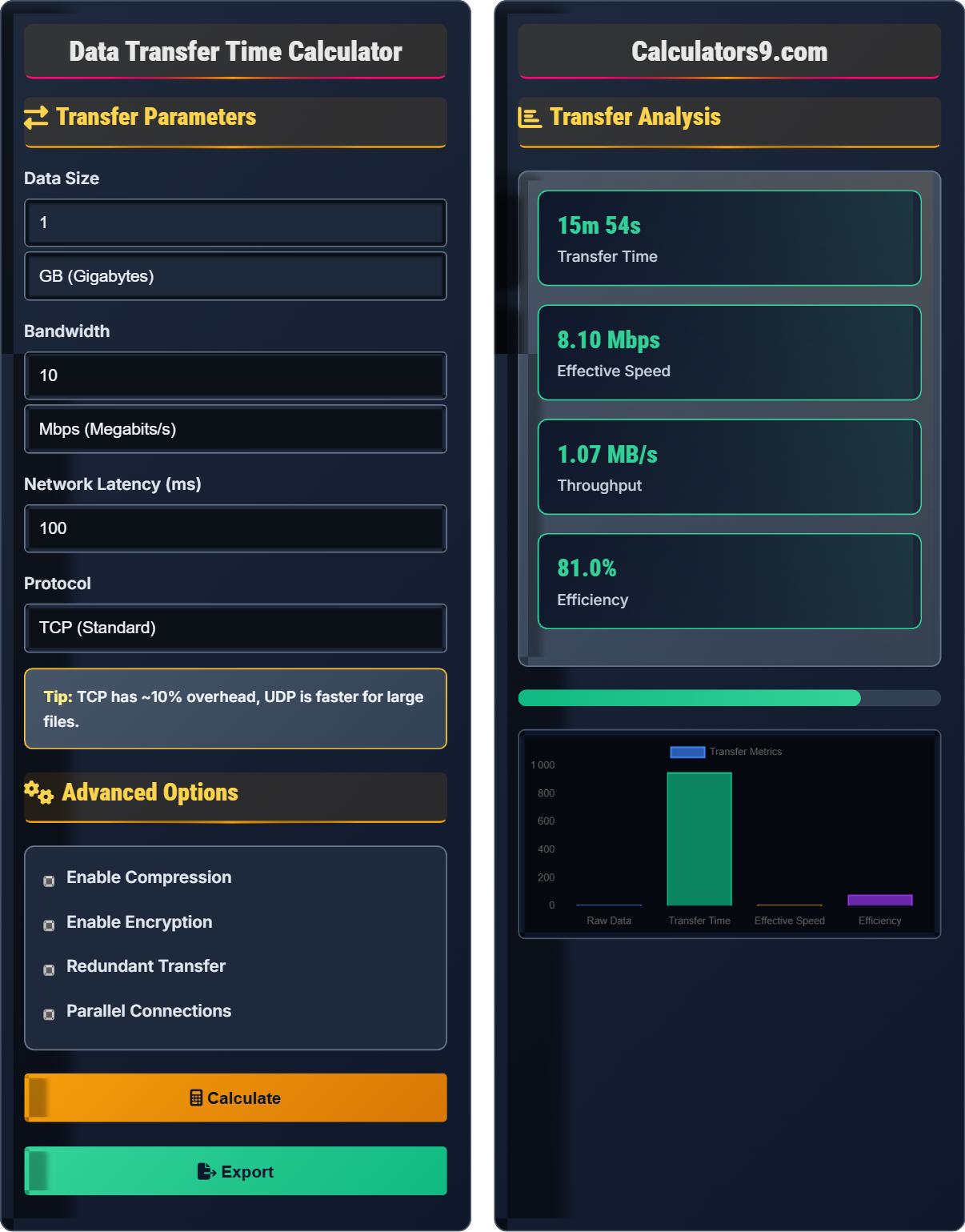
Example: Transferring 1 GB file at 10 Mbps with 100ms latency:
\( T = \frac{1 \times 8}{10} + 0.1 = 0.8 + 0.1 = 0.9 \) seconds
Thus, the transfer would take approximately 0.9 seconds.
Transfer Parameters
Advanced Options
Transfer Analysis
| Metric | Value | Details |
|---|---|---|
| Data Size | 1.00 GB | Original size |
| Bandwidth | 10.00 Mbps | Available speed |
| Latency | 100 ms | Network delay |
| Protocol | TCP | Transport method |
| Parameter | Value | Impact |
|---|---|---|
| Compression | Off | Reduces data size |
| Encryption | Off | Slows transfer |
| Parallel | 1 | Speeds up large files |
| Overhead | 10% | Protocol overhead |
Comprehensive Data Transfer Guide
Data transfer time is the duration required to move data from one location to another across a network. It depends on several factors including file size, available bandwidth, network latency, protocol overhead, and connection quality. Understanding these factors helps optimize network performance and plan for efficient data operations.
Basic transfer time formula:
Where:
- \( T \) = total transfer time (seconds)
- \( D \) = data size (bytes) - multiplied by 8 for bits
- \( R \) = transfer rate (bits per second)
- \( L \) = latency (seconds)
Note: Bandwidth is typically measured in bits per second (Mbps), while file sizes are in bytes (MB). 1 byte = 8 bits.
Typical bandwidth speeds for different connection types:
- Dial-up: 56 Kbps (obsolete)
- DSL: 1-100 Mbps
- Cable: 10-1000 Mbps
- Fiber: 100 Mbps - 10 Gbps
- WiFi 6: Up to 9.6 Gbps
- 5G: Up to 20 Gbps
- Compression: Reduce file size before transfer (ZIP, gzip, etc.)
- Parallel Transfers: Use multiple connections for large files
- CDNs: Distribute content geographically closer to users
- Protocol Selection: Choose optimal protocol for file type
- Time of Day: Transfer during off-peak hours for better speeds
Transfer Time Fundamentals
Bandwidth is the theoretical maximum capacity, while throughput is the actual achieved speed.
\( \text{Time} = \frac{\text{Size (bits)}}{\text{Rate (bps)}} \)
Remember: 1 byte = 8 bits, so multiply file size by 8.
- Bandwidth is measured in bits per second
- File sizes are measured in bytes
- Latency matters more for small files
Optimization Techniques
Different protocols have varying levels of overhead affecting effective transfer speeds.
- Split large file into chunks
- Transfer chunks simultaneously
- Reassemble at destination
- Speed improvement limited by bottleneck
- More connections = more resource usage
- Diminishing returns after 4-8 connections
- Server may limit concurrent connections
- Small files benefit less from parallelism
Data Transfer Learning Quiz
How long would it take to transfer a 100 MB file over a 10 Mbps connection? (Ignore latency and overhead)
The answer is B) 80 seconds. First convert file size to bits: 100 MB = 100 × 8 = 800 Mb. Then divide by bandwidth: 800 Mb ÷ 10 Mbps = 80 seconds.
This problem demonstrates the importance of unit conversion. Bandwidth is measured in bits per second, while file sizes are in bytes. Since 1 byte = 8 bits, you must multiply the file size by 8 before dividing by the bandwidth. This is a common mistake in data transfer calculations.
Bandwidth: Maximum data transfer rate of a connection
Byte: Unit of digital information (8 bits)
Bit: Smallest unit of digital information
• 1 byte = 8 bits
• Bandwidth typically in bits per second
• File sizes typically in bytes
• Always convert to consistent units before calculating
• Remember: Mega (M) = 1,000,000, Giga (G) = 1,000,000,000
• Mbps = Megabits per second, MBps = Megabytes per second
• Forgetting to convert bytes to bits
• Confusing Mbps with MBps
• Not accounting for protocol overhead
A 1 GB file is transferred using 4 parallel connections over a 100 Mbps connection. Calculate the transfer time and explain why parallel transfers help with large files but not necessarily small ones.
For a 1 GB file over 100 Mbps with 4 parallel connections:
File size in bits: 1 GB = 1 × 8 = 8 Gb = 8,000 Mb
Total bandwidth: 4 × 25 Mbps = 100 Mbps (assuming equal distribution)
Transfer time: 8,000 Mb ÷ 100 Mbps = 80 seconds
Parallel transfers help with large files because they can utilize more of the available bandwidth. However, for small files, the overhead of establishing multiple connections and the latency of each connection can actually make the transfer slower than using a single connection.
Parallel transfers work best when the file size is large enough to justify the overhead of multiple connections. The optimal number of connections depends on factors like latency, bandwidth, and server capabilities. Too many connections can actually decrease performance due to resource contention.
Parallel Transfer: Using multiple connections simultaneously
Connection Overhead: Resources needed to establish and maintain connections
Bottleneck: Component limiting overall system performance
• Parallel transfers help with large files
• Small files may be slower with parallel connections
• Optimal connections depend on network characteristics
• Try 4-8 connections for large files
• Use 1 connection for files under 1 MB
• Test different connection counts for optimal performance
• Using too many connections for small files
• Not considering server connection limits
• Assuming more connections always equals faster transfers
FAQ
Q: Why is my actual transfer speed much lower than my advertised bandwidth?
A: Several factors cause actual speeds to be lower than advertised bandwidth:
1. Protocol Overhead: TCP/IP headers, error correction, flow control
2. Network Congestion: Shared infrastructure during peak times
3. Distance/Latency: Speed of light limitations over long distances
4. Hardware Limitations: Router, switch, or NIC bottlenecks
5. Server Performance: Disk I/O, CPU, memory constraints
6. Background Processes: Other traffic consuming bandwidth
Real-world speeds are typically 70-90% of theoretical maximum depending on conditions.
Q: What's the difference between Mbps and MBps?
A: Mbps (Megabits per second) and MBps (Megabytes per second) differ by a factor of 8:
• Mbps: Used for network bandwidth (internet plans, connection speeds)
• MBps: Used for file transfer speeds (download/upload speeds)
1 MBps = 8 Mbps
So if your internet plan is 100 Mbps, your maximum theoretical download speed is 12.5 MBps. This distinction is crucial for accurate calculations and understanding your actual transfer capabilities.