Backup Frequency Calculator
RPO/RTO planning & data protection • 2026 edition
Backup Frequency Formula:
Show Calculator\( F = \frac{RPO}{(D \times U)} \)
Where:
- \( F \) = Backup frequency (how often backups occur)
- \( RPO \) = Recovery Point Objective (maximum acceptable data loss)
- \( D \) = Data change rate (amount of data changed per time unit)
- \( U \) = Utilization factor (efficiency of backup process)
Additional considerations for backup frequency:
- RTO (Recovery Time Objective) affects backup type selection
- Storage capacity constraints
- Network bandwidth limitations
- Business criticality of data
Example: For a database with RPO of 1 hour, daily change rate of 10GB, and 0.8 utilization factor:
\( F = \frac{1}{(10 \times 0.8)} = 0.125 \) hours (approximately every 7.5 minutes)
The backup should occur approximately every 7.5 minutes to meet the RPO requirement.
Data Profile
Advanced Options
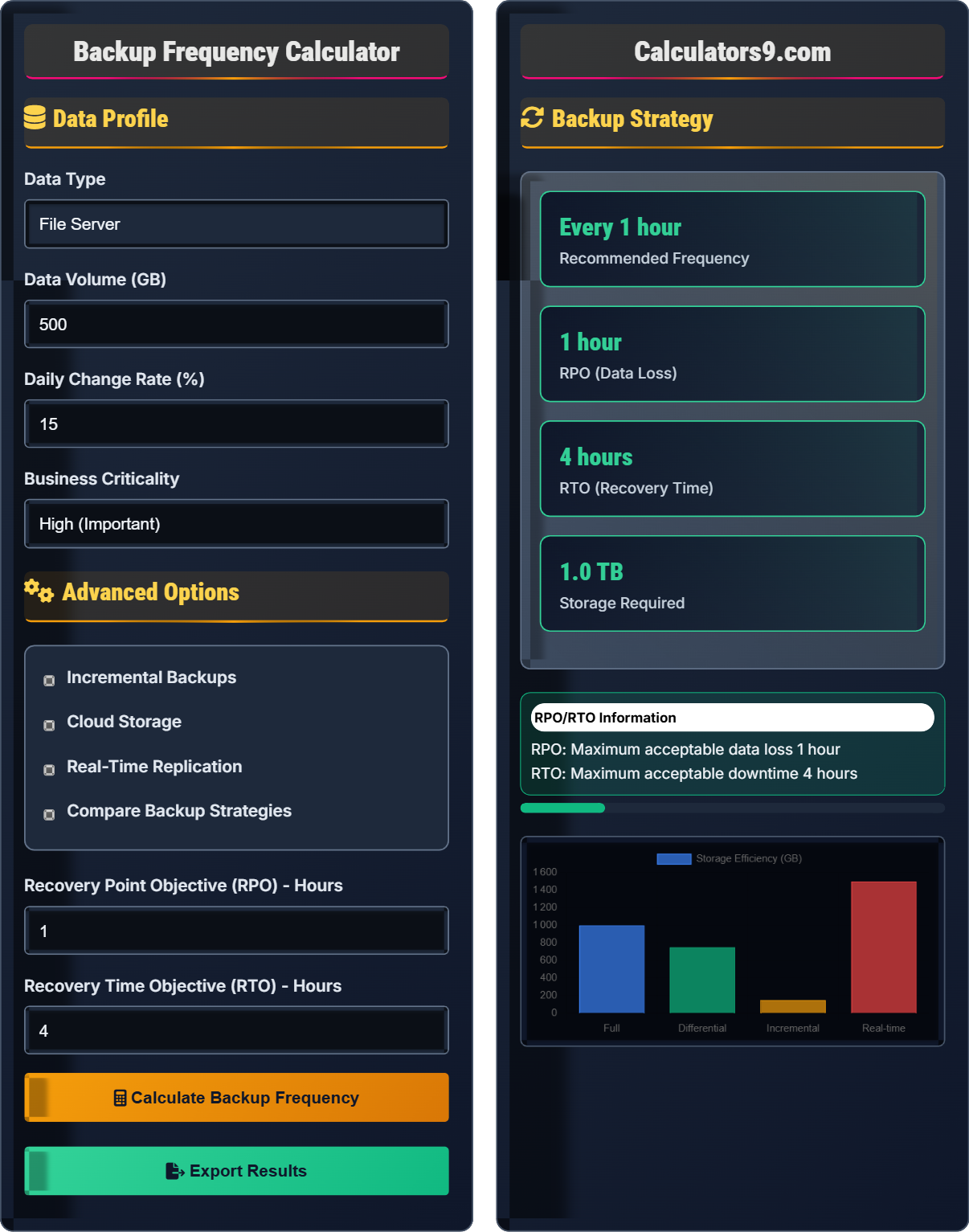
Backup Strategy
| Metric | Value | Recommendation |
|---|---|---|
| Frequency | Every 15 min | High |
| Retention | 30 days | Adequate |
| Storage | 1.5 TB | Sufficient |
Implement incremental backups every 15 minutes
Prepare for 4-hour recovery window
Allocate 1.5TB for retention policy
Comprehensive Backup Strategy Guide
Backup frequency refers to how often data is backed up to ensure minimal data loss in case of system failures. It's determined by Recovery Point Objective (RPO) and Recovery Time Objective (RTO), which define acceptable data loss and system downtime respectively. Proper backup frequency balances data protection needs with storage costs and operational overhead.
The optimal backup frequency is calculated based on:
Where:
- \(F\) = Backup frequency
- \(RPO\) = Recovery Point Objective
- \(D\) = Data change rate
- \(U\) = Utilization factor
Key factors affecting backup frequency:
- Data Change Rate: How much data changes over time
- Business Criticality: Importance of data to operations
- Storage Capacity: Available backup storage
- Network Bandwidth: Transfer speed limitations
- Recovery Objectives: RPO and RTO requirements
- 3-2-1 Rule: 3 copies, 2 media types, 1 offsite
- Hybrid Approach: Local + cloud storage
- Layered Protection: Multiple backup frequencies
- Regular Testing: Verify backup integrity
- Automation: Scheduled backup processes
Backup Fundamentals
How often data is backed up to minimize loss.
\(F = \frac{RPO}{(D \times U)}\)
Where F=frequency, RPO=objective, D=change rate, U=utilization.
- More frequent backups = less data loss
- Higher criticality = more frequent backups
- Storage costs increase with frequency
Security Planning
Strategic approach to data protection and recovery.
- Assess data criticality
- Define RPO/RTO requirements
- Calculate backup frequency
- Implement backup solutions
- Regulatory requirements
- Cost-benefit analysis
- Technical constraints
- Recovery testing
Backup Strategy Learning Quiz
What is the difference between Recovery Point Objective (RPO) and Recovery Time Objective (RTO)?
The answer is B) RPO is data loss allowed, RTO is time to recover. RPO (Recovery Point Objective) defines the maximum acceptable amount of data loss measured in time (e.g., 1 hour of data loss is acceptable). RTO (Recovery Time Objective) defines the maximum acceptable amount of time to restore operations after an incident (e.g., systems must be back online within 4 hours). RPO determines backup frequency, while RTO influences recovery method selection.
Students must understand that RPO and RTO are complementary but distinct concepts. RPO focuses on data protection (how much data loss is acceptable), while RTO focuses on service restoration (how quickly systems must be recovered). Together, they form the foundation of disaster recovery planning and directly influence backup strategy decisions.
RPO: Recovery Point Objective - maximum acceptable data loss
RTO: Recovery Time Objective - maximum acceptable downtime
Disaster Recovery: Process of restoring IT systems after an outage
• RPO determines backup frequency requirements
• RTO influences recovery method selection
• Both are defined by business requirements
• RPO = "How much data can I lose?"
• RTO = "How fast must I recover?"
• Remember: Point vs Time
• Confusing RPO with RTO definitions
• Thinking they mean the same thing
• Not understanding their impact on backup strategy
Calculate the recommended backup frequency for a system with an RPO of 2 hours, a daily data change rate of 20GB, and a utilization factor of 0.75. Show your work.
Using the formula: \(F = \frac{RPO}{(D \times U)}\)
Given values:
- RPO = 2 hours
- D = 20GB per day (convert to per hour: 20/24 = 0.83GB/hour)
- U = 0.75
Step 1: Calculate the denominator = \(D \times U = 0.83 \times 0.75 = 0.625\)
Step 2: Calculate frequency = \(F = \frac{2}{0.625} = 3.2\) hours
Step 3: Convert to minutes = \(3.2 \times 60 = 192\) minutes
Therefore, backups should occur approximately every 3.2 hours (or every 192 minutes).
This calculation demonstrates how RPO, data change rate, and system efficiency combine to determine optimal backup frequency. The result shows that for a system with moderate data changes and reasonable efficiency, backups every 3.2 hours would meet the RPO requirement. In practice, this might be rounded to every 3 hours for operational simplicity.
Utilization Factor: Efficiency of backup process (0-1 scale)
Data Change Rate: Amount of data modified per time period
Backup Frequency: How often backups are performed
• Convert units to be consistent in calculations
• Utilization factor is typically less than 1
• Result should be practical for implementation
• Convert all time units to hours for consistency
• Remember: larger denominator = less frequent backups
• Round results to practical intervals
• Forgetting to convert time units consistently
• Misunderstanding the utilization factor
• Not considering practical implementation intervals
A financial services company processes $10 million in transactions daily. They can accept up to 4 hours of data loss (RPO) and must recover operations within 2 hours (RTO) after an incident. If transaction data changes at a rate of 5GB per hour, what backup frequency would you recommend? Additionally, calculate the potential financial impact of not meeting RPO requirements.
Backup Frequency Calculation:
- RPO = 4 hours
- Data change rate (D) = 5GB per hour
- Assuming utilization factor (U) = 0.8
- Frequency = RPO / (D × U) = 4 / (5 × 0.8) = 4 / 4 = 1 hour
Potential Financial Impact:
- Daily transactions = $10 million
- Hourly transaction value = $10,000,000 / 24 = $416,667
- If RPO is exceeded by 1 hour, potential loss = $416,667
- Over 4-hour RPO window = 4 × $416,667 = $1,666,667
Recommendation: Perform backups every hour to meet RPO requirements and minimize potential financial loss.
This example demonstrates how business requirements directly influence technical backup decisions. The financial services company's high transaction volume necessitates frequent backups to minimize potential losses. The calculation shows that even a 1-hour deviation from RPO could result in significant financial impact, justifying the investment in frequent backup systems.
Financial Impact: Monetary cost of not meeting RPO/RTO requirements
Business Continuity: Maintaining operations during disruptions
Cost-Benefit Analysis: Evaluating investment vs protection value
• RPO directly impacts potential data loss cost
• Business requirements drive technical decisions
• Cost of protection should be less than cost of loss
• Calculate hourly transaction value for impact assessment
• Consider both direct and indirect costs
• Factor in regulatory and reputational impacts
• Not considering business impact in technical decisions
• Underestimating the cost of data loss
• Focusing only on technical feasibility
An organization has 1TB of critical data that changes at a rate of 10% daily. They require an RPO of 1 hour and RTO of 2 hours. If they use incremental backups every hour with a 30-day retention period, calculate the total storage requirements. Assume incremental backups are 5% of full backup size on average.
Full Backup Storage:
- Initial full backup = 1TB
Incremental Backup Storage:
- Daily incrementals = 24 per day
- Monthly incrementals = 24 × 30 = 720
- Average incremental size = 5% of 1TB = 0.05TB
- Total incremental storage = 720 × 0.05TB = 36TB
Total Storage Requirement:
- Full backup + Incremental backups = 1TB + 36TB = 37TB
- Adding 20% overhead for metadata and compression = 37TB × 1.2 = 44.4TB
The organization needs approximately 44.4TB of storage for their backup strategy.
This calculation shows how backup frequency significantly impacts storage requirements. The hourly incremental backups result in 720 backup sets over 30 days, which can quickly consume storage resources. This demonstrates why organizations must carefully balance RPO requirements with storage capacity and budget constraints. Compression and deduplication technologies can help reduce these requirements.
Incremental Backup: Backs up only data that has changed since last backup
Storage Overhead: Additional space needed for metadata and indexing
Data Deduplication: Technology to eliminate redundant data
• More frequent backups = more storage required
• Retention periods multiply storage needs
• Always account for storage overhead
• Calculate storage needs before implementing backup strategy
• Consider compression and deduplication ratios
• Plan for storage growth over time
• Underestimating storage requirements for frequent backups
• Not accounting for retention periods
• Forgetting storage overhead and metadata
Which backup type provides the fastest recovery time but requires the most storage space?
The answer is C) Full Backup. Full backups contain complete copies of all data, making recovery straightforward and fast since only one backup set is needed. However, they require the most storage space and take the longest to create. Differential backups require less storage than full backups but more than incremental, and take longer to restore than full backups. Incremental backups require the least storage but the longest recovery time since multiple backup sets may be needed.
Students must understand the trade-offs between different backup types. Full backups offer the fastest recovery but highest storage costs. Incremental backups offer the lowest storage costs but slowest recovery. Differential backups provide a middle ground. The choice depends on the organization's RPO/RTO requirements and available resources. Modern backup strategies often combine multiple types for optimal results.
Full Backup: Complete copy of all data
Differential Backup: Changes since last full backup
Incremental Backup: Changes since last backup of any type
• Trade-off exists between speed and storage
• Recovery time depends on backup type
• Storage requirements vary by backup type
• Full = Fast recovery, high storage
• Incremental = Low storage, slow recovery
• Differential = Middle ground
• Thinking all backup types are equal
• Not understanding the speed/storage trade-off
• Assuming incremental is always best
FAQ
Q: How do I determine the right RPO and RTO for my organization?
A: Determining RPO and RTO requires a business impact analysis:
- RPO (Recovery Point Objective): Assess the financial impact of data loss. Calculate the value of data generated per time unit. For example, if your business generates $10,000 worth of data per hour, losing 4 hours would cost $40,000.
- RTO (Recovery Time Objective): Evaluate the cost of downtime. Consider lost revenue, productivity, and reputation. If downtime costs $5,000 per hour, a 2-hour RTO would limit losses to $10,000.
- Business Input: Involve stakeholders to understand tolerance for data loss and downtime. Critical systems may require RPO/RTO of minutes, while less critical systems might tolerate hours or days.
- Cost Analysis: Balance protection costs against potential losses. The cost of achieving very aggressive RPO/RTO targets may exceed the potential loss.
The goal is to find the sweet spot where protection costs are justified by the reduction in potential losses.
Q: What are the advantages and disadvantages of cloud vs. on-premises backup solutions?
A: Cloud vs. on-premises backup solutions have distinct trade-offs:
Cloud Advantages:
- Off-site protection from local disasters
- Scalable storage without hardware investment
- Automatic management and maintenance
- Global accessibility for remote workers
- Often includes built-in encryption and compliance features
Cloud Disadvantages:
- Recurring subscription costs
- Dependence on internet connectivity
- Potential data sovereignty concerns
- Slower recovery for large datasets
- Limited control over infrastructure
On-Premises Advantages:
- Full control over data and infrastructure
- Fast recovery speeds
- No recurring subscription fees
- Complete data sovereignty
- Customizable to specific requirements
Hybrid Approach: Many organizations use a combination of both, keeping recent backups on-premises for fast recovery and using cloud for long-term retention and disaster recovery.