Storage Growth Projection Calculator
Predict data needs • 2026 edition
Storage Growth Projection Formula:
Show the calculator\( \text{Future Storage} = \text{Current Storage} \times (1 + \text{Growth Rate})^{\text{Time Period}} \)
Where:
- Future Storage = Projected storage requirement
- Current Storage = Present storage capacity used
- Growth Rate = Annual growth rate (decimal)
- Time Period = Number of years in the future
For compound growth with additional factors:
\( S_t = S_0 \times (1 + r)^t \times (1 + f) \)
Where:
- St = Storage at time t
- S0 = Initial storage
- r = Growth rate
- t = Time period
- f = Additional factor (compression, deduplication, etc.)
This formula accounts for exponential growth patterns typical in data storage needs. The additional factor can account for efficiency improvements like compression or increased data density.
Example: With 1TB current usage, 15% annual growth, and 3 years projection:
\( S_3 = 1 \times (1 + 0.15)^3 = 1 \times 1.521 = 1.52 \) TB
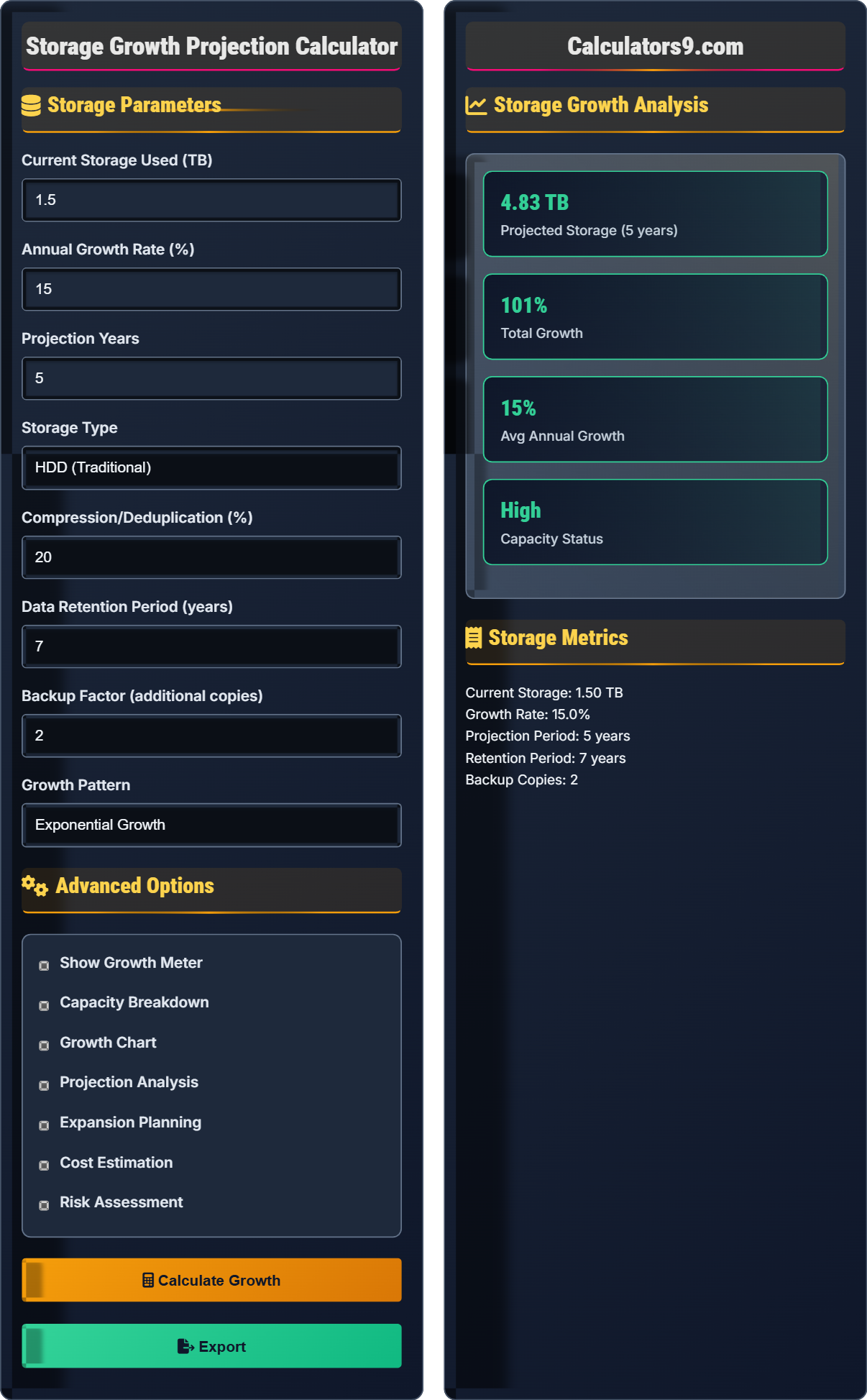
Storage Parameters
Advanced Options
Storage Growth Analysis
Storage Metrics
Storage Growth Fundamentals
Storage growth projection is the process of forecasting future data storage needs based on historical usage patterns and growth trends to ensure adequate capacity planning.
\( S_t = S_0 \times (1 + r)^t \)
Where St=storage at time t, S0=initial storage, r=growth rate, t=time period.
- Exponential growth accelerates over time
- Include backup and redundancy requirements
- Account for data retention policies
- Consider compression and deduplication
Capacity Planning
Effective capacity management requires monitoring growth patterns and implementing proactive expansion strategies to avoid service disruptions.
- Monitor current usage trends
- Project future requirements
- Plan for buffer capacity
- Implement expansion strategies
- Maintain 20-30% capacity buffer
- Monitor growth monthly
- Consider multiple growth scenarios
- Plan upgrades during maintenance windows
Storage Growth Learning Quiz
Which growth pattern typically results in the fastest increase in storage requirements over time?
The answer is B) Exponential growth. Exponential growth follows the pattern S_t = S_0 × (1 + r)^t, where the growth rate compounds over time. This results in increasingly larger increments as time progresses, leading to rapid escalation in storage requirements.
Exponential growth accelerates because each increment is based on the previous total, creating a compounding effect. In data storage, this pattern often occurs due to increasing data generation, expanding user bases, and growing feature sets that generate more data.
Exponential Growth: Growth rate proportional to current value
Linear Growth: Constant rate of increase
Compounding Effect: Growth on previous growth
• Exponential growth accelerates over time
• Linear growth remains constant
• Growth patterns affect planning timelines
• Monitor for exponential patterns early
• Assuming linear growth when exponential is occurring
• Not accounting for compounding effects
• Underestimating long-term capacity needs
Calculate the projected storage needs for an organization with 2TB current usage, 25% annual growth rate, and 4-year projection period. Include 2 backup copies and 15% compression ratio.
Step 1: Calculate base growth
Future storage = Current storage × (1 + growth rate)^years
Future storage = 2TB × (1 + 0.25)^4 = 2TB × 2.441 = 4.88TB
Step 2: Apply backup factor
Total with backups = 4.88TB × (1 + 2) = 4.88TB × 3 = 14.64TB
Step 3: Apply compression ratio
Compressed storage = 14.64TB × (1 - 0.15) = 14.64TB × 0.85 = 12.44TB
Step 4: Calculate total requirements
Total storage needed = 12.44TB
Therefore, the organization will need 12.44TB of storage after 4 years.
This calculation demonstrates how multiple factors compound to affect total storage requirements. The exponential growth drives the base calculation, while backups multiply the requirement, and compression provides a reduction factor. Each component must be calculated sequentially to arrive at the final figure.
Backup Factor: Multiplier for additional copies
Compression Ratio: Space reduction through compression
Compounding Effect: Multiplicative impact of factors
• Apply growth before other factors
• Backup factor multiplies total
• Compression reduces final total
• Calculate growth first, then apply other factors
• Consider deduplication separately from compression
• Plan for peak usage not average
• Applying factors in wrong order
• Not accounting for backup multiplication
• Forgetting to adjust for compression
An IT manager has 10TB of storage with 30% annual growth and a 5-year projection. The storage array has a maximum capacity of 30TB. How much time does the manager have before needing to upgrade, and what is the risk level?
Step 1: Calculate storage requirements over time
Year 1: 10TB × 1.30 = 13TB
Year 2: 13TB × 1.30 = 16.9TB
Year 3: 16.9TB × 1.30 = 21.97TB
Year 4: 21.97TB × 1.30 = 28.56TB
Year 5: 28.56TB × 1.30 = 37.13TB
Step 2: Determine upgrade timeline
Maximum capacity is 30TB
By Year 4: 28.56TB (adequate)
By Year 5: 37.13TB (exceeds capacity)
Step 3: Assess risk level
The manager has until Year 4 to upgrade, with high risk of capacity shortage in Year 5.
Therefore, upgrade should occur before Year 5, with high risk level.
This example demonstrates the importance of understanding growth timelines and capacity limits. The calculation shows how exponential growth can quickly approach system limits, requiring proactive planning. Risk assessment involves comparing projected needs against maximum capacity to determine safe operating windows.
Capacity Limit: Maximum storage system can handle
Risk Timeline: When capacity will be exceeded
Proactive Planning: Action before problems occur
• Monitor against maximum capacity
• Plan upgrades before capacity is reached
• Consider buffer time for migrations
• Plan for 20-30% buffer beyond projected needs
• Monitor growth trends monthly
• Consider phased expansions
• Not accounting for growth acceleration
• Waiting until capacity is reached
• Not considering migration time
A company currently uses 5TB of storage with 20% annual growth. Cloud storage costs $25/TB/year while on-premise storage costs $15/TB/year but requires a $50,000 hardware investment. Which option is more cost-effective over 5 years?
Step 1: Calculate storage requirements
Year 1: 5TB × 1.20 = 6TB
Year 2: 6TB × 1.20 = 7.2TB
Year 3: 7.2TB × 1.20 = 8.64TB
Year 4: 8.64TB × 1.20 = 10.37TB
Year 5: 10.37TB × 1.20 = 12.44TB
Step 2: Calculate cloud storage costs
Year 1: 6TB × $25 = $150
Year 2: 7.2TB × $25 = $180
Year 3: 8.64TB × $25 = $216
Year 4: 10.37TB × $25 = $259
Year 5: 12.44TB × $25 = $311
Total cloud cost: $1,116
Step 3: Calculate on-premise costs
Hardware investment: $50,000
Yearly maintenance: (6+7.2+8.64+10.37+12.44)TB × $15 = 44.65TB × $15 = $669.75
Total on-premise cost: $50,000 + $669.75 = $50,669.75
Step 4: Compare options
Cloud: $1,116 over 5 years
On-premise: $50,669.75 over 5 years
Cloud storage is significantly more cost-effective for this scenario.
This example demonstrates how growth patterns affect long-term cost analysis. While on-premise storage has lower per-TB costs, the initial investment and the compounding effect of growing storage needs make cloud storage more economical for smaller organizations. The analysis shows the importance of considering growth in cost projections.
TCO: Total Cost of Ownership
CapEx: Capital Expenditure
OpEx: Operational Expenditure
• Consider growth in cost projections
• Factor in both initial and ongoing costs
• Compare total costs over time horizon
• Calculate costs annually to see trends
• Consider hybrid approaches for optimization
• Factor in administrative costs
• Not accounting for growth in cost calculations
• Forgetting ongoing maintenance costs
• Not considering scalability requirements
Which of the following is the most effective strategy for managing exponential storage growth?
The answer is B) Implement data lifecycle management. Data lifecycle management addresses the root cause of storage growth by implementing policies for data retention, archival, and deletion. This strategy proactively manages data volume rather than just increasing capacity to accommodate growth.
Data lifecycle management is proactive rather than reactive. Instead of continuously adding storage capacity to accommodate growing data, lifecycle management controls the growth itself through policies that govern data creation, retention, and disposal. This approach is more sustainable for exponential growth patterns.
Data Lifecycle Management: Policies for data creation to deletion
Proactive Management: Addressing issues before they occur
Capacity Planning: Anticipating storage needs
• Address root causes of growth
• Implement proactive policies
• Regular review of lifecycle policies
• Automate data lifecycle policies
• Regularly review and update retention rules
• Monitor effectiveness of policies
• Only reacting to capacity shortages
• Not implementing data governance policies
• Ignoring the root causes of growth
FAQ
Q: How do I calculate storage growth projections?
A: The formula is: \( S_t = S_0 \times (1 + r)^t \).
Where:
- St = Storage at time t
- S0 = Initial storage
- r = Growth rate
- t = Time period
For example, with 1TB current usage, 15% annual growth, and 3 years:
\( S_3 = 1 \times (1 + 0.15)^3 = 1 \times 1.521 = 1.52 \) TB
Don't forget to include backup copies and retention policies in your calculations.
Q: What are the most effective strategies for managing storage growth?
A: Most effective strategies include:
- Data lifecycle management: Implement retention and archival policies
- Compression and deduplication: Reduce storage requirements
- Regular monitoring: Track growth trends
- Capacity buffers: Maintain 20-30% headroom
- Proactive planning: Plan upgrades before capacity is reached
Focus on controlling growth rather than just accommodating it.