Storage Needs Calculator
Data storage planning • 2026 tech tools
Storage Requirements
Advanced Options
Storage Analysis
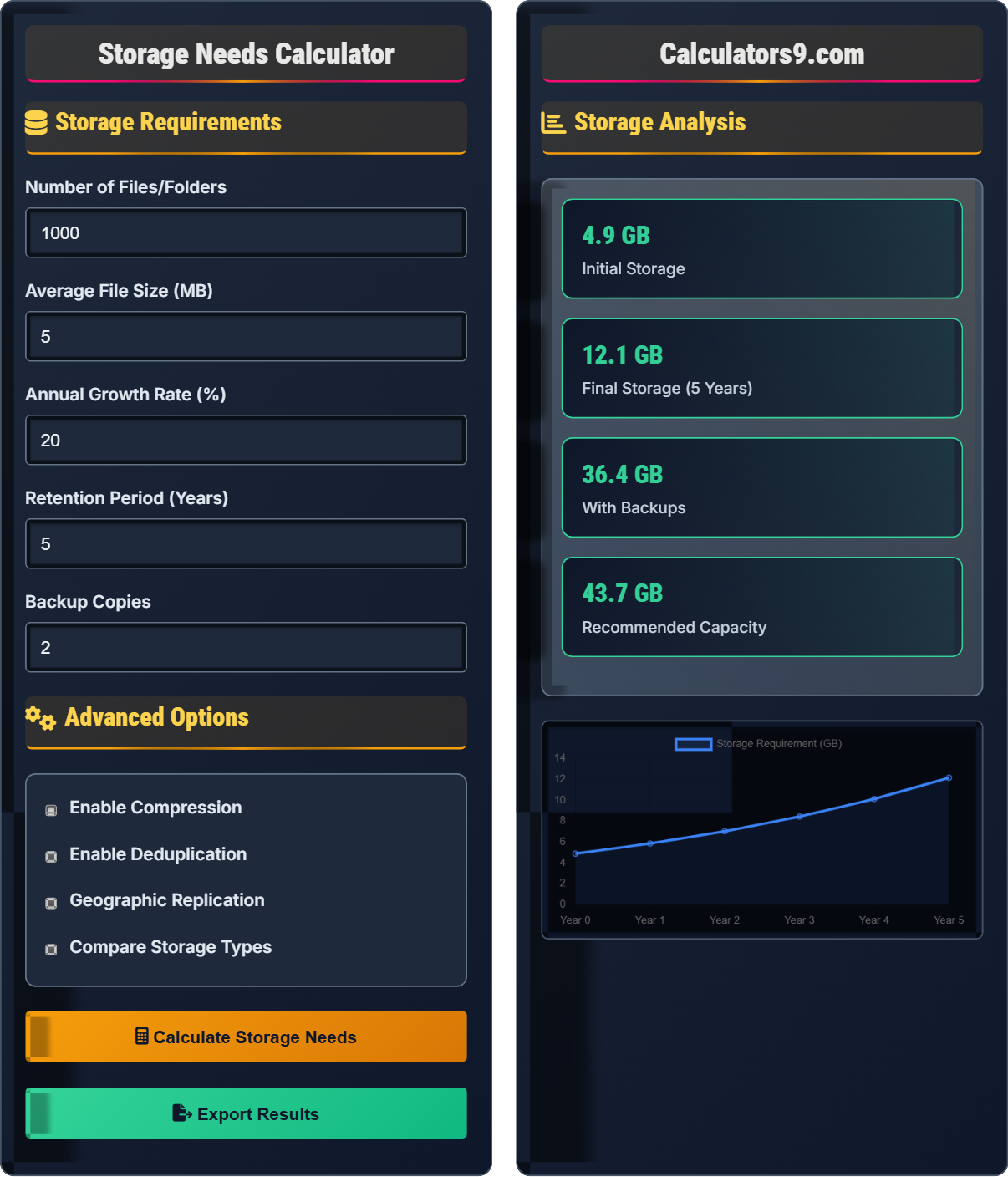
| Component | Size | Details |
|---|---|---|
| Raw Data | 5.0 GB | Base file storage |
| Growth Projection | 12.0 GB | After 5 years |
| Backup Storage | 24.0 GB | 2 copies required |
| Overhead | 1.2 GB | System files, metadata |
| Year | Storage Needed | Cumulative Growth |
|---|---|---|
| Year 1 | 6.0 GB | +20% |
| Year 2 | 7.2 GB | +44% |
| Year 3 | 8.6 GB | +73% |
| Year 4 | 10.4 GB | +107% |
| Year 5 | 12.0 GB | +140% |
Comprehensive Storage Planning Guide
Storage planning involves calculating current and future data needs while accounting for growth, backups, and system overhead. Effective storage management considers file types, access patterns, compliance requirements, and cost optimization. Modern storage solutions include local drives, network-attached storage (NAS), cloud services, and hybrid approaches.
The fundamental formula for storage needs is:
Where:
- Initial Data = Current data volume
- Growth Factor = (1 + Annual Growth Rate)^Years
- Backup Copies = Number of backup copies needed
- Overhead Factor = System files, metadata, and reserved space
Data is typically categorized by access patterns and importance:
- Hot Data: Frequently accessed, stored on fast media
- Warm Data: Occasionally accessed, moderate speed storage
- Cold Data: Rarely accessed, archived to slow but cheap storage
- Deep Archive: Compliance data, rarely accessed, lowest cost
- Capacity Monitoring: Track usage trends and plan expansions
- Performance Planning: Balance speed and cost requirements
- Security Considerations: Encryption, access controls, compliance
- Disaster Recovery: Multiple backup locations and methods
- Cost Optimization: Right-size storage and use appropriate tiers
Storage Planning Learning Quiz
How much storage is needed for 2,000 files averaging 10MB each, with 25% annual growth over 3 years and 2 backup copies?
Initial storage: 2,000 files × 10MB = 20,000 MB = 20 GB
Growth factor: (1.25)^3 = 1.953
Storage after growth: 20 GB × 1.953 = 39.06 GB
With backups: 39.06 GB × (1 + 2) = 117.18 GB ≈ 117 GB
Adding overhead: 117 GB × 1.07 = 125 GB (rounded)
This problem demonstrates exponential growth in storage needs. The key insight is that growth compounds annually, so a 25% annual growth rate results in nearly 100% growth over 3 years. Additionally, backup copies multiply the total storage requirement significantly. This highlights why storage planning must consider both growth and redundancy requirements.
Exponential Growth: Growth that compounds over time
Backup Copies: Additional copies of data for recovery
Storage Overhead: Space used by system files and metadata
• Growth compounds exponentially: (1 + rate)^years
• Backup storage = raw storage × (1 + backup copies)
• Always include overhead in calculations
• Use (1 + growth_rate) for exponential calculations
• Remember to multiply by (1 + backup_copies)
• Add 5-10% overhead to all calculations
• Calculating growth linearly instead of exponentially
• Forgetting to include backup copies
• Not accounting for system overhead
If a company has 100GB of data with 60% compression and 40% deduplication, calculate the actual storage needed and the percentage saved.
Starting data: 100 GB
After compression: 100 GB × (1 - 0.60) = 40 GB
After deduplication: 40 GB × (1 - 0.40) = 24 GB
Total savings: (100 - 24) / 100 × 100 = 76%
Actual storage needed: 24 GB, representing 76% savings.
This example shows how multiple optimization techniques combine multiplicatively rather than additively. When applying both compression and deduplication, the effects compound. First, compression reduces the data by 60%, then deduplication removes 40% of the remaining compressed data. This demonstrates why combining storage optimization techniques can achieve significant space savings.
Compression: Reducing file sizes through encoding
Deduplication: Removing duplicate data blocks
Space Efficiency: Amount of space saved through optimization
• Apply optimizations sequentially: 1st × (1 - ratio)
• Combined savings ≠ simple addition of ratios
• Different file types compress differently
• Apply compression first, then deduplication
• Text files compress better than images
• Calculate savings as (original - optimized) / original
• Adding compression and deduplication ratios directly
• Applying optimizations in wrong order
• Not understanding multiplicative effects
A business has 500GB of data growing at 30% annually. They need 3 backup copies and want to plan for 4 years. Calculate total storage needed, then determine the cost difference between local storage ($0.05/GB) and cloud storage ($0.08/GB/month).
Initial storage: 500 GB
After 4 years: 500 × (1.30)^4 = 500 × 2.856 = 1,428 GB
With 3 backup copies: 1,428 × (1 + 3) = 5,712 GB
With 7% overhead: 5,712 × 1.07 = 6,112 GB
Local storage cost: 6,112 × $0.05 = $305.60
Cloud storage cost: 6,112 × $0.08 × 12 = $5,867.52/year
Cost difference: $5,867.52 - $305.60 = $5,561.92
This problem illustrates the complexity of enterprise storage planning. It combines exponential growth, multiple backup copies, and overhead factors. The cost comparison highlights the difference between capital expenditure (CAPEX) for local storage versus operational expenditure (OPEX) for cloud storage. At scale, cloud storage becomes significantly more expensive over time.
CAPEX: Capital expenditure (one-time purchase)
OPEX: Operational expenditure (ongoing costs)
TCO: Total cost of ownership
• Growth compounds: (1 + rate)^years
• Total storage = raw × (1 + backups) × overhead
• Cloud costs are recurring monthly
• Convert cloud costs to annual for comparison
• Consider scalability requirements
• Factor in maintenance and upgrade costs
• Forgetting to compound growth over multiple years
• Not converting cloud costs to same timeframe
• Omitting overhead and backup considerations
A company has 2TB of data where 20% is hot data (accessed daily), 30% is warm data (accessed weekly), and 50% is cold data (accessed monthly). Calculate storage costs for pure local ($0.05/GB), pure cloud ($0.08/GB/month), and a tiered approach (hot local, warm cloud, cold archive at $0.02/GB/month).
Hot data: 2TB × 0.20 = 0.4TB (400GB)
Warm data: 2TB × 0.30 = 0.6TB (600GB)
Cold data: 2TB × 0.50 = 1.0TB (1000GB)
Pure local: 2000GB × $0.05 = $100
Pure cloud: 2000GB × $0.08 × 12 = $1,920/year
Tiered approach: (400 × $0.05) + (600 × $0.08 × 12) + (1000 × $0.02 × 12) = $20 + $576 + $240 = $836/year
Savings with tiered: $1,920 - $836 = $1,084/year
This demonstrates the value of storage tiering based on access patterns. Hot data requires fast, expensive storage due to frequent access. Warm data can use slower, cheaper storage. Cold data benefits from archival storage solutions. By matching storage costs to access requirements, organizations can significantly reduce their storage expenses while maintaining performance for critical data.
Storage Tiering: Matching storage type to data access frequency
Hot Data: Frequently accessed data requiring fast storage
Storage Class: Different storage types with varying costs and speeds
• Match storage cost to data access value
• Tier based on access frequency and performance needs
• Regularly re-evaluate data classification
• Monitor access patterns regularly
• Automate data tiering when possible
• Consider egress costs for cloud storage
• Storing all data on premium storage
• Not monitoring changing access patterns
• Forgetting egress costs for cloud solutions
Which of the following is the most effective strategy for managing 10TB of data that grows by 40% annually?
The answer is B) Plan for growth with 30% buffer and monitor. With 40% annual growth, storage needs will double every 2 years. Planning for growth with a buffer allows for predictable expansion while avoiding over-provisioning. Regular monitoring ensures adequate capacity and allows for adjustments to the strategy. This approach balances cost, performance, and scalability requirements.
Effective storage management requires balancing multiple factors: cost, performance, scalability, and predictability. Planning for growth with a buffer provides headroom for unexpected increases while avoiding excessive upfront costs. Regular monitoring enables proactive management rather than reactive responses. The 30% buffer accounts for unforeseen growth and maintenance requirements. This strategy works well for predictable growth patterns.
Data Lifecycle Management: Managing data from creation to deletion
Capacity Planning: Predicting and preparing for storage needs
Buffer Capacity: Extra capacity for unexpected growth
• Plan for 20-30% more than projected needs
• Monitor usage patterns regularly
• Implement alerts for capacity thresholds
• Set alerts at 70% and 85% capacity
• Review access patterns quarterly
• Consider seasonal variations in usage
• Underestimating growth rates
• Not planning for compound growth
• Failing to monitor and adjust plans
Storage Planning Fundamentals
Calculating current and future data storage requirements with growth projections.
Total Storage = (Initial × Growth^Years) × (1 + Backups) × Overhead
Where growth = (1 + annual_rate), backups = copies needed, overhead = 1.05-1.10.
- Growth compounds exponentially
- Always include backup requirements
- Add 5-10% overhead for system files
Strategies
Match storage type to data access frequency and importance.
- Implement compression (saves 20-90%)
- Use deduplication (saves 20-80%)
- Apply storage tiering
- Regular cleanup and archiving
- Access patterns and performance needs
- Compliance and retention requirements
- Security and encryption needs
- Cost optimization across solutions
FAQ
Q: How much storage should I plan for growth?
A: Plan for 140-200% of current needs for 3-5 years. With 20-30% annual growth, data doubles every 3-4 years. Include 10-15% buffer for unexpected growth.
Q: Cloud vs local storage - which is better?
A: Depends on data type. Local for critical/secure data, cloud for scalable/accessible data. Hybrid approach often optimal: hot data local, cold data cloud.