Regex Tester & Builder
Pattern matching & validation tool • 2026 dev
Regular Expression Syntax:
Show the builderPattern: /pattern/flags
Common Metacharacters:
.- Any character except newline^- Start of string$- End of string*- Zero or more+- One or more?- Zero or one[]- Character class()- Grouping|- Alternation (OR)
Character Classes:
\d- Digit [0-9]\w- Word character [a-zA-Z0-9_]\s- Whitespace\D- Non-digit\W- Non-word character\S- Non-whitespace
Example: Email validation pattern: /^[a-zA-Z0-9._%+-]+@[a-zA-Z0-9.-]+\.[a-zA-Z]{2,}$/
This pattern matches email addresses by ensuring they have a username part, @ symbol, domain, and top-level domain.
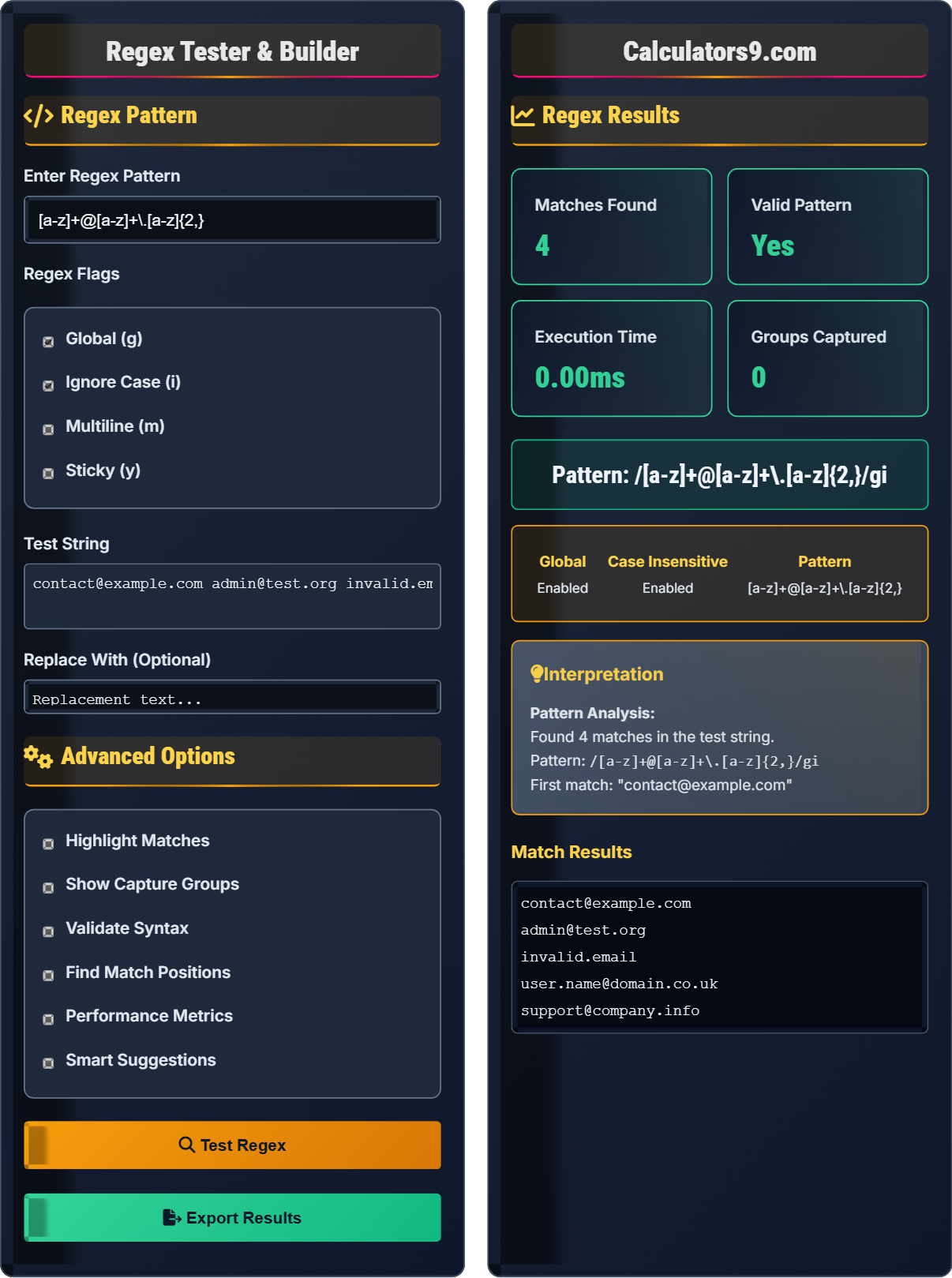
Regex Pattern
Advanced Options
Regex Results
Match Results
Comprehensive Regex Guide
Regular expressions (regex) are sequences of characters that define search patterns. They are used for string matching, validation, searching, and text manipulation. Regex is a powerful tool for developers to process and validate text efficiently.
Essential Regex Patterns:
^- Start of string anchor$- End of string anchor.- Any character except newline\d- Digit [0-9]\w- Word character [a-zA-Z0-9_]\s- Whitespace character[abc]- Character class (a, b, or c)[a-z]- Range (any lowercase letter)+- One or more*- Zero or more?- Zero or one (optional){n,m}- Between n and m times(...)- Grouping/capturing|- Alternation (OR operator)
/^[a-zA-Z0-9._%+-]+@[a-zA-Z0-9.-]+\.[a-zA-Z]{2,}$/
/^\+?[\d\s\-\(\)]{10,}$/
/^https?:\/\/[^\s/$.?#].[^\s]*$/
/^(?:(?:25[0-5]|2[0-4][0-9]|[01]?[0-9][0-9]?)\.){3}(?:25[0-5]|2[0-4][0-9]|[01]?[0-9][0-9]?)$/
Common flags that modify regex behavior:
- g (Global): Find all matches, not just the first
- i (Ignore Case): Case-insensitive matching
- m (Multiline): ^ and $ match line boundaries
- s (Dotall): . matches newline characters
- u (Unicode): Enable Unicode support
- y (Sticky): Perform sticky matching
- Be Specific: Use character classes and quantifiers carefully
- Test Thoroughly: Validate with various inputs
- Escape Special Characters: Use \ to escape metacharacters
- Optimize Performance: Avoid catastrophic backtracking
- Use Tools: Leverage online regex testers and builders
Regex Fundamentals
Pattern matching for text processing.
/pattern/flags
Defines search patterns in strings.
- Escape special characters
- Use anchors for boundaries
- Test with diverse inputs
Regex Applications
For pattern matching and text validation.
- Input validation
- Data extraction
- Text replacement
- Format checking
- Performance with complex patterns
- Readability of expressions
- Language-specific variations
- Security implications
Regex Learning Quiz
What does the regex pattern /[a-z]+/ match?
The answer is B) One or more consecutive lowercase letters. The pattern [a-z] defines a character class that matches any lowercase letter from 'a' to 'z'. The + quantifier means "one or more" of the preceding element, so [a-z]+ matches one or more consecutive lowercase letters.
Breaking down the pattern: [a-z] is a character class that matches any single character in the range from 'a' to 'z'. The + is a quantifier that specifies that the preceding element (the character class) must occur one or more times. So "hello" would match, but "hi there" would match only "hi" and "there" separately.
Character Class: [...] matches any single character inside brackets
Quantifier: Specifies how many times a character or group repeats
Plus (+): One or more occurrences
• + means one or more
• * means zero or more
• ? means zero or one
• Use {n,m} for exact range
• [A-Za-z] for all letters
• \w matches word characters
• Confusing + with *
• Forgetting that + requires at least one match
• Misunderstanding character class ranges
Which of the following strings would match the regex pattern /^\d{3}-\d{2}-\d{4}$/? (This pattern is commonly used for US Social Security Numbers)
Let's break down the pattern /^\d{3}-\d{2}-\d{4}$/:
^- Start of string\d{3}- Exactly 3 digits-- Literal hyphen character\d{2}- Exactly 2 digits-- Literal hyphen character\d{4}- Exactly 4 digits$- End of string
So the pattern matches strings in the format "XXX-XX-XXXX" where each X is a digit. For example: "123-45-6789", "987-65-4321", "001-23-4567".
This pattern demonstrates several important regex concepts: anchors (^ and $) ensure the entire string matches the pattern, not just a substring. The \d shorthand matches any digit (equivalent to [0-9]). The {n} quantifier specifies exactly n occurrences. The literal hyphens are not escaped because they're not inside a character class where they might have special meaning.
Anchors: ^ start, $ end of string
Shorthand Classes: \d digits, \w word chars
Exact Quantifier: {n} exactly n times
• Use anchors to match entire string
• Shorthand classes are convenient
• Quantifiers specify repetition counts
• {n,m} for minimum to maximum
• {n,} for at least n times
• Escape special chars when literal needed
• Forgetting anchors allows partial matches
• Confusing \d with \D
• Misplacing quantifiers
Create a regex pattern to validate basic email addresses. The pattern should match strings with a username part (letters, numbers, dots, underscores), followed by '@', then a domain name (letters, numbers, dots), and finally a top-level domain (at least 2 letters).
A suitable pattern would be: /^[a-zA-Z0-9._%+-]+@[a-zA-Z0-9.-]+\.[a-zA-Z]{2,}$/
Breaking it down:
^- Start of string[a-zA-Z0-9._%+-]+- Username: one or more allowed characters@- Literal @ symbol[a-zA-Z0-9.-]+- Domain: one or more allowed characters\.- Literal dot (escaped)[a-zA-Z]{2,}- Top-level domain: 2 or more letters$- End of string
This pattern would match: "user@example.com", "john.doe@company.org", "test_email@sub.domain.co.uk"
This pattern demonstrates advanced regex concepts. The username part allows common characters found in email usernames. The domain part is more restrictive. Note that the dot in the TLD part must be escaped (\.) because it's outside of a character class where it would otherwise match any character. The {2,} quantifier ensures at least 2 letters in the TLD.
Escaping: Using \ to treat special chars literally
Character Class: Set of allowed characters
Minimum Quantifier: {n,} at least n times
• Always escape special chars when literal needed
• Use character classes for allowed sets
• Anchors prevent partial matches
• Test with valid and invalid examples
• Start simple, add complexity gradually
• Use online testers to validate
• Forgetting to escape the dot in TLD
• Not anchoring the pattern
• Being too restrictive or too permissive
Create a regex pattern to validate US phone numbers in the format (XXX) XXX-XXXX or XXX-XXX-XXXX. The pattern should be flexible enough to handle optional country codes and spaces.
A flexible pattern would be: /^(\+\d{1,3}[-.\s]?)?\(?(\d{3})\)?[-.\s]?(\d{3})[-.\s]?(\d{4})$/
Breaking it down:
^- Start of string(\+\d{1,3}[-.\s]?)?- Optional country code\(?(\d{3})\)?- Area code (with optional parentheses)[-.\s]?- Optional separator(\d{3})- Next 3 digits[-.\s]?- Optional separator(\d{4})- Last 4 digits$- End of string
This pattern would match: "(123) 456-7890", "123-456-7890", "+1 123 456 7890", "123.456.7890"
This pattern shows advanced concepts like optional groups and alternation. The (...)? syntax makes the entire group optional. Parentheses create capturing groups that can be referenced later. The flexibility comes from allowing optional separators and formatting variations while maintaining the core digit pattern.
Capturing Group: (...) creates a group that remembers matched text
Optional Group: (...)? matches zero or one time
Alternation: | operator for OR logic
• Group related elements together
• Use optional quantifiers for flexibility
• Balance specificity with usability
• Use non-capturing groups (?:...) when not needed
• Test with various formats
• Consider international formats
• Creating overly complex patterns
• Not considering all valid formats
• Forgetting to escape special characters
Which regex flag would you use to make a pattern case-insensitive?
The answer is B) i (ignore case). The 'i' flag makes the regex pattern case-insensitive, so it treats uppercase and lowercase letters as equivalent. For example, the pattern /hello/i would match "Hello", "HELLO", "hello", "HeLLo", etc.
Regex flags modify how the pattern matching behaves. The 'i' flag is particularly useful when dealing with user input where case variations are expected. Other flags include 'g' for global matching (find all occurrences), 'm' for multiline mode (where ^ and $ match line boundaries), and 's' for dotall mode (where . matches newlines).
Flags: Modifiers that change regex behavior
Case-insensitive: Ignores letter case during matching
Global: Matches all occurrences, not just first
• 'i' flag enables case-insensitive matching
• Flags are applied after the closing slash
• Multiple flags can be combined
• Combine flags: /pattern/gim
• Use 'g' for replacing all matches
• 'm' is useful for line-by-line processing
• Confusing flag purposes
• Forgetting to add flags when needed
• Not understanding flag interactions
FAQ
Q: What's the difference between . and \. in regex?
A: The dot (.) is a metacharacter that matches any character except newline, while \. matches a literal dot character. The backslash escapes the special meaning of the dot, treating it as a regular character. For example:
/file./ matches "file1", "fileA", "file!", etc.
/file\./ matches "file.txt", "file.pdf", "file.doc", etc.
This escaping principle applies to all metacharacters: *.+?^$[]{|()} need to be escaped with \ to match literally.
Q: How can I validate that a string contains only alphanumeric characters?
A: Use the pattern /^[a-zA-Z0-9]+$/ to match strings containing only alphanumeric characters:
^ - Start of string
[a-zA-Z0-9] - Character class matching letters and numbers
+ - One or more of the preceding character class
$ - End of string
Alternatively, you can use /^\w+$/ with the restriction that \w also includes underscore. For strict alphanumeric without underscore: /^[a-zA-Z0-9]+$/