CSS Beautifier
Professional CSS Code Formatter • 2026 Edition
CSS Formatting Rules:
Show the formatterCSS formatting follows specific structural rules:
- Selectors must be properly followed by opening braces
- Properties must end with semicolons
- Values must be properly formatted
- Braces must be balanced
- Comments must be properly enclosed
- Units should be consistent
CSS formatting improves readability and maintainability of stylesheets. Properly formatted CSS is easier to debug, maintain, and collaborate on.
Example: A well-formatted CSS rule with proper indentation and line breaks:
.container {
    display: flex;
    justify-content: center;
    align-items: center;
    padding: 20px;
    background-color: #f5f5f5;
}

.button {
    background-color: #007bff;
    color: white;
    padding: 10px 20px;
    border: none;
    border-radius: 4px;
}
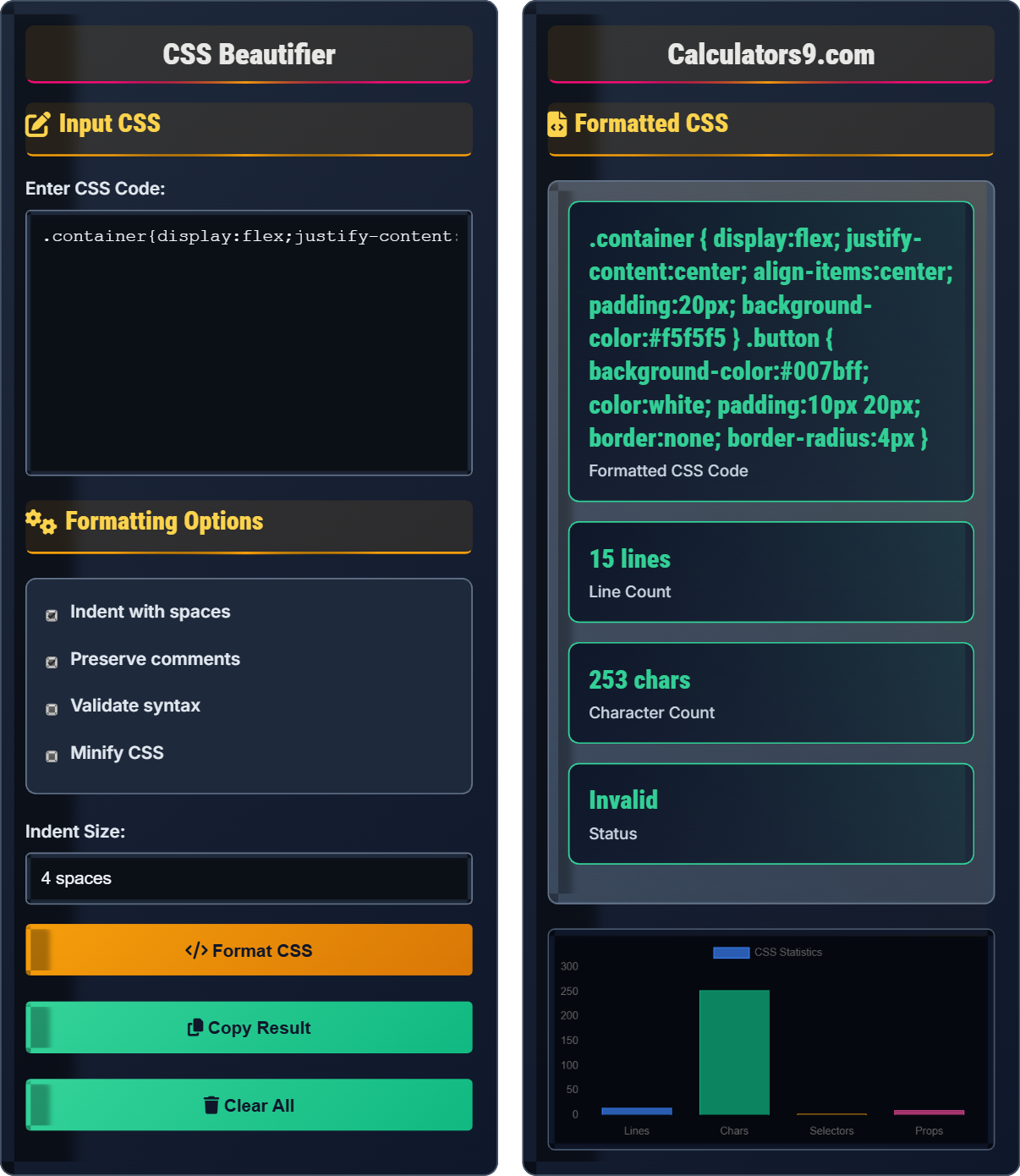
Input CSS
Formatting Options
Formatted CSS
.container {
    display: flex;
    justify-content: center;
    align-items: center;
    padding: 20px;
    background-color: #f5f5f5;
}

.button {
    background-color: #007bff;
    color: white;
    padding: 10px 20px;
    border: none;
    border-radius: 4px;
}
| Metric | Value |
|---|---|
| Lines | 12 |
| Characters | 187 |
| Selectors | 2 |
| Properties | 9 |
Comprehensive CSS Guide
CSS (Cascading Style Sheets) is a stylesheet language used to describe the presentation of a document written in HTML or XML. CSS describes how elements should be rendered on screen, paper, or other media.
- Every selector must be followed by opening curly brace
- Each property must end with a semicolon
- All CSS rules must have balanced braces
- Comments must be enclosed in /* */
- Units should be consistent throughout the stylesheet
- Vendor prefixes should be properly ordered
A CSS declaration block consists of multiple declarations separated by semicolons:
.selector {
    property1: value1;
    property2: value2;
    property3: value3;
}
- Use consistent naming conventions
- Keep consistent indentation
- Group related styles together
- Use meaningful class names
- Comment complex sections
- Organize CSS by sections
CSS Formatting Learning Quiz
Which of the following is NOT a valid CSS rule?
The answer is C) Units are required for all values. In CSS, units are not required for dimensionless values such as line-height, opacity, or z-index. For example, line-height: 1.5; is valid without a unit. However, for dimensions like width, height, margin, etc., units are required.
Understanding CSS syntax rules is crucial because they ensure proper rendering across browsers. While many properties require units, some values are unitless. The line-height property is a common example where unitless values are preferred as they scale proportionally with the font size. This knowledge helps developers write more efficient and maintainable CSS.
Property: A CSS feature that controls how elements are displayed
Value: The setting applied to a CSS property
Declaration Block: The section between curly braces containing CSS properties
• All properties must end with semicolons
• Selectors must be followed by opening braces
• Some values don't require units (like line-height)
• Use unitless line-height values for better scalability
• Always end properties with semicolons
• Keep consistent spacing in your CSS
• Forgetting semicolons after property declarations
• Not balancing opening and closing braces
• Adding unnecessary units to unitless properties
Explain CSS selector specificity and how it determines which styles are applied when multiple rules target the same element.
CSS selector specificity determines which styles are applied when multiple rules target the same element. Specificity is calculated using a point system:
- Inline styles: 1,0,0,0 points
- ID selectors: 0,1,0,0 points
- Class selectors, attributes, pseudo-classes: 0,0,1,0 points
- Element selectors, pseudo-elements: 0,0,0,1 points
Example:
/* Specificity: 0,0,0,1 */
p { color: blue; }

/* Specificity: 0,0,1,1 */
p.highlight { color: red; }

/* Specificity: 0,1,0,1 */
#content p { color: green; }

/* Specificity: 1,0,0,0 */
p { color: purple !important; }
When multiple rules apply to an element, the one with the highest specificity wins. If specificity is equal, the last rule in the stylesheet is applied.
Specificity is crucial for understanding how CSS cascade works. It explains why certain styles override others and helps developers write more predictable CSS. The specificity calculation helps explain why IDs are more powerful than classes, and why inline styles take precedence over external stylesheets.
Specificity: The algorithm used to determine which CSS rule is applied to an element
Cascade: The process of determining which styles are applied when multiple rules conflict
Selector: The pattern used to select HTML elements for styling
• More specific selectors override less specific ones
• !important overrides normal specificity
• Later rules override earlier ones if specificity is equal
• Use classes over IDs when possible
• Avoid using !important when possible
• Understand specificity to write more predictable CSS
• Overusing IDs which have high specificity
• Relying too heavily on !important
• Not understanding why certain styles aren't applied
You're given the following CSS that needs to be properly formatted: .header{color:red;font-size:16px;}.nav{background-color:#fff;padding:10px;}.footer{margin:20px;}. How should this be formatted correctly?
Correctly formatted CSS:
.header {
    color: red;
    font-size: 16px;
}

.nav {
    background-color: #fff;
    padding: 10px;
}

.footer {
    margin: 20px;
}
The original CSS had all rules on a single line without proper indentation. The formatted version follows best practices by placing each property on its own line with consistent indentation, making it much more readable and maintainable.
Proper CSS formatting improves readability and maintainability. When each property is on its own line, it's easier to locate specific styles, make changes, and add comments. Consistent indentation helps visualize the structure of the CSS, making it easier to understand the relationship between selectors and their properties.
Declaration: A property-value pair within a CSS rule
Rule: A selector and its associated declaration block
Property: A CSS feature that controls how elements are displayed
• Each property should be on its own line
• Use consistent indentation
• Place opening brace on the same line as selector
• Use 4-space indentation consistently
• Add a space before the opening brace
• Align properties under the selector
• Placing all properties on a single line
• Inconsistent indentation
• Not following a consistent formatting style
A developer has a CSS file with 500 lines that appears to have formatting issues. Some styles are not being applied correctly. What steps should they take to properly format and validate the CSS file?
Step 1: Check for balanced braces and semicolons
Step 2: Verify that all selectors have proper syntax
Step 3: Ensure all properties have proper syntax
Step 4: Use a CSS formatter to standardize indentation and structure
Step 5: Validate against W3C CSS validator
Step 6: Use browser dev tools to inspect computed styles
Step 7: Review and fix any reported errors systematically
Step 8: Test in multiple browsers for consistency
Large CSS files can be challenging to validate manually. A systematic approach helps identify issues efficiently. CSS formatters not only improve readability but also help reveal structural problems. Validation tools provide specific error locations and descriptions, making debugging more efficient than manual inspection.
CSS Validator: A tool that checks CSS documents for well-formedness and validity
Well-formed: CSS that follows all syntax rules
Computed Styles: Final styles applied to an element after all rules are processed
• Always validate CSS after formatting changes
• Fix errors from top to bottom in document order
• Use automated tools for large documents
• Use CSS preprocessors like Sass or Less
• Break large files into smaller modules
• Use browser dev tools for debugging
• Attempting to validate without fixing basic syntax errors first
• Ignoring error line numbers provided by validators
• Making multiple changes before validating again
Which of the following is NOT a benefit of properly formatted CSS?
The answer is D) Reduced file size. Properly formatted CSS with indentation and line breaks actually increases file size due to added whitespace. However, the benefits of improved readability, easier debugging, and better maintainability far outweigh the slight increase in storage requirements. Minified CSS (without formatting) would reduce file size but sacrifice readability.
There's a trade-off between human-readable CSS and machine-optimized CSS. During development, formatted CSS is preferred for its readability and maintainability. For production environments where bandwidth is critical, CSS might be minified (whitespace removed). Modern browsers handle both formats equally well, so the choice depends on the intended use case.
Minified CSS: CSS with whitespace and formatting removed to reduce file size
Human-readable: Formatted CSS optimized for people to read
Machine-optimized: CSS optimized for processing speed and storage
• Formatted CSS has larger file size than minified CSS
• Both formats are equally valid for processing
• Choose format based on intended use case
• Use formatted CSS for development and debugging
• Use minified CSS for production when bandwidth matters
• Automate formatting during build processes
• Assuming formatted CSS is always smaller than unformatted
• Using minified CSS during development
• Not considering the trade-off between readability and size
CSS Basics
Style sheet language for web page presentation.
selector { property: value; }
Where selector targets elements and property:value sets styles.
- Properties must end with semicolons
- Braces must be balanced
- Units are not required for all values
Best Practices
Consistent indentation improves readability.
- Check syntax rules
- Validate against standards
- Test in browsers
- Document changes
- Use consistent naming
- Group related styles
- Comment complex sections
- Organize by sections
FAQ
Q: Why is CSS formatting important for developers?
A: CSS formatting is crucial for several reasons:
- Readability: Properly indented CSS is much easier to read and understand
- Debugging: Well-formatted CSS makes it easier to spot structural errors
- Maintainability: Team members can quickly comprehend and modify CSS structures
- Collaboration: Consistent formatting helps team members work together
- Performance: Organized CSS can be optimized more easily
For example, consider this poorly formatted CSS:
.header{color:red;font-size:16px;}.nav{background-color:#fff;}
Versus the same content properly formatted:
.header {
    color: red;
    font-size: 16px;
}

.nav {
    background-color: #fff;
}
The second version clearly shows the structure, making it much easier to work with.
Q: What's the difference between CSS validation and formatting?
A: There's an important distinction between CSS validation and formatting:
- CSS Validation: Checks if the CSS follows all syntax rules and standards. Ensures proper property values, valid selectors, and compliance with CSS specifications.
- CSS Formatting: Focuses on the visual presentation and organization of the code, including indentation, spacing, and readability.
Example of valid but poorly formatted CSS:
.header{color:red;font-size:16px;}.nav{background-color:#fff;}
Same content properly formatted:
.header {
    color: red;
    font-size: 16px;
}

.nav {
    background-color: #fff;
}
Both are valid CSS, but the second is much more readable and maintainable.