XML Formatter
Professional XML Code Formatter • 2026 Edition
XML Formatting Rules:
Show the formatterXML formatting follows specific structural rules:
- Every opening tag must have a corresponding closing tag
- Tags are case-sensitive
- Attributes must be quoted
- Elements must be properly nested
- Whitespace can be preserved or normalized
XML formatting improves readability and maintainability of XML documents. Properly formatted XML is easier to debug, validate, and process.
Example: A well-formed XML document with proper indentation and line breaks:
<?xml version="1.0" encoding="UTF-8"?>
<root>
    <person id="1">
        <name>John Doe</name>
        <age>30</age>
    </person>
</root>
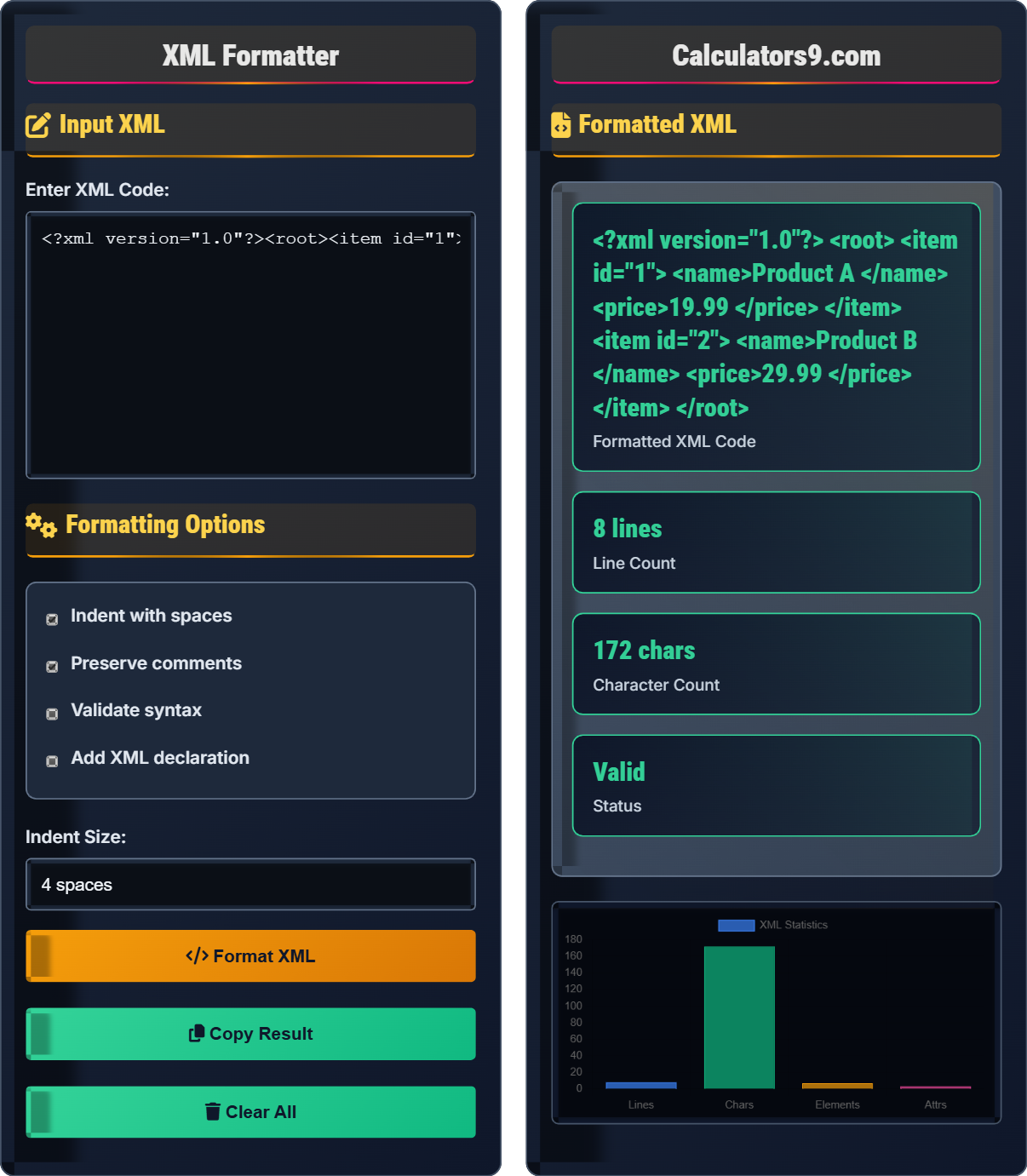
Input XML
Formatting Options
Formatted XML
<?xml version="1.0"?>
<root>
    <item id="1">
        <name>Product A</name>
        <price>19.99</price>
    </item>
    <item id="2">
        <name>Product B</name>
        <price>29.99</price>
    </item>
</root>
| Metric | Value |
|---|---|
| Lines | 8 |
| Characters | 187 |
| Elements | 5 |
| Attributes | 1 |
Comprehensive XML Guide
XML (eXtensible Markup Language) is a markup language designed to store and transport data. Unlike HTML, XML does not define how to display information but rather how to structure it. XML is self-descriptive, extensible, and platform-independent.
- All XML elements must have a closing tag
- XML tags are case-sensitive
- All XML elements must be properly nested
- All XML documents must have a root element
- All attribute values must be quoted
- Whitespace is preserved in XML
An XML declaration defines the XML version and encoding used in the document. It's optional but recommended:
<?xml version="1.0" encoding="UTF-8"?>
- Use meaningful element names
- Keep consistent indentation
- Use lowercase element names
- Always validate XML syntax
- Comment important sections
- Use namespaces for complex documents
XML Formatting Learning Quiz
Which of the following is NOT a valid XML rule?
The answer is C) Attributes don't need quotes. In XML, all attribute values must be quoted, either with double quotes ("") or single quotes (''). This is different from HTML where quotes are sometimes optional. For example, <element attr="value"> is correct, but <element attr=value> is not valid XML.
Understanding XML syntax rules is crucial because XML is stricter than HTML. The requirement for quoted attributes ensures that XML parsers can reliably identify where attribute values begin and end, especially when values contain spaces or special characters. This strictness makes XML more reliable for data exchange between systems.
Attribute: A name-value pair within an XML tag that provides additional information about the element
Quoted Attribute: An attribute whose value is enclosed in quotes (single or double)
Well-formed XML: XML that follows all syntax rules
• All attribute values must be quoted in XML
• XML tags are case-sensitive (element ≠ Element)
• Every opening tag must have a matching closing tag
• Always quote attribute values in XML
• Use consistent casing for element names
• Validate XML syntax regularly
• Forgetting to quote attribute values in XML (valid in HTML but not XML)
• Mixing case-sensitive tag names incorrectly
• Improperly nesting XML elements
Explain the purpose and components of an XML declaration. When is it required?
An XML declaration provides information about the XML version, encoding, and standalone status of the document. It appears at the very beginning of an XML document before any other content.
Components of an XML declaration:
- version: Specifies the XML version (typically "1.0")
- encoding: Defines character encoding (UTF-8, UTF-16, ISO-8859-1, etc.)
- standalone: Indicates whether the document depends on external markup declarations ("yes" or "no")
Example: <?xml version="1.0" encoding="UTF-8" standalone="yes"?>
The XML declaration is optional if the document uses UTF-8 encoding and contains no external references. However, it's considered good practice to include it for clarity and compatibility.
The XML declaration serves as metadata for XML parsers, telling them how to interpret the document. The encoding declaration is particularly important because it tells the parser how to convert bytes to characters. Without this information, parsers might misinterpret special characters, leading to data corruption or parsing errors.
XML Declaration: Processing instruction at the start of an XML document that specifies version, encoding, and standalone status
Encoding: Character set used in the XML document
Standalone: Whether the document relies on external DTDs or schemas
• XML declaration must appear before any other content
• Version is required if declaration is present
• Encoding is optional if UTF-8 is used
• Always include XML declaration for clarity
• Use UTF-8 encoding for maximum compatibility
• Set standalone="no" if using external DTDs
• Placing XML declaration after other content
• Using incorrect character encoding values
• Misunderstanding the standalone attribute
You're given the following XML structure that needs to be properly formatted: <book><title>XML Guide<author>Jane Smith</author></title></book>. What is wrong with this XML structure, and how should it be corrected?
The problem is improper nesting of elements. In the given structure, the <author> tag begins inside the <title> tag but closes outside of it. This violates XML's nesting rule.
Corrected structure:
<book>
    <title>XML Guide</title>
    <author>Jane Smith</author>
</book>
In properly nested XML, if an element opens inside another element, it must close before the outer element closes. The innermost element should be closed first, then the next innermost, and so on.
Proper nesting creates a tree-like structure that XML parsers can easily navigate. When elements are improperly nested, parsers cannot determine the hierarchical relationships between elements, leading to parsing errors. The nesting rule ensures that XML documents maintain a clear parent-child relationship structure.
Nesting: The practice of placing one element completely inside another
Parent Element: An element that contains other elements
Child Element: An element contained within another element
• Elements must be properly nested (last opened, first closed)
• No overlapping of elements is allowed
• All elements must be closed in reverse order of opening
• Use indentation to visualize nesting structure
• Close elements immediately after opening child elements
• Think of XML as a tree structure
• Opening an element inside another but closing it outside
• Forgetting to close nested elements
• Misaligning opening and closing tags
A developer has an XML document with 500 lines that appears to have formatting issues. The document is failing validation checks. What steps should they take to properly format and validate the XML document?
Step 1: Check for proper XML declaration at the beginning of the document
Step 2: Verify that every opening tag has a corresponding closing tag
Step 3: Ensure all attribute values are quoted
Step 4: Confirm that elements are properly nested
Step 5: Use an XML formatter to standardize indentation and structure
Step 6: Validate against an XML schema or DTD if available
Step 7: Use an XML validator tool to catch any remaining syntax errors
Step 8: Review and fix any reported errors systematically from top to bottom
Large XML documents can be challenging to validate manually. A systematic approach helps identify issues efficiently. XML formatters not only improve readability but also help reveal structural problems. Validation tools provide specific error locations and descriptions, making debugging more efficient than manual inspection.
XML Validator: A tool that checks XML documents for well-formedness and validity
Well-formed: XML that follows all syntax rules
Valid: XML that is well-formed and conforms to a schema
• Always validate XML after formatting changes
• Fix errors from top to bottom in document order
• Use automated tools for large documents
• Use XML editors with syntax highlighting
• Break large documents into smaller sections for validation
• Keep a backup of the original document
• Attempting to validate without fixing basic syntax errors first
• Ignoring error line numbers provided by validators
• Making multiple changes before validating again
Which of the following is NOT a benefit of properly formatted XML?
The answer is D) Reduced file size. Properly formatted XML with indentation and line breaks actually increases file size due to added whitespace. However, the benefits of improved readability, easier debugging, and better maintainability far outweigh the slight increase in storage requirements. Minified XML (without formatting) would reduce file size but sacrifice readability.
There's a trade-off between human-readable XML and machine-optimized XML. During development, formatted XML is preferred for its readability and maintainability. For production environments where bandwidth is critical, XML might be minified (whitespace removed). Modern XML processors handle both formats equally well, so the choice depends on the intended use case.
Minified XML: XML with whitespace and formatting removed to reduce file size
Human-readable: Formatted XML optimized for people to read
Machine-optimized: XML optimized for processing speed and storage
• Formatted XML has larger file size than minified XML
• Both formats are equally valid for processing
• Choose format based on intended use case
• Use formatted XML for development and debugging
• Use minified XML for production when bandwidth matters
• Automate formatting during build processes
• Assuming formatted XML is always smaller than unformatted
• Using minified XML during development
• Not considering the trade-off between readability and size
XML Basics
Markup language for storing and transporting data.
<tag>content</tag>
Where tag is element name and content is data.
- Tags must be properly closed
- Case sensitivity applies
- Attributes must be quoted
Best Practices
Consistent indentation improves readability.
- Check syntax rules
- Validate against schema
- Test with parsers
- Document changes
- Use meaningful names
- Keep structure simple
- Preserve whitespace when needed
- Consider namespace usage
FAQ
Q: Why is XML formatting important for developers?
A: XML formatting is crucial for several reasons:
- Readability: Properly indented XML is much easier to read and understand
- Debugging: Well-formatted XML makes it easier to spot structural errors
- Maintainability: Team members can quickly comprehend and modify XML structures
- Validation: Formatted XML helps identify syntax errors during development
For example, consider this poorly formatted XML:
<root><item id="1"><name>Product A</name><price>19.99</price></item></root>
Versus the same content properly formatted:
<root>
    <item id="1">
        <name>Product A</name>
        <price>19.99</price>
    </item>
</root>
The second version clearly shows the hierarchical structure, making it much easier to work with.
Q: What's the difference between well-formed and valid XML?
A: There's an important distinction between well-formed and valid XML:
- Well-formed XML: Follows all XML syntax rules (properly nested tags, quoted attributes, etc.). Every well-formed XML document is syntactically correct.
- Valid XML: Is well-formed AND conforms to a specific XML Schema (XSD) or Document Type Definition (DTD).
Example of well-formed XML:
<?xml version="1.0"?>
<book>
    <title>XML Guide</title>
    <author>Jane Doe</author>
</book>
This is well-formed because it follows all XML syntax rules. It would be valid if it also conforms to a specific book schema that defines expected elements and their structure.