Professional Invoice Generator
Create professional invoices • 2026 edition
Invoice Formula:
Show the generator\( \text{Subtotal} = \sum(\text{Quantity} \times \text{Unit Price}) \)
\( \text{Tax Amount} = \text{Subtotal} \times \text{Tax Rate} \)
\( \text{Total} = \text{Subtotal} + \text{Tax Amount} + \text{Fees} - \text{Discounts} \)
Where:
- \( \text{Subtotal} = \text{Sum of all line item totals} \)
- \( \text{Tax Rate} = \text{Applicable tax percentage (e.g., 8.5\%)} \)
- \( \text{Fees} = \text{Additional charges (shipping, handling, etc.)} \)
- \( \text{Discounts} = \text{Promotional discounts or early payment reductions} \)
This formula calculates the total amount due on an invoice by summing all charges, applying taxes, and adjusting for any discounts or additional fees. It ensures accurate billing and compliance with accounting standards.
Example: For an invoice with 2 items at $100 each, 8.5% tax, and $10 shipping:
Subtotal: 2 × $100 = $200
Tax: $200 × 0.085 = $17
Total: $200 + $17 + $10 = $227
Therefore, the total amount due is $227.00.
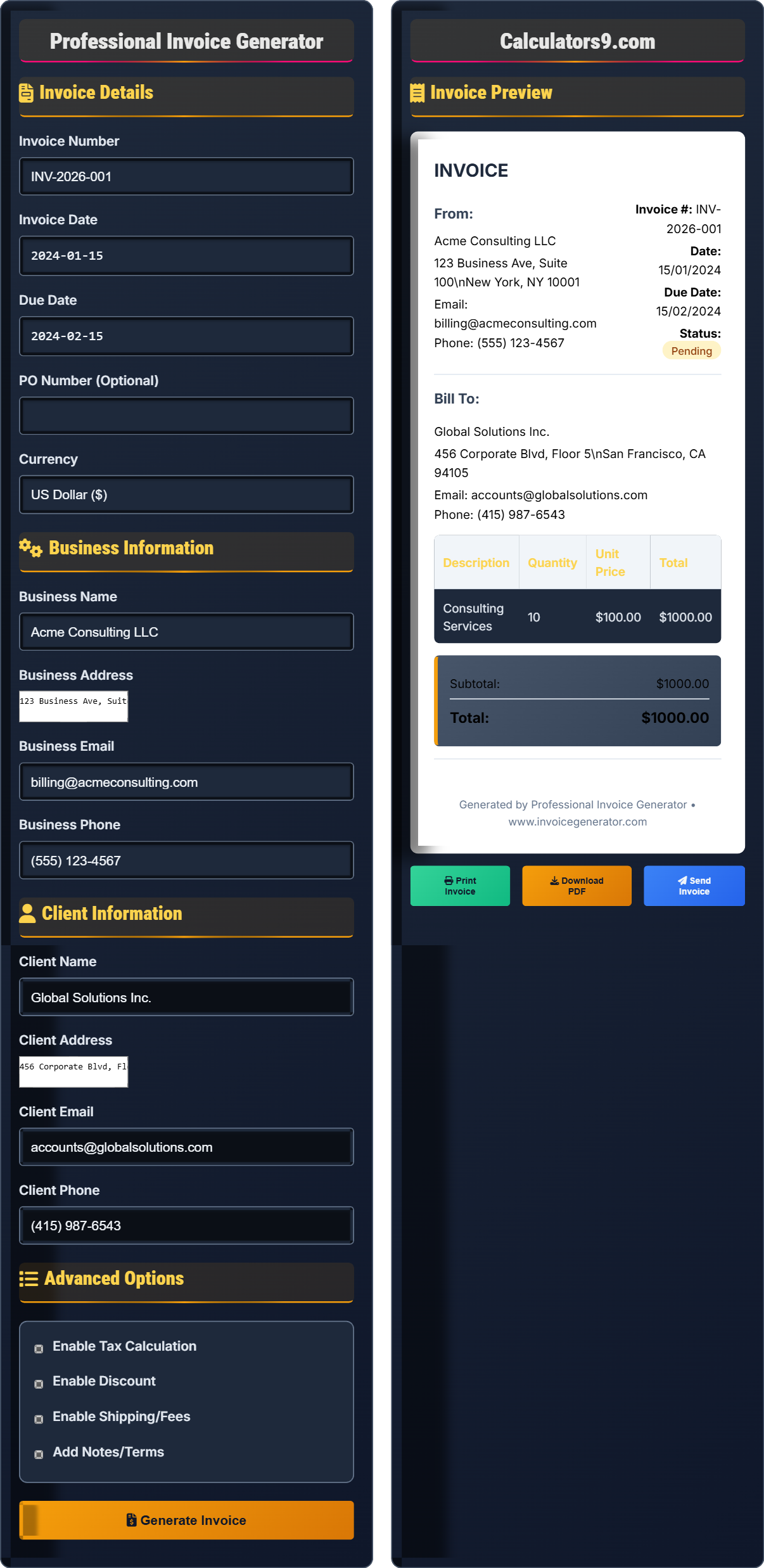
Invoice Details
Business Information
Client Information
Advanced Options
Invoice Preview
INVOICE
From:
Acme Consulting LLC
123 Business Ave, Suite 100 New York, NY 10001
Email: billing@acmeconsulting.com
Phone: (555) 123-4567
Invoice #: INV-2026-001
Date: Jan 15, 2024
Due Date: Feb 15, 2024
Status: Pending
Bill To:
Global Solutions Inc.
456 Corporate Blvd, Floor 5 San Francisco, CA 94105
Email: accounts@globalsolutions.com
Phone: (415) 987-6543
| Description | Quantity | Unit Price | Total |
|---|---|---|---|
| Consulting Services | 10 | $100.00 | $1,000.00 |
Invoice Items
Added Items
| Description | Qty | Unit Price | Total | Action |
|---|
Comprehensive Invoice Generation Guide
Invoice generation is the process of creating formal bills for goods or services provided to clients. A professional invoice serves as a legal document that requests payment and provides detailed records for accounting purposes. It ensures proper billing practices and maintains positive client relationships.
The standard invoice calculation uses the following formula:
Where:
- \( \text{Subtotal} = \sum(\text{Quantity} \times \text{Unit Price}) \)
- \( \text{Tax} = \text{Subtotal} \times \text{Tax Rate} \)
- \( \text{Fees} = \text{Additional charges (shipping, handling, etc.)} \)
- \( \text{Discounts} = \text{Promotional discounts or early payment reductions} \)
Effective invoice generation involves several key practices:
- Send Promptly: Issue invoices immediately after delivering goods/services
- Be Specific: Provide detailed descriptions of work performed
- Include Payment Terms: Clearly state due dates and accepted payment methods
- Track Status: Monitor payments and follow up on overdue invoices
- Maintain Records: Keep copies for tax and audit purposes
- Use Sequential Numbers: Maintain organized numbering system for tracking
- Automate When Possible: Use software to streamline repetitive tasks
- Accept Multiple Payments: Offer various payment options to clients
- Set Clear Terms: Define late payment penalties and discount policies
- Review Regularly: Update templates to reflect business changes
Invoice Basics
Creating formal bills for goods or services provided to clients.
\( \text{Total} = \text{Subtotal} + \text{Tax} + \text{Fees} - \text{Discounts} \)
Where subtotal = sum of all line item totals.
- Include all required information
- Send invoices promptly
- Track payment status
Best Practices
Maintaining quality and compliance in invoice creation.
- Use clear, descriptive line items
- Implement automated reminders
- Offer multiple payment options
- Keep detailed records
- Tax compliance requirements
- Industry-specific regulations
- International billing considerations
- Electronic invoicing standards
Invoice Generation Learning Quiz
Which of the following is NOT a required component of a professional invoice?
The answer is C) Company logo. While a company logo is professionally desirable and helps with brand recognition, it is not a required component of an invoice. The essential elements are invoice number, date, line items, amounts, and payment terms. A logo enhances the appearance but doesn't affect the invoice's legal validity or functionality.
Understanding the distinction between required and optional elements of an invoice helps prioritize what must be included for legal and accounting purposes versus what improves presentation. Required elements ensure the invoice serves its primary purpose of requesting payment and providing documentation, while optional elements enhance professionalism and brand recognition.
Required Element: Component necessary for invoice validity
Optional Element: Component that enhances but isn't essential
Legal Validity: Meeting requirements for legal enforceability
• Invoice number and date are essential
• Line items provide transaction details
• Payment terms define obligations
• Focus on required elements first
• Add optional elements for professionalism
• Ensure all calculations are accurate
• Omitting essential information like due dates
• Inaccurate calculations
• Unclear line item descriptions
Calculate the total amount due for an invoice with 3 items: 5 units at $75 each, 2 units at $120 each, and 1 unit at $200. Apply 8.5% tax and subtract a $25 discount. Show your work.
Step 1: Calculate line item totals:
Item 1: 5 × $75 = $375
Item 2: 2 × $120 = $240
Item 3: 1 × $200 = $200
Step 2: Calculate subtotal: $375 + $240 + $200 = $815
Step 3: Calculate tax: $815 × 0.085 = $69.28
Step 4: Calculate total: $815 + $69.28 - $25 = $859.28
Therefore, the total amount due is $859.28.
This calculation demonstrates the step-by-step process for invoice totaling. Each line item is calculated individually, then summed for the subtotal. Tax is applied to the subtotal, and any discounts are subtracted from the final amount. This systematic approach ensures accuracy and provides a clear audit trail for both the issuer and recipient.
Subtotal: Sum of all line item amounts before adjustments
Tax Calculation: Percentage applied to taxable amount
Discount: Reduction in total amount due
• Calculate each line item separately
• Apply tax to subtotal, not individual items
• Subtract discounts from final total
• Double-check all calculations
• Round only at the final step
• Show work for verification
• Applying tax to individual items instead of subtotal
• Adding rather than subtracting discounts
• Incorrectly calculating line item totals
A contractor invoices $5,000 for services with payment terms of "2% discount if paid within 10 days, otherwise net 30." If the client pays on day 8, how much should they pay? If they pay on day 35, how much should they pay?
Scenario 1 (Paid on day 8 - within discount period):
Discount amount: $5,000 × 0.02 = $100
Amount due: $5,000 - $100 = $4,900
Scenario 2 (Paid on day 35 - after discount period):
No discount applies
Amount due: $5,000
Additionally, day 35 is 5 days past due date, so late fees may apply according to terms.
Therefore, paying early saves $100, while paying late results in the full $5,000 due.
This problem demonstrates how payment terms incentivize early payment and establish consequences for late payment. The "2/10 net 30" terms are common in business, offering a 2% discount for payment within 10 days, with full payment due in 30 days otherwise. This system helps businesses improve cash flow while rewarding prompt payment.
Payment Terms: Conditions for when and how payment is due
Early Payment Discount: Incentive for prompt payment
Net Terms: Full payment required by due date
• Discount period must be met exactly
• Net terms apply after discount period
• Late payments may incur penalties
• Clearly state payment terms on invoices
• Take advantage of early payment discounts
• Set up automated reminders for due dates
• Misinterpreting discount period requirements
• Not calculating discount correctly
• Ignoring late payment consequences
A freelancer provides services in multiple states with different tax rates. An invoice includes $1,000 for work done in State A (6% tax) and $800 for work done in State B (8.25% tax). How should the tax be calculated and presented on the invoice?
Calculate tax separately for each jurisdiction:
State A tax: $1,000 × 0.06 = $60
State B tax: $800 × 0.0825 = $66
Subtotal: $1,000 + $800 = $1,800
Total tax: $60 + $66 = $126
Total amount due: $1,800 + $126 = $1,926
On the invoice, show separate line items for each tax jurisdiction:
- Services (State A): $1,000
- Tax (State A - 6%): $60
- Services (State B): $800
- Tax (State B - 8.25%): $66
- Total: $1,926
This approach ensures proper tax reporting for each jurisdiction.
This demonstrates the complexity of multi-jurisdictional taxation. Rather than applying a blended tax rate, each portion of the invoice subject to different tax rates should be calculated separately. This ensures compliance with tax regulations in each jurisdiction and provides clear documentation for tax filing purposes.
Jurisdiction: Geographic area with specific tax authority
Tax Compliance: Adhering to tax laws and regulations
Multi-State Taxation: Different tax rates in different locations
• Calculate tax separately for each jurisdiction
• Show tax breakdown clearly on invoice
• Comply with local tax regulations
• Research tax rates for service locations
• Use accounting software for multi-state taxes
• Consult tax professionals for complex situations
• Applying single tax rate to multi-state invoices
• Not documenting tax jurisdictions
• Failing to comply with local regulations
When is the best time to issue an invoice for services rendered?
The answer is B) Immediately after completing the work. Issuing invoices promptly after delivering services or goods ensures fresh memory of the work performed, maintains professional relationships, and improves cash flow. Delayed invoicing can lead to disputes, forgotten details, and slower payments.
Timely invoicing is crucial for business success. Immediate invoicing demonstrates professionalism, reduces the chance of billing disputes, and helps maintain positive cash flow. It also shows respect for the client's accounting processes and helps them plan their payments. Consistent, prompt invoicing establishes reliable payment patterns and strengthens business relationships.
Cash Flow: Movement of money in and out of business
Professional Relationship: Trust and communication with clients
Accounting Process: Financial recording and reporting system
• Invoice promptly after work completion
• Maintain consistent timing
• Follow agreed-upon billing schedules
• Set up automated invoicing when possible
• Create standardized billing procedures
• Track invoice aging for follow-up
• Delaying invoicing for convenience
• Inconsistent billing timing
• Not tracking invoice status
FAQ
Q: What's the difference between an invoice and a receipt?
A: An invoice is a bill sent to request payment for goods or services provided. It details what was delivered and how much is owed. An receipt is proof of payment received after the invoice has been paid.
Invoice:
- Sent before payment is made
- Requests payment for delivered goods/services
- Shows amount due and payment terms
- Used for accounts receivable tracking
Receipt:
- Provided after payment is received
- Confirms payment has been made
- Shows amount paid and method
- Used for expense documentation
Think of an invoice as "you owe me" and a receipt as "you paid me".
Q: How should I handle partial payments on invoices?
A: For partial payments, maintain careful records:
Recording Partial Payments:
- Create a payment record showing partial amount received
- Update invoice balance to show remaining amount due
- Issue a credit note if customer overpays
- Continue tracking until full amount is paid
Invoice Management:
- Mark invoice as "Partially Paid" until balance clears
- Send updated statements showing remaining balance
- Apply payments to oldest invoices first (FIFO)
- Consider payment plans for large outstanding balances
For example, if an invoice is for $1,000 and customer pays $400, record the $400 payment and show $600 remaining. Continue following up on the remaining balance according to your standard collection procedures.