Aspect Ratio Calculator
Image dimensions & proportions tool • 2026 design
Aspect Ratio Formula:
Show the calculatorAspect Ratio = Width / Height
Common Ratios:
- 1:1 - Square
- 4:3 - Traditional TV/Computer
- 16:9 - Widescreen HD
- 16:10 - Laptop Screens
- 21:9 - Ultrawide
- Golden Ratio - 1.618:1
Conversion Formula:
If Width = W, Height = H, and Aspect Ratio = AR
H = W / AR
W = H × AR
Example: For 1920×1080 resolution (16:9), aspect ratio = 1920/1080 = 1.778 (16/9)
To maintain aspect ratio when resizing: New_Width/New_Height = Original_Width/Original_Height
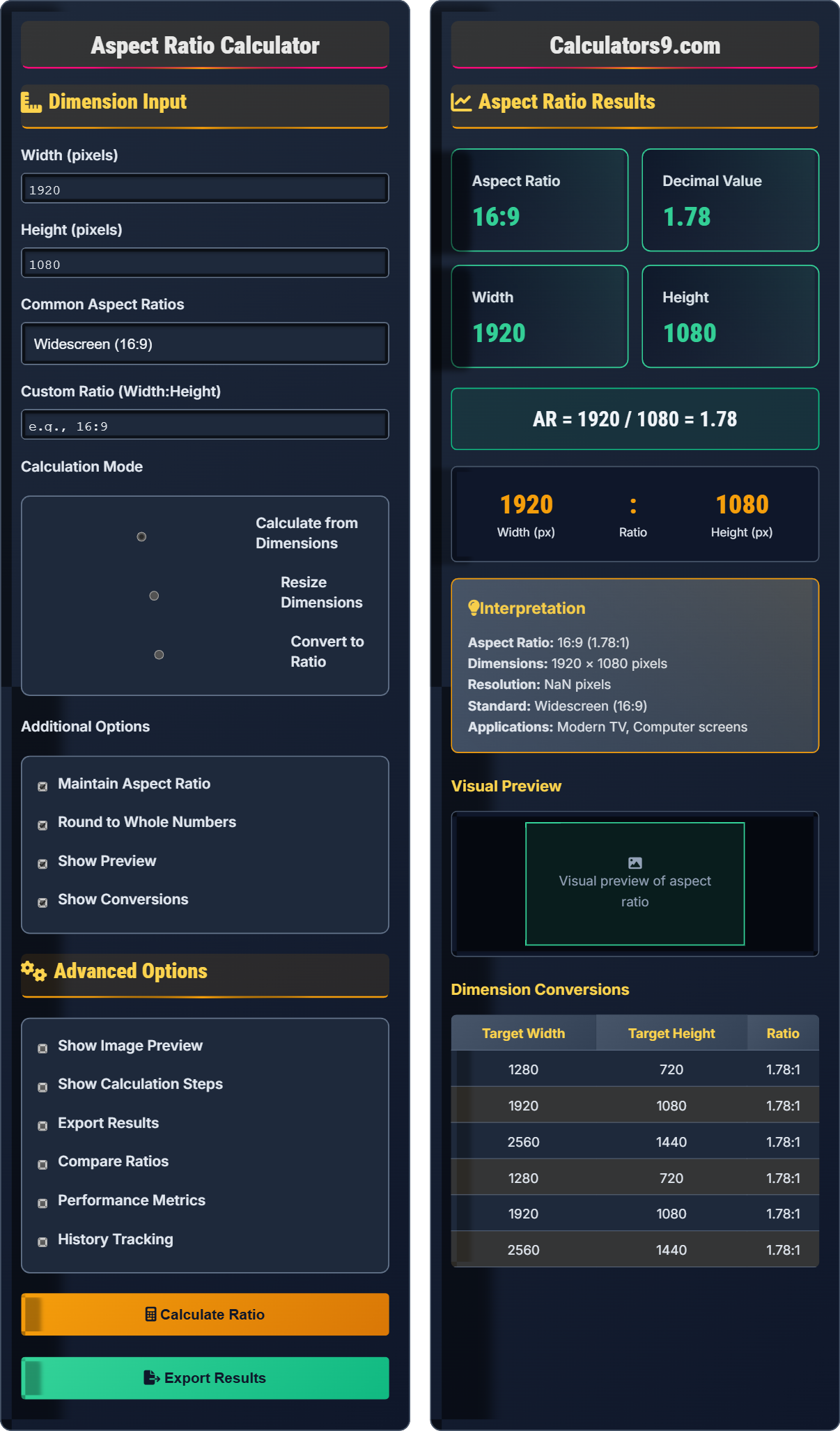
Dimension Input
Advanced Options
Aspect Ratio Results
Visual Preview
Visual preview of aspect ratio
Dimension Conversions
| Target Width | Target Height | Ratio |
|---|---|---|
| 1920 | 1080 | 16:9 |
| 1280 | 720 | 16:9 |
| 3840 | 2160 | 16:9 |
Comprehensive Aspect Ratio Guide
Aspect ratio is the proportional relationship between the width and height of an image or screen. It's expressed as two numbers separated by a colon (e.g., 16:9), representing the width to height ratio. Understanding aspect ratios is crucial for image resizing, video production, and design consistency.
Basic Formula:
Aspect Ratio = Width / Height
Conversion Formulas:
New Height = Width / Aspect RatioNew Width = Height × Aspect RatioCommon Ratios: 1:1, 4:3, 16:9, 21:9, Golden Ratio (1.618:1)
Examples:
- HD Video: 1920×1080 → 16:9 aspect ratio
- Photo: 3000×2000 → 3:2 aspect ratio
- Square: 800×800 → 1:1 aspect ratio
Aspect ratios are important for:
- Photography: Maintaining composition when resizing
- Video Production: Ensuring compatibility across devices
- Web Design: Responsive layouts and image placement
- Printing: Matching photo paper dimensions
- Mobile Design: Optimizing for different screen sizes
- Maintain ratios: Preserve original proportions when resizing
- Consider platform: Use appropriate ratios for target devices
- Plan for cropping: Anticipate how images will be displayed
- Test compatibility: Verify how images appear across devices
- Use presets: Leverage common aspect ratios for consistency
Aspect Ratio Fundamentals
Width to height proportion.
AR = Width / Height
Preserves dimensional relationship.
- Express as width:height
- Maintain when resizing
- Consider platform requirements
Aspect Ratio Applications
For image and video consistency.
- Image resizing
- Video production
- Web design
- Photography
- Device compatibility
- Platform requirements
- Composition preservation
- Quality maintenance
Aspect Ratio Learning Quiz
What is the aspect ratio of an image that is 1920 pixels wide and 1080 pixels tall?
The answer is B) 16:9. To find the aspect ratio, divide both numbers by their greatest common divisor. For 1920 and 1080:
GCD(1920, 1080) = 120
1920 ÷ 120 = 16
1080 ÷ 120 = 9
So the aspect ratio is 16:9, which is the standard high-definition (HD) ratio.
Aspect ratio is calculated by dividing the width and height by their greatest common divisor (GCD). This reduces the ratio to its simplest form. The 16:9 aspect ratio is the international standard for high-definition television and computer monitors because it provides a good balance between screen real estate and compatibility with various content formats.
Aspect Ratio: Proportional relationship between width and height
GCD: Greatest Common Divisor - largest number that divides both
Resolution: Total number of pixels (width × height)
• Divide by GCD to simplify
• Always express as width:height
• Maintain ratio when resizing
• 16:9 = 1.778:1 in decimal
• Common ratios have standard names
• Always check platform requirements
• Confusing aspect ratio with resolution
• Not simplifying to lowest terms
• Changing aspect ratio when resizing
If you have an image that is 1200 pixels wide with an aspect ratio of 4:3, what is its height?
Using the aspect ratio formula: Aspect Ratio = Width / Height
Given: Width = 1200 pixels, Aspect Ratio = 4:3
Step 1: Convert aspect ratio to decimal: 4:3 = 4/3 = 1.333
Step 2: Rearrange formula to solve for height: Height = Width / Aspect Ratio
Step 3: Calculate: Height = 1200 / (4/3) = 1200 × (3/4) = 900 pixels
Step 4: Verify: 1200:900 = 4:3 (dividing both by 300)
So the height is 900 pixels.
When you know the width and aspect ratio, you can find the height by rearranging the aspect ratio formula. The key insight is that aspect ratio = width/height, so height = width/aspect_ratio. This maintains the proportional relationship between width and height.
Aspect Ratio: Width/Height relationship
Proportional: Maintaining same ratio
Resolution: Width × Height in pixels
• Height = Width / Aspect Ratio
• Width = Height × Aspect Ratio
• Always maintain ratio when resizing
• Convert ratio to decimal for calculations
• Cross-multiply to verify
• Use common ratios for consistency
• Forgetting to maintain proportions
• Confusing multiplication with division
• Not simplifying ratios
You need to resize a 2400×1600 pixel image to fit in a space that is 800 pixels wide while maintaining its aspect ratio. What will be the new dimensions, and what percentage of the original area will the resized image occupy?
Step 1: Find the original aspect ratio
AR = 2400 / 1600 = 3:2 (dividing by GCD of 800)
Step 2: Calculate the new height
New Height = New Width / Aspect Ratio
New Height = 800 / (3/2) = 800 × (2/3) = 533.33 pixels ≈ 533 pixels
Step 3: Calculate new dimensions
New dimensions: 800 × 533 pixels
Step 4: Calculate area percentage
Original area: 2400 × 1600 = 3,840,000 pixels²
New area: 800 × 533 = 426,400 pixels²
Percentage: (426,400 / 3,840,000) × 100 = 11.1%
The new dimensions are 800×533 pixels, occupying approximately 11.1% of the original area.
This problem demonstrates how maintaining aspect ratio affects both dimensions. When you resize one dimension, the other must change proportionally. The area changes quadratically with linear dimension changes (since area = width × height).
Aspect Ratio Maintenance: Proportional resizing
Area Scaling: Changes with square of linear scale
Resolution: Total pixel count
• Always maintain aspect ratio
• Area scales quadratically
• Linear scale factor = √(area factor)
• Calculate aspect ratio first
• Use decimal form for calculations
• Verify with cross-multiplication
• Changing aspect ratio during resize
• Forgetting to round to whole pixels
• Confusing linear and area scaling
A social media platform requires profile pictures to be exactly 400×400 pixels (square) but you have a high-resolution photo at 3000×2000 pixels (3:2 ratio). What is the best approach to prepare this image for the platform, and what will be the crop dimensions?
Since the platform requires a 1:1 aspect ratio (square) but the photo has a 3:2 ratio, cropping is necessary.
Step 1: Determine which dimension to match
The 3:2 photo has a wider aspect ratio than the 1:1 requirement.
Step 2: Calculate crop dimensions
To maintain the full height: Crop to 2000×2000 (remove 1000px from width)
To maintain the full width: Crop to 3000×3000 (impossible, exceeds original height)
So we crop to 2000×2000 to maintain the original height.
Step 3: Calculate final resize
Cropped image: 2000×2000
Final size: 400×400 (maintaining 1:1 ratio)
Scale factor: 400/2000 = 0.2 (20% of cropped size)
The best approach is to center-crop the original image to 2000×2000 (square) and then resize to 400×400.
When the required aspect ratio differs from the source image, cropping is necessary. The strategy is to crop to the dimension that doesn't exceed the original (in this case, matching the shorter side). This preserves the most important visual elements while meeting platform requirements.
Cropping: Removing parts of image to match aspect ratio
Center-Crop: Removing equal amounts from sides
Aspect Ratio Compatibility: Matching platform requirements
• Crop to dimension that fits original
• Maintain important visual elements
• Always resize after cropping
• Plan compositions with platform ratios in mind
• Use multiple crops for different platforms
• Consider the rule of thirds when cropping
• Stretching image to fit dimensions
• Cropping important visual elements
• Not maintaining aspect ratio after resize
Which aspect ratio is commonly used for modern high-definition televisions and computer monitors?
The answer is B) 16:9. This is the international standard for high-definition television (HDTV) and is widely used in computer monitors, laptops, and mobile devices. It provides a good compromise between traditional 4:3 content and cinematic 21:9 formats, making it versatile for various types of content.
The 16:9 aspect ratio (1.778:1 in decimal) became the standard because it closely matches the aspect ratios used in modern cinema (typically 1.85:1 or 2.39:1). This allows both television content and movies to be displayed with minimal letterboxing or pillarboxing, optimizing screen real estate for viewers.
International Standard: Globally accepted specification
Letterboxing: Black bars on top/bottom for wide content
Pillarboxing: Black bars on sides for narrow content
• 16:9 = HDTV standard
• 4:3 = Old TV standard
• 21:9 = Ultrawide format
• Know platform-specific ratios
• Consider content type when choosing
• Test on target devices
• Using old 4:3 for new content
• Not considering platform requirements
• Forgetting about mobile viewing
FAQ
Q: What's the difference between aspect ratio and resolution?
A: Aspect ratio is the proportional relationship between width and height (expressed as X:Y), while resolution is the total number of pixels (expressed as width × height).
For example: A 1920×1080 image has:
- Resolution: 1920 × 1080 = 2,073,600 pixels
- Aspect Ratio: 16:9 (1920÷120 : 1080÷120)
Two images can have the same aspect ratio but different resolutions (e.g., 1920×1080 and 3840×2160 both have 16:9 aspect ratio but different resolutions).
Q: Why does my image look stretched or compressed on different devices?
A: This happens when the aspect ratio of your image doesn't match the aspect ratio of the display device, and the system stretches the image to fill the screen. To prevent this:
- Maintain the original aspect ratio when resizing
- Use "fit" or "fill" modes appropriately in CSS or image editors
- Design with common aspect ratios in mind
- Provide multiple versions for different devices
Always check that your image's aspect ratio matches the intended display container to avoid distortion.