Color Palette Generator
Color harmony & theory tool • 2026 design
Color Theory Formulas:
Show the generatorRGB to HSL: Convert RGB values to Hue, Saturation, Lightness
Harmony Rules: Complementary (H+180°), Triadic (H+120°), Analogous (H±30°)
Color Models:
- RGB: Red, Green, Blue (0-255)
- HSL: Hue (0-360°), Saturation (0-100%), Lightness (0-100%)
- HEX: Hexadecimal color representation (#RRGGBB)
Harmony Formulas:
- Complementary: Base hue + 180°
- Triadic: Base hue + 120°, Base hue + 240°
- Analogous: Base hue - 30°, Base hue + 30°
- Tetradic: 2 complementary pairs (base + 180°, base+90° + 270°)
Accessibility: Contrast ratio = (L1 + 0.05) / (L2 + 0.05) where L is relative luminance
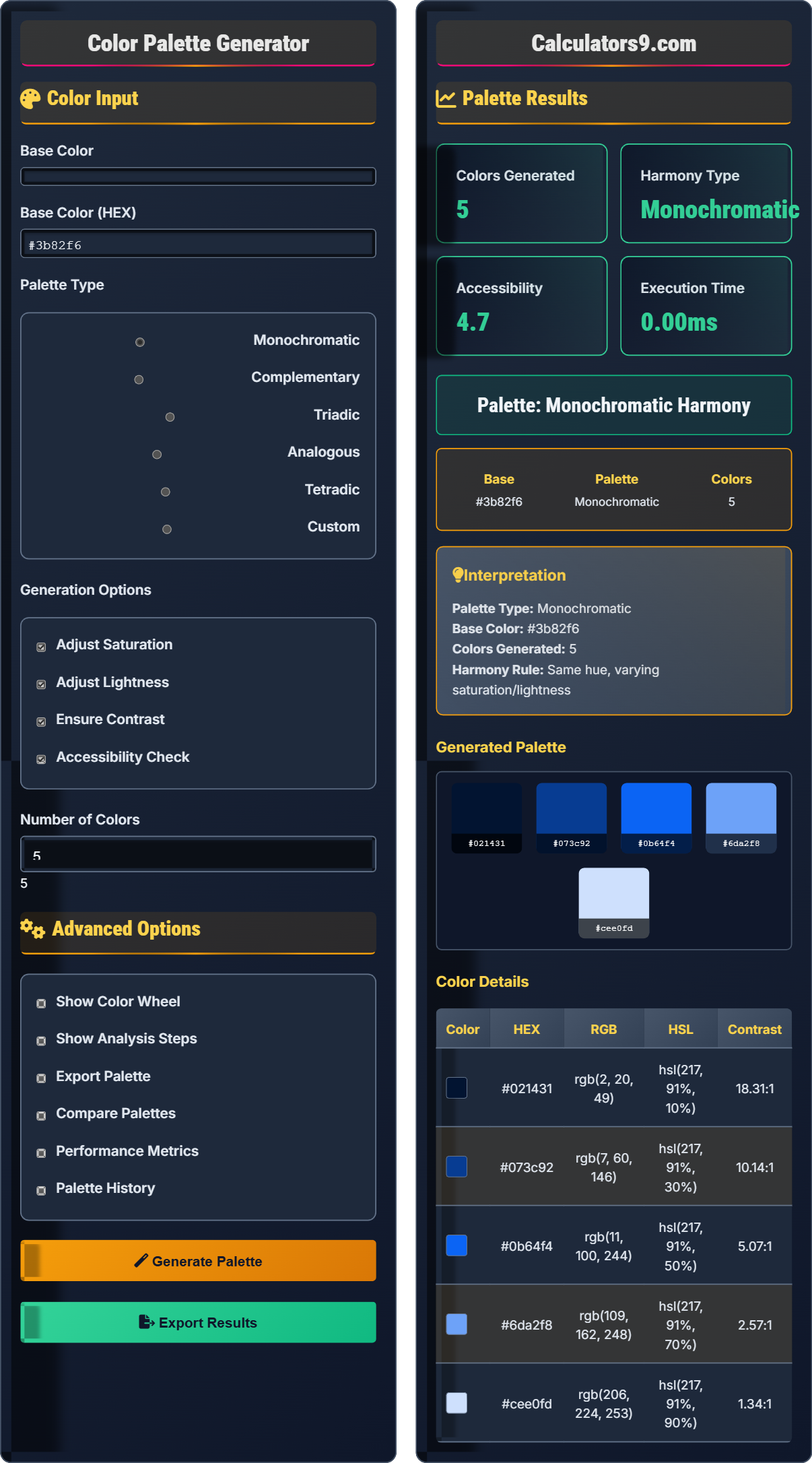
Color Input
Advanced Options
Palette Results
Generated Palette
Color Details
| Color | HEX | RGB | HSL | Contrast |
|---|
Comprehensive Color Theory Guide
Color theory is the study of how colors interact and the visual effects of color combinations. It encompasses the color wheel, harmony rules, and the psychological effects of colors. Understanding color theory is essential for creating visually appealing and accessible designs.
RGB Model:
Red, Green, Blue- Additive color mixing- Values: 0-255 for each channel
- Used in digital displays
HSL Model:
Hue:0-360° (position on color wheel)Saturation:0-100% (intensity)Lightness:0-100% (brightness)
HEX Model:
#RRGGBB- Hexadecimal representation- RR = Red, GG = Green, BB = Blue
- Most common web format
Color accessibility ensures that designs are usable by everyone, including people with visual impairments:
- WCAG Standards: Minimum contrast ratios (4.5:1 for normal text)
- Color Blindness: Consider colorblind-friendly combinations
- Testing Tools: Use contrast checkers and simulation tools
- Alternative Cues: Don't rely solely on color to convey information
- Limit Colors: Use 3-5 colors maximum for coherence
- Consider Context: Cultural and emotional associations
- Test Accessibility: Ensure sufficient contrast
- Brand Consistency: Maintain color standards across materials
- Platform Guidelines: Follow system design principles
Color Theory Fundamentals
Study of color interactions.
RGB, HSL, HEX color systems.
Harmony through relationships.
- Use complementary for contrast
- Triadic for vibrancy
- Monochromatic for unity
Color Applications
For brand identity and design.
- Brand identity
- UI/UX design
- Web development
- Print media
- Target audience preferences
- Cultural color meanings
- Accessibility standards
- Platform guidelines
Color Theory Learning Quiz
Which color model uses the three primary colors of light (Red, Green, Blue)?
The answer is B) RGB. The RGB color model uses Red, Green, and Blue as its primary colors. These are the primary colors of light, and the model is additive, meaning colors are created by adding light wavelengths together. This model is used in digital displays like monitors, TVs, and smartphones.
RGB is an additive color system where colors are created by combining light. When all three primary colors are at full intensity (255, 255, 255), they produce white light. When all are at zero (0, 0, 0), they produce black. This is the opposite of subtractive color systems like CMYK used in printing.
RGB: Red, Green, Blue - additive color model
CMYK: Cyan, Magenta, Yellow, Black - subtractive model
Additive: Colors created by adding light
• RGB for digital displays
• Values 0-255 per channel
• Additive color mixing
• RGB for web and screens
• Higher values = brighter colors
• (255,255,255) = white
• Confusing RGB with CMYK
• Using wrong values (0-255)
• Not understanding additive vs subtractive
What is the complementary color of blue on the traditional color wheel?
The complementary color of blue is orange. On the traditional color wheel, complementary colors are located directly opposite each other, 180 degrees apart. Blue and orange form a complementary pair because they are positioned directly across from each other on the wheel.
Complementary colors create high contrast and vibrant looks when used together. They make each other appear more intense and vibrant.
Complementary colors are pairs that, when combined, create visual harmony through contrast. The traditional color wheel has 12 colors arranged in a circle. Complementary pairs are always 180 degrees apart: Red-Blue, Yellow-Purple, Orange-Blue.
Complementary Colors: Opposite on color wheel (180°)
Traditional Color Wheel: 12-color arrangement
Visual Contrast: Colors that enhance each other
• Complementary = 180° apart
• Create high contrast
• Enhance each other
• Use sparingly for emphasis
• Check accessibility contrast
• Balance warm and cool tones
• Using too much complementary contrast
• Not considering accessibility
• Confusing with analogous colors
If you choose red (0°) as your base color for a triadic color scheme, what are the other two colors you should use?
In a triadic color scheme, colors are evenly spaced around the color wheel at 120-degree intervals. Starting with red at 0°:
- First color: Red (0°)
- Second color: Green (0° + 120° = 120°)
- Third color: Blue (0° + 240° = 240°)
So the triadic scheme with red as the base would include red, green, and blue. This creates a vibrant, balanced scheme with high visual interest.
Triadic color schemes use three colors that are equidistant on the color wheel (120° apart). This creates a balanced and vibrant color scheme. The key is to choose one dominant color and use the other two as accents to maintain visual harmony.
Triadic Scheme: Three colors 120° apart
Color Wheel: Circular arrangement of colors
Visual Balance: Equally distributed color intensity
• 120° intervals
• Choose one dominant color
• Use others as accents
• Use 60-30-10 rule
• Adjust saturation for balance
• Consider cultural meanings
• Equal use of all three colors
• Not adjusting for balance
• Forgetting cultural implications
You're designing a website with blue text (#3b82f6) on a white background (#ffffff). Is this combination accessible according to WCAG AA standards? How would you improve it if needed?
Blue text (#3b82f6) on white (#ffffff) has a contrast ratio of approximately 4.5:1. This meets the WCAG AA standard for normal-sized text (minimum 4.5:1) but only barely. For enhanced accessibility:
- Use a darker blue like #1e40af (contrast ratio ~7:1)
- Ensure font size is at least 18px for normal text
- Consider the needs of users with visual impairments
WCAG AAA requires 7:1 contrast for normal text, so for higher accessibility, aim for even better contrast ratios.
Color contrast is crucial for accessibility. The contrast ratio is calculated using the relative luminance of colors. WCAG standards ensure that text is readable for people with visual impairments, including color blindness and low vision.
WCAG AA: Web Content Accessibility Guidelines minimum
Contrast Ratio: Luminance difference between colors
Relative Luminance: Brightness relative to white
• AA: 4.5:1 for normal text
• AAA: 7:1 for normal text
• 3:1 for large text
• Use contrast checkers
• Test with color blindness simulators
• Don't rely only on color for information
• Not testing contrast ratios
• Assuming all blue is accessible
• Ignoring accessibility requirements
Which color is most commonly associated with trust, reliability, and professionalism in business contexts?
The answer is B) Blue. Blue is widely associated with trust, reliability, professionalism, and stability. It's the dominant color in many corporate logos (Facebook, Twitter, LinkedIn, IBM) because it conveys dependability and competence. Blue also has calming effects and is perceived as trustworthy.
Color psychology studies how colors affect human behavior and decision-making. Different colors evoke different emotions and associations. Blue is particularly effective in business contexts because it reduces anxiety and promotes feelings of security and trust.
Color Psychology: Study of color-emotion relationships
Corporate Colors: Colors chosen for business identity
Trust Signals: Visual cues that convey reliability
• Blue = Trust and reliability
• Red = Urgency and passion
• Green = Growth and nature
• Research cultural meanings
• Test with target audience
• Consider industry standards
• Assuming universal color meanings
• Not considering cultural differences
• Ignoring target audience preferences
FAQ
Q: What's the difference between HSL and HSV color models?
A: Both HSL and HSV are cylindrical-coordinate representations of the RGB color model:
HSL (Hue, Saturation, Lightness):
- Lightness: 0% is black, 100% is white, 50% is the pure color
- Saturation: 0% is grayscale, 100% is fully saturated
HSV (Hue, Saturation, Value):
- Value: 0% is black, 100% is the brightest possible
- Saturation: 0% is grayscale, 100% is fully saturated
HSL is more intuitive for adjusting brightness, as 50% lightness gives the pure color, while HSV is more aligned with how light works physically.
Q: How do I ensure my color palette is accessible?
A: To ensure accessibility:
1. Check contrast ratios: Text on background should meet WCAG standards (4.5:1 for normal text, 3:1 for large text)
2. Test for color blindness: Use tools to simulate different types of color vision deficiency
3. Don't use color alone: Ensure information isn't conveyed by color only (add text, patterns, or icons)
4. Use color contrast checkers: Tools like WebAIM's contrast checker
5. Consider the entire palette: Ensure all color combinations meet standards
The formula for contrast ratio is: (L1 + 0.05) / (L2 + 0.05), where L1 and L2 are the relative luminances of the colors.