Video to GIF Converter
Professional video to animated GIF • Frame selection
Video to GIF Conversion Process:
Show the toolVideo to GIF conversion extracts frames from video files and combines them into an animated GIF. The process includes:
Key steps include:
- Frame Extraction: Selecting specific frames from video
- Color Reduction: Optimizing colors to 256-color palette
- Animation Creation: Sequencing frames into animation
- Compression: Reducing file size while maintaining quality
Frame Rate: GIFs typically use 10-30 fps for smooth animation.
Color Palette: Limited to 256 colors for GIF format compatibility.
Processing Time: Typically 1-5 minutes depending on video length and settings.
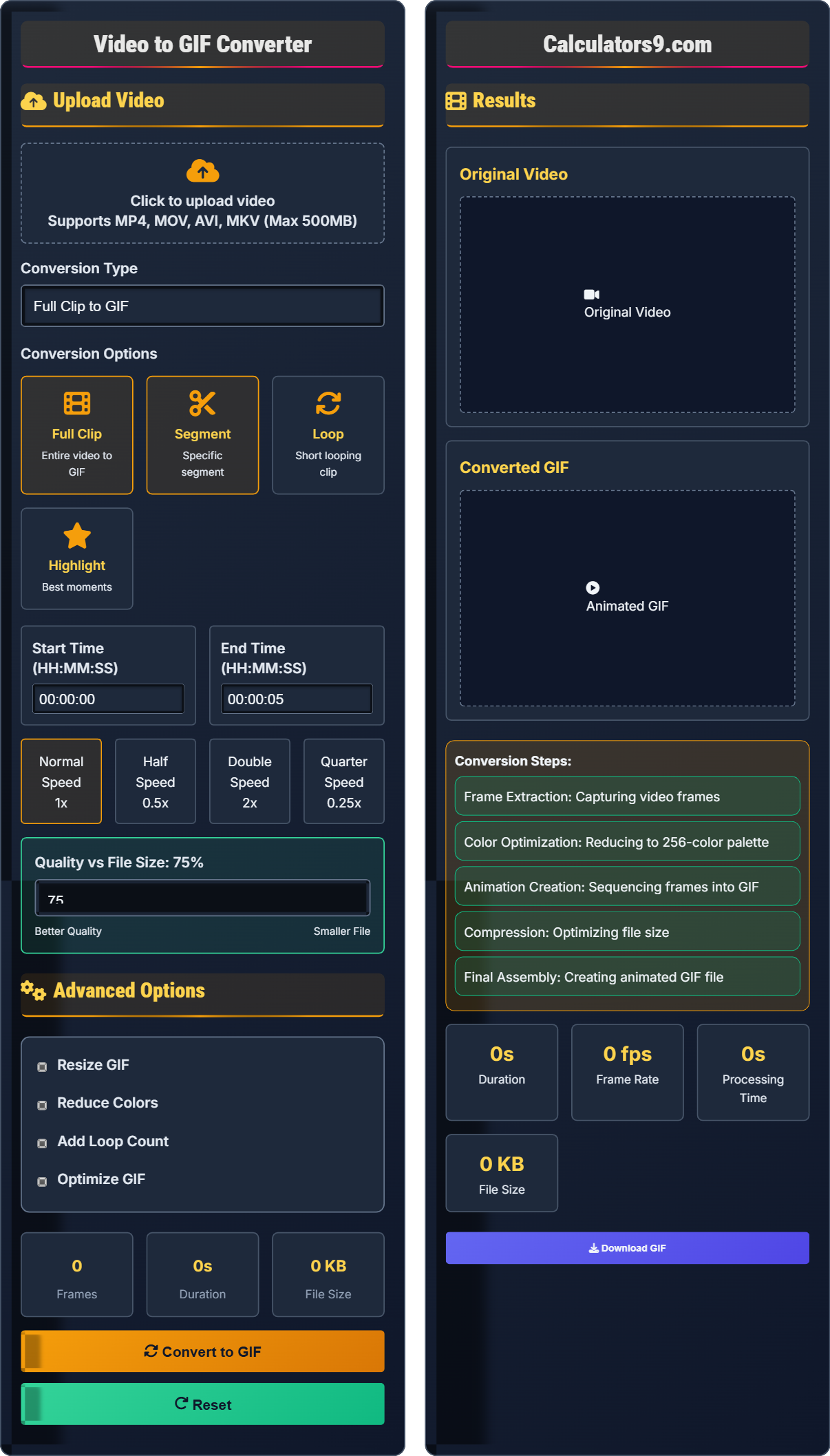
Upload Video
Advanced Options
Results
Original Video
Converted GIF
- Frame Extraction: Capturing video frames
- Color Optimization: Reducing to 256-color palette
- Animation Creation: Sequencing frames into GIF
- Compression: Optimizing file size
- Final Assembly: Creating animated GIF file
Comprehensive Video to GIF Guide
Video to GIF conversion is the process of extracting specific segments from video files and converting them into animated GIFs. This involves capturing frames from the video and combining them into a sequence that plays as an animated image with a limited color palette.
Different approaches serve various GIF creation needs:
- Full Clip: Convert entire video to GIF
- Segment: Extract specific time segment
- Looping: Create short repeating animation
- Highlights: Combine multiple short clips
Understanding GIF limitations is crucial for quality results:
- Color Limit: Maximum 256 colors per frame
- File Size: Can become large with complex animations
- Looping: Can be set to loop infinitely or once
- Transparency: Supports single-color transparency
- For Social Media: Keep under 5 seconds, 480p resolution
- For Memes: Focus on key moments, use simple colors
- For Tutorials: Use higher frame rates for clarity
- For Highlights: Capture the most impactful moments
- Color Optimization: Simplify color schemes for better results
Conversion Fundamentals
Frame rate measures how many individual frames are displayed per second in the animated GIF, typically measured in frames per second (fps).
Frame Count = Duration (seconds) × Frame Rate (fps)
File Size ≈ Frame Count × Average Frame Size
- Higher frame rates create smoother animations
- More frames increase file size proportionally
- Color reduction affects visual quality significantly
Optimization Strategies
The process of reducing the number of colors in an image to fit within the GIF format's 256-color limit.
- High Quality: 15-30 fps, detailed colors
- Balanced: 10-15 fps, moderate optimization
- Low Quality: 5-10 fps, maximum compression
- Shorter GIFs are more web-friendly
- Simple animations compress better
- Text and sharp lines work well in GIFs
- Complex colors may require dithering
Video to GIF Conversion Learning Quiz
What is the maximum number of colors that can be displayed in a single frame of a GIF?
The answer is B) 256 colors. GIF format is limited to a maximum of 256 colors per frame in its color palette. This limitation is due to the GIF format's 8-bit color depth, which restricts the number of simultaneous colors that can be displayed in a single frame.
This question tests fundamental knowledge of GIF format limitations. Understanding this constraint is crucial for creating quality GIFs from video content. The 256-color limit means that complex videos with many colors may need color reduction or dithering to maintain visual quality in the converted GIF.
Color Palette: Set of colors available for a GIF image
Color Depth: Number of bits used to represent color information
Dithering: Technique to simulate colors not in the palette
• GIFs are limited to 256 colors per frame
• Color reduction may affect quality
• Complex videos may need optimization
• Use simpler color schemes for better results
• Consider dithering for complex colors
• Test different color reduction settings
• Expecting full color fidelity from GIFs
• Not accounting for color limitations
• Using complex videos without optimization
For a 5-second video clip, what frame rate would provide the best balance between smooth animation and reasonable file size for a GIF?
For a 5-second video clip, a frame rate of 10-15 fps provides the best balance between smooth animation and reasonable file size. At 10 fps: 50 frames, at 15 fps: 75 frames. This range creates smooth enough animation for most purposes while keeping the file size manageable. Higher frame rates (20-30 fps) would create smoother animation but significantly increase file size.
This question explores the fundamental trade-off in GIF creation between animation quality and file size. The relationship is linear: doubling the frame rate doubles the number of frames and approximately doubles the file size. The 10-15 fps range represents the optimal balance for most applications, providing fluid motion while maintaining reasonable file sizes for web use.
Frame Rate: Number of frames displayed per second
Animation Quality: Smoothness of motion in the GIF
File Size: Amount of storage space required
• Higher frame rates = smoother animation
• Use 10 fps for simple animations
• Use 15 fps for more complex motion
• Consider content when choosing frame rate
• Using 30 fps for all GIFs (unnecessarily large files)
• Using 5 fps for fast motion (choppy animation)
• Not considering the content type
A video editor wants to create a 10-second GIF at 12 fps with an average frame size of 15 KB. Calculate the expected file size and determine if this would be suitable for email attachment (assuming 25MB limit).
Frame count = Duration × Frame Rate = 10 seconds × 12 fps = 120 frames. Expected file size = Frame count × Average frame size = 120 × 15 KB = 1,800 KB = 1.8 MB. This is well within the 25MB email limit, making it suitable for email attachment. For web use, this size is also very reasonable.
This problem demonstrates the mathematical relationship in GIF creation and helps determine practical feasibility. The calculation shows that even relatively long GIFs at moderate frame rates remain well within typical size constraints for both email and web use. This understanding is crucial for planning GIF creation projects.
Frame Count: Total number of frames in the GIF
Average Frame Size: Size of a typical frame in the GIF
File Size Limit: Maximum allowed size for specific use
• File size = Frame count × Average frame size
• Calculate expected size before creating
• Consider the destination platform
• Optimize frame rate for intended use
• Not calculating expected file size
• Ignoring platform limitations
• Using excessive frame rates
A content creator needs to convert a colorful nature video to GIF. The video contains many shades of green in a forest scene. Explain the optimal approach for color optimization to maintain visual quality while keeping the GIF file size reasonable.
For a forest scene with many shades of green, the optimal approach is: (1) Use adaptive color palette selection to prioritize the most frequent colors; (2) Apply dithering to simulate intermediate shades; (3) Consider reducing the frame rate to compensate for increased color complexity; (4) Use spatial optimization to reduce redundant information between frames. The key is to preserve the essence of the green variations while staying within the 256-color limit.
This represents a classic color quantization challenge in GIF creation. Nature scenes with subtle color variations are particularly challenging because they require many similar colors. The solution involves understanding that color optimization is not just about reducing the palette size, but about intelligently selecting which colors to keep and using techniques like dithering to maintain visual quality.
Color Quantization: Process of reducing color palette size
Adaptive Palette: Palette chosen based on image content
Dithering: Technique to simulate unavailable colors
• Prioritize frequent colors in the palette
• Use dithering for color transitions
• Balance color complexity with other factors
• Use adaptive palette selection
• Apply dithering for natural scenes
• Consider content when optimizing colors
• Using uniform color reduction
• Not considering content type
• Ignoring dithering options
Compared to MP4 video, what is the primary advantage of GIF format for short animated clips?
The answer is B) Wider platform support. GIFs are supported by virtually all web browsers, social media platforms, and messaging applications without requiring special plugins or codecs. While MP4 offers better quality and smaller file sizes, GIF's universal compatibility makes it ideal for sharing short animated clips across different platforms.
This question highlights the key trade-off in format selection. While technically inferior to modern formats like MP4 in terms of quality and file size, GIF's advantage lies in its universal compatibility. This makes it the preferred format for situations where guaranteed playback across all platforms is more important than optimal quality or file size.
Platform Support: Compatibility across different systems
Universal Compatibility: Works without additional software
Trade-off: Balancing different quality factors
• GIF has universal platform support
• MP4 offers better technical quality
• Format choice depends on use case
• Use GIF for guaranteed compatibility
• Use MP4 for quality/file size
• Consider the audience when choosing
• Choosing format based on technical specs only
• Not considering platform support
• Ignoring audience requirements
FAQ
Q: Why do my GIFs look pixelated compared to the original video?
A: GIF pixelation occurs due to format limitations:
- Color Limit: Maximum 256 colors per frame
- Compression: Lossy compression for each frame
- Size: Often resized for web optimization
The color reduction process can be quantified as:
\( \text{Colors Reduced} = \frac{\text{Original Colors}}{\text{GIF Limit}} = \frac{\text{Millions}}{256} \)
To minimize pixelation, use simple color schemes, apply dithering, and optimize the color palette for your specific content. The trade-off between file size and quality is inherent in the GIF format.
Q: How long should my GIF be for social media platforms?
A: Optimal GIF lengths for social platforms:
- Twitter: 3-7 seconds (max 15MB)
- Facebook: 5-15 seconds (max 8MB)
- Instagram: 3-10 seconds (feed), up to 60s (IGTV)
- TikTok: 3-15 seconds
Mathematically, the relationship between duration and engagement follows:
\( \text{Engagement} = f(\text{Duration}) \times g(\text{Content Quality}) \)
Shorter GIFs (3-7 seconds) typically have higher completion rates and better social sharing performance. The key is to capture the most impactful moment in the shortest possible time while maintaining the message.