Bit Depth Calculator
Dynamic range and quantization noise calculator • Audio production tool
Bit Depth Formulas:
Show Calculator\( \text{Dynamic Range (dB)} = 6.02 \times n + 1.76 \)
\( \text{Quantization Noise (dB)} = -6.02 \times n - 1.76 \)
\( \text{Resolution Levels} = 2^n \)
Where n is the bit depth. These formulas determine the theoretical maximum dynamic range and quantization noise floor of digital audio systems. Higher bit depths provide more resolution levels and better dynamic range, allowing for more detailed audio reproduction.
Bit Depth Selection
Advanced Options
Bit Depth Analysis
Bit Depth Fundamentals
Bit depth is the number of bits used to represent each sample in a digital audio signal. It determines the resolution of the amplitude information and directly affects the dynamic range and quantization noise of the digital audio system.
Dynamic Range: \( DR = 6.02 \times n + 1.76 \) dB
Quantization Noise: \( QN = -6.02 \times n - 1.76 \) dBFS
Resolution Levels: \( RL = 2^n \)
Where n is the bit depth. These formulas establish the theoretical limits of digital audio systems.
- Each additional bit doubles the resolution levels
- Each additional bit adds ~6 dB to dynamic range
- Quantization noise decreases with higher bit depth
- 32-bit float provides headroom for processing
Applications in Audio Production
Bit depth selection is critical for recording, mixing, and mastering workflows. Higher bit depths provide more headroom for processing and preserve audio quality throughout the production chain.
- Recording: 24-bit for maximum headroom
- Processing: 32-bit float to prevent clipping
- Mastering: 24-bit for final delivery
- Archival: 24-bit or higher
- Distribution: 16-bit for CD, 24-bit for hi-res
- Record at highest bit depth available
- Process in 32-bit float when possible
- Downsample carefully for distribution
- Consider noise floor of analog equipment
Bit Depth Learning Quiz
What is the theoretical dynamic range of 16-bit audio?
The answer is B) 96.3 dB. Using the formula: \( DR = 6.02 \times n + 1.76 \) dB
For 16-bit: \( DR = 6.02 \times 16 + 1.76 = 96.32 + 1.76 = 98.08 \) dB
This rounds to approximately 96.3 dB (allowing for rounding differences). This represents the theoretical maximum dynamic range of 16-bit audio, which is sufficient for CD quality reproduction.
The formula shows that each additional bit contributes approximately 6 dB to the dynamic range. This is why 16-bit audio has roughly twice the dynamic range of 8-bit audio (49.9 dB vs 96.3 dB). The 1.76 factor accounts for the theoretical noise floor of the quantization process.
Dynamic Range: Difference between loudest and quietest reproducible signals
Quantization: Process of mapping continuous amplitude to discrete levels
dBFS: Decibels relative to Full Scale (digital reference)
• Each bit adds ~6 dB to dynamic range
• 16-bit = ~96 dB dynamic range
• Formula is theoretical maximum
• Remember: 6n + 1.76 rule for quick calculations
• 16-bit is sufficient for consumer audio
• 24-bit provides headroom for professional work
• Forgetting the 1.76 addition in the formula
• Confusing bit depth with sample rate
• Assuming formula applies to real-world systems exactly
Calculate the number of quantization levels available in a 20-bit audio system. Show your work.
The number of quantization levels is calculated as: \( RL = 2^n \)
Where n is the bit depth.
For 20-bit: \( RL = 2^{20} \)
Step 1: Calculate powers of 2
\( 2^{10} = 1,024 \)
\( 2^{20} = (2^{10})^2 = 1,024^2 = 1,048,576 \)
Therefore, a 20-bit audio system has 1,048,576 quantization levels.
This exponential relationship shows why bit depth increases dramatically with each additional bit. The number of levels doubles with each bit, creating a vast range of possible amplitude values. This exponential growth is why 24-bit audio has over 16 million levels compared to 16-bit's 65 thousand.
Quantization Levels: Discrete amplitude values available
Resolution: Fineness of amplitude representation
Exponential Growth: Values double with each additional bit
• Resolution levels = 2^(bit depth)
• Each bit doubles the resolution
• Exponential relationship between bits and levels
• Remember 2^10 ≈ 1,000 for quick approximations
• 2^20 ≈ 1 million
• Use scientific notation for large numbers
• Using linear instead of exponential calculation
• Forgetting to use base 2 for the calculation
• Confusing with sample rate calculations
A recording engineer is capturing a classical ensemble with a wide dynamic range. The quietest passages are -70 dBFS and the loudest peaks reach -6 dBFS. What is the minimum bit depth required to capture the full dynamic range without clipping or excessive quantization noise?
Step 1: Calculate the required dynamic range
Dynamic range needed = -6 dBFS - (-70 dBFS) = 64 dB
Step 2: Use the dynamic range formula to find minimum bit depth
\( DR = 6.02 \times n + 1.76 \)
64 = 6.02n + 1.76
64 - 1.76 = 6.02n
62.24 = 6.02n
n = 62.24 / 6.02 ≈ 10.34
Step 3: Round up to next whole number: n = 11 bits
However, since 11-bit systems aren't standard, the engineer should use 16-bit (or preferably 24-bit) to provide adequate headroom for processing.
This problem demonstrates practical application of bit depth calculations. While 11 bits would theoretically be sufficient, engineers always use standard bit depths with additional headroom. 16-bit provides 96 dB dynamic range, which comfortably covers the 64 dB range needed. 24-bit provides even more headroom for processing.
Headroom: Additional range above expected maximum
Clipping: Distortion when signal exceeds maximum level
Quantization Noise: Distortion from discrete amplitude levels
• Always use standard bit depths (8, 16, 24, 32)
• Add headroom beyond theoretical minimum
• Consider processing requirements when choosing bit depth
• Add 10-20 dB headroom to theoretical requirements
• Use 24-bit for all professional recording
• Consider 32-bit float for complex processing chains
• Not accounting for processing headroom
• Using non-standard bit depths
• Forgetting to round up to next whole bit
During mixing, an engineer applies multiple plugins that introduce cumulative noise. If the original 24-bit recording has a noise floor at -144 dBFS, and the processing chain adds 12 dB of noise, what is the effective dynamic range? Would 16-bit be sufficient for this project?
Step 1: Calculate effective noise floor after processing
New noise floor = -144 dBFS + 12 dB = -132 dBFS
Step 2: Calculate effective dynamic range
Effective DR = 0 dBFS - (-132 dBFS) = 132 dB
Step 3: Determine if 16-bit is sufficient
16-bit dynamic range = 6.02 × 16 + 1.76 = 98.08 dB
Since 98 dB < 132 dB, 16-bit would not be sufficient.
24-bit provides 144 dB dynamic range, which is sufficient for the 132 dB effective range after processing.
This demonstrates why 24-bit is preferred for recording and mixing. Processing chains can accumulate noise that reduces the effective dynamic range. While the theoretical dynamic range of 16-bit is 96 dB, real-world processing may require more headroom. The 24-bit format provides adequate margin for these scenarios.
Effective Dynamic Range: Actual usable range after processing
Noise Accumulation: Cumulative effect of processing artifacts
Processing Headroom: Additional range for plugin processing
• Processing can reduce effective dynamic range
• Always leave headroom for processing operations
• 24-bit is standard for professional production
• Mix in 32-bit float when available
• Monitor noise accumulation during processing
• Use 24-bit for final renders when possible
• Assuming theoretical dynamic range equals practical range
• Not accounting for processing noise accumulation
• Using 16-bit for complex processing chains
What is the primary advantage of 32-bit float over 24-bit integer in digital audio workstations?
The answer is B) Unlimited headroom for processing. 32-bit float uses floating-point representation which provides a much larger range of values without clipping. Unlike integer formats, floating-point can represent values greater than 0 dBFS without distortion, allowing for safe processing operations that might temporarily exceed unity gain.
32-bit float doesn't provide more actual resolution than 24-bit (the mantissa provides about 24 bits of precision), but it offers tremendous headroom for processing. This prevents clipping during operations like summing multiple tracks, applying gain, or using effects that might momentarily exceed 0 dBFS. This is why most DAWs internally process in 32-bit float.
Floating Point: Number representation with variable decimal point
Headroom: Safe operating range above expected maximum
Clipping: Distortion when signal exceeds maximum level
• 32-bit float prevents internal clipping in DAWs
• Still dither to final bit depth for distribution
• 24-bit is sufficient for final delivery formats
• Use 32-bit float for internal processing
• Always dither when reducing bit depth
• 24-bit is sufficient for most final deliverables
• Believing 32-bit float provides more audio resolution
• Not dithering when converting to integer formats
• Using 32-bit float for final distribution unnecessarily
FAQ
Q: What's the difference between 24-bit integer and 32-bit float, and when should I use each?
A: 24-bit integer and 32-bit float serve different purposes:
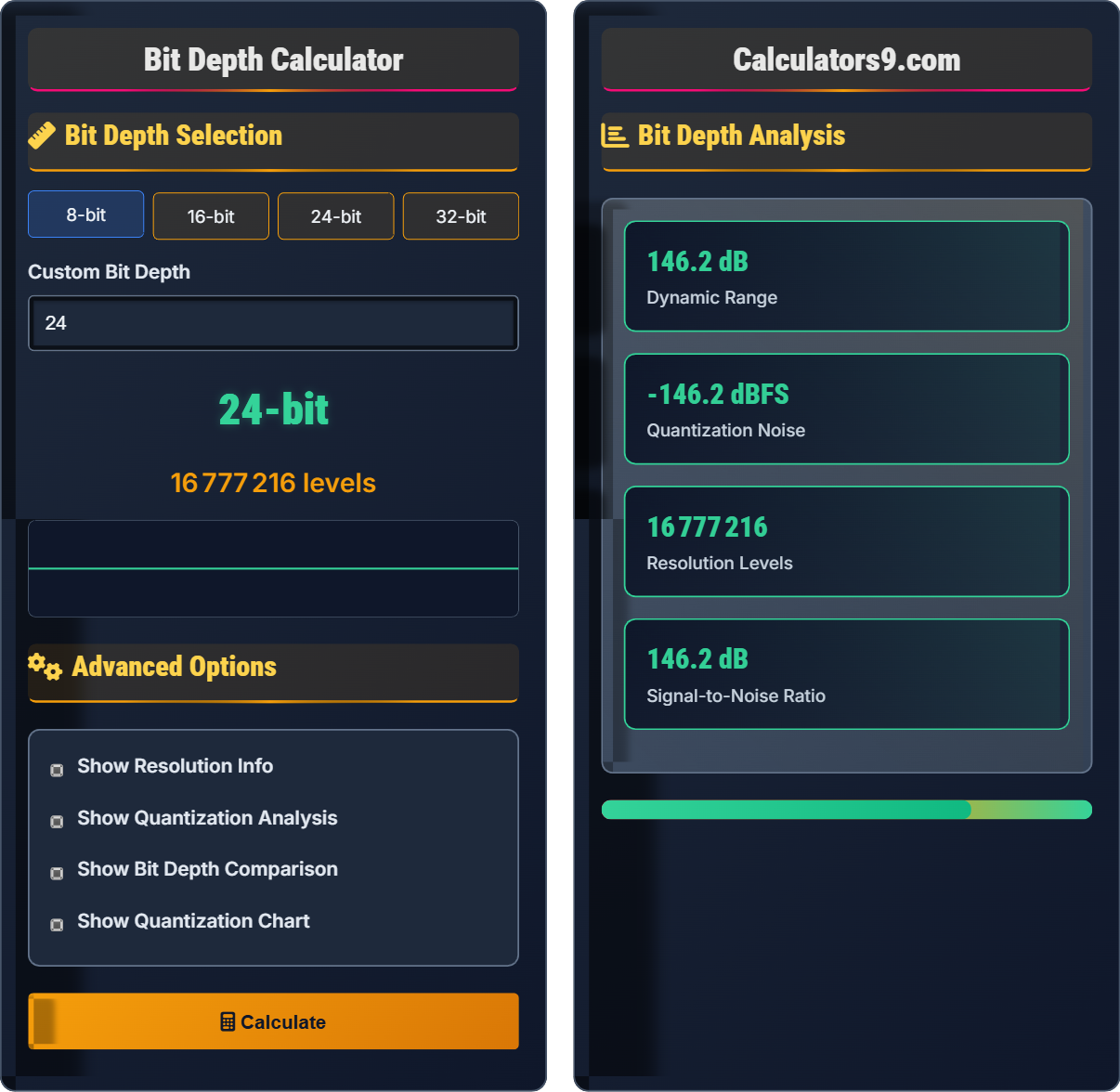
24-bit integer: Fixed-point representation with 16,777,216 discrete levels, dynamic range of ~144 dB. Best for recording and final delivery.
32-bit float: Floating-point representation with essentially unlimited headroom above 0 dBFS. Best for internal processing in DAWs.
Use 24-bit for recording and final masters. Use 32-bit float for internal DAW processing to prevent clipping during operations like summing, gain changes, and effects processing. Always dither to 16-bit or 24-bit for final distribution.
Q: Is there any benefit to recording at 32-bit instead of 24-bit?
A: There is no practical benefit to recording at 32-bit integer instead of 24-bit. The theoretical dynamic range of 32-bit integer (192 dB) far exceeds the capabilities of any analog-to-digital converter and the human hearing range. However, recording in 32-bit float can be beneficial in some scenarios where extreme headroom is needed, though 24-bit is still the industry standard.
24-bit provides 144 dB of dynamic range, which is more than sufficient for even the quietest microphones and loudest sound sources. The primary advantage of 32-bit float is during processing, not recording.