Ping Time Estimator
Network latency calculator • 2026 edition
Ping Time Formula:
Show Calculator\( RTT = \frac{2 \times D}{S} + P_{processing} + P_{queuing} \)
Where:
- \( RTT \) = Round Trip Time (latency in ms)
- \( D \) = Distance between endpoints (km)
- \( S \) = Signal propagation speed (km/ms)
- \( P_{processing} \) = Processing delay at nodes
- \( P_{queuing} \) = Queueing delay at routers
This formula estimates network latency based on physical distance and network overhead. The signal propagation speed is typically 200,000 km/s (200 km/ms) in fiber optic cables, about 2/3 the speed of light.
Example: For a server 5000 km away with 0.5 ms processing delay and 0.2 ms queuing delay:
\( RTT = \frac{2 \times 5000}{200} + 0.5 + 0.2 = 50 + 0.5 + 0.2 = 50.7 \) ms
Therefore, the estimated ping time would be approximately 50.7 milliseconds.
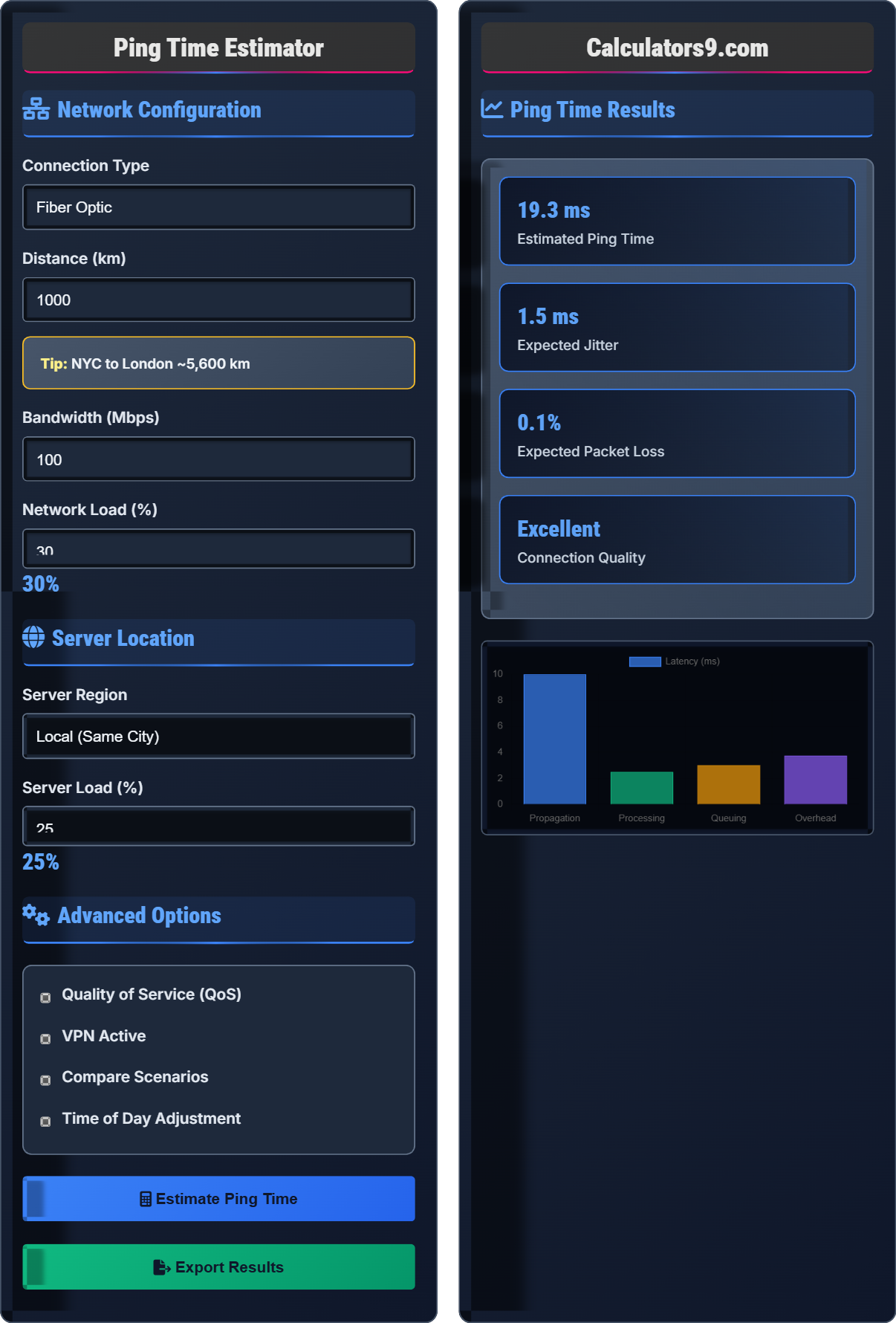
Network Configuration
Server Location
Advanced Options
Ping Time Results
| Component | Value | Unit | Impact |
|---|
| Application | Minimum Ping | Recommended | Status |
|---|
Ping Time Guide
Ping time, also known as latency, measures the round-trip time it takes for a data packet to travel from your device to a server and back. It's measured in milliseconds (ms) and indicates the responsiveness of your network connection. Lower ping times mean faster response and better performance for real-time applications.
The ping time estimation uses the following formula:
Where:
- \(RTT\) = Round Trip Time (milliseconds)
- \(D\) = Distance to destination (kilometers)
- \(S\) = Signal propagation speed (km/ms)
- \(P_{processing}\) = Processing delay at network nodes
- \(P_{queuing}\) = Queueing delay at routers
Ping time is influenced by multiple factors:
- Physical Distance: Greater distances increase latency due to signal propagation time
- Network Infrastructure: Fiber optic is fastest, followed by cable, DSL, and satellite
- Network Congestion: High traffic periods increase queuing delays
- Router Quality: Better hardware processes packets faster
- Server Response: Server load affects processing time
- Security Measures: VPNs and firewalls add processing overhead
- Use Wired Connection: Ethernet provides more stable latency than Wi-Fi
- Choose Closer Servers: Select geographically nearby servers
- Optimize Router Settings: Enable QoS for priority applications
- Manage Bandwidth: Limit concurrent downloads during real-time activities
- Restart Network Equipment: Refresh connections and clear buffers
- Upgrade Hardware: Modern routers handle traffic more efficiently
Ping Time Quiz
What does ping time measure in a network connection?
The answer is B) Round-trip packet travel time. Ping time measures the time it takes for a data packet to travel from your device to a server and back. It's measured in milliseconds (ms) and represents the responsiveness of the connection, not the data transfer speed.
It's important to distinguish between latency (ping time) and bandwidth (data transfer rate). Latency affects how quickly you receive responses, while bandwidth affects how much data you can transfer. A connection can have high bandwidth but high latency, or low bandwidth but low latency.
Latency: Time delay between sending and receiving data
Bandwidth: Maximum data transfer rate of a connection
Round Trip Time (RTT): Total time for a packet to travel to destination and back
• Ping time measures response speed, not data volume
• Lower latency is better for real-time applications
• Latency and bandwidth are independent metrics
• Remember: ping = response time, bandwidth = data volume
• Use ping command to test latency: ping google.com
• Confusing latency with download speed
• Assuming high bandwidth means low latency
Calculate the theoretical minimum ping time for a connection to a server 3000 km away, assuming light travels at 200,000 km/s in fiber optic cables. Show your work.
Step 1: Convert speed to km/ms
\(Speed = 200,000 km/s = 200 km/ms\)
Step 2: Calculate round-trip distance
\(Distance = 3000 km \times 2 = 6000 km\)
Step 3: Calculate minimum ping time
\(Time = \frac{6000 km}{200 km/ms} = 30 ms\)
Therefore, the theoretical minimum ping time is 30 milliseconds.
This calculation shows the physical limitation of network speed based on the speed of light in fiber optic cables. In reality, ping times will be higher due to processing delays at routers, queuing delays, and other network overhead. The theoretical minimum represents the best possible case.
Theoretical Minimum: Best possible latency given physical constraints
Signal Propagation: How fast data travels through network mediaPhysical Limitation: Fundamental constraints imposed by physics
• Round-trip distance = 2 × one-way distance
• Fiber optic speed ≈ 200,000 km/s
• Actual times will exceed theoretical minimum
• Remember to double the distance for round trip
• Convert units consistently (km and km/ms)
• Forgetting to double the distance for round trip
• Using incorrect propagation speed
A competitive gamer needs a ping time below 30ms for optimal performance. If the closest server is 2000 km away and the current connection has 25ms of additional network overhead, will the player meet the requirement? Calculate the total expected ping time.
Step 1: Calculate propagation time (assuming 200 km/ms speed)
\(Propagation = \frac{2 \times 2000 km}{200 km/ms} = \frac{4000}{200} = 20 ms\)
Step 2: Add network overhead
\(Total = 20 ms + 25 ms = 45 ms\)
Step 3: Compare to requirement
Since 45ms > 30ms, the player will NOT meet the requirement.
The expected ping time is 45ms, which is too high for optimal competitive gaming.
This example demonstrates how to combine physical limitations with network overhead to determine if a connection meets specific requirements. Competitive gaming typically requires very low latency (under 30ms) to ensure responsive gameplay and fair competition.
Competitive Gaming: Online games where low latency is critical
Network Overhead: Additional delays beyond propagation time
Requirement Threshold: Maximum acceptable performance metric
• Total ping = propagation + overhead
• Calculate propagation time separately
• Add all overhead components to get total
• Forgetting to include network overhead
• Misunderstanding gaming latency requirements
A video conference has 150ms ping time, 10ms jitter, and 2% packet loss. According to ITU recommendations, voice quality becomes problematic above 150ms one-way delay. Calculate the one-way delay and assess the call quality impact.
Step 1: Calculate one-way delay
\(One-way delay = \frac{Round-trip delay}{2} = \frac{150ms}{2} = 75ms\)
Step 2: Assess quality impact
ITU recommendation: Voice quality is problematic above 150ms one-way delay.
Since 75ms < 150ms, the delay alone shouldn't cause major issues.
However, the 10ms jitter and 2% packet loss will still impact call quality.
The call will experience some audio quality degradation due to jitter and packet loss, though the delay is within acceptable limits.
This problem shows that ping time isn't the only factor affecting network application performance. Jitter (variation in delay) and packet loss also significantly impact quality. For video conferencing, all three metrics matter: delay, jitter, and packet loss.
One-Way Delay: Time for data to travel in one direction
Jitter: Variation in packet arrival times
Packet Loss: Percentage of data packets that fail to arrive
• One-way delay = RTT ÷ 2
• ITU recommends <150ms for voice quality
• Consider all three metrics: delay, jitter, loss
• Divide RTT by 2 for one-way delay
• Check multiple quality metrics
• Confusing RTT with one-way delay
• Focusing only on ping time ignoring jitter/packet loss
Which connection would provide the best gaming experience?
The answer is C) 15ms ping, 2ms jitter, 0.1% packet loss. For gaming, all three metrics matter: low ping for responsiveness, low jitter for consistent performance, and low packet loss for complete data delivery. Option C has the best combination of all three metrics.
Gaming performance depends on multiple network metrics. Low ping ensures quick response to player inputs. Low jitter prevents sudden latency spikes that cause stuttering. Low packet loss ensures all game state updates are received. All three must be optimized for the best experience.
Responsive Gameplay: Immediate feedback to player inputs
Consistent Performance: Stable latency without spikes
Data Integrity: Complete reception of all network packets
• All three metrics affect gaming performance
• Low values are better for all metrics
• Balance all metrics for optimal experience
• Look for triple low: ping, jitter, loss
• Prioritize lowest ping for responsiveness
• Focusing only on ping time and ignoring other metrics
• Assuming high ping is acceptable with low packet loss
Ping Time Basics
Round-trip time for data packets to travel to destination and return.
\(RTT = \frac{2 \times D}{S} + P_{processing} + P_{queuing}\)
Where RTT=round trip time, D=distance, S=speed, P=delays.
- Lower ping = better performance
- Physical distance creates minimum latency
- Network overhead adds to base time
Performance Analysis
Latency, jitter, and packet loss determine connection quality.
- Use wired connections
- Select closer servers
- Enable QoS settings
- Manage network traffic
- Application-specific requirements
- Hardware capabilities
- Network infrastructure
- Geographical constraints
FAQ
Q: How accurate are ping time estimations?
A: Ping time estimations using the formula \( RTT = \frac{2 \times D}{S} + P_{processing} + P_{queuing} \) provide reasonable approximations. The theoretical minimum based on distance and signal speed is quite accurate:
For a 2000km connection: \( RTT = \frac{2 \times 2000}{200} = 20 \) ms theoretical minimum
Real-world measurements often range from 25-50ms due to router processing, queuing delays, and network congestion. Estimations are most accurate for stable networks during low-traffic periods.
Actual measurements using ping commands provide the most accurate real-time readings.
Q: What's the difference between ping and bandwidth?
A: Ping (latency) and bandwidth are distinct network metrics:
- Ping/Latency: Time for data to travel (measured in ms)
- Bandwidth: Data transfer capacity (measured in Mbps)
Think of it like a highway: bandwidth is the number of lanes (how much traffic), while ping is the speed limit (how fast traffic moves).
For example, a connection might have 100Mbps bandwidth but 100ms ping. It can transfer large amounts of data slowly, suitable for downloads but poor for gaming.
Both metrics matter for different applications: bandwidth for file transfers, ping for real-time applications.