PDF Password Remover
Document unlocking • Security removal • 2026 edition
PDF Security Removal:
Show the toolPDF Password Protection:
• User Password: Required to open document
• Owner Password: Controls permissions (printing, copying)
• Encryption: AES-128, AES-256, or RC4
• Permission Bits: Define allowed operations
Where:
- User Password: Opens protected document
- Owner Password: Grants full access rights
- Encryption Level: Security strength (128-bit, 256-bit)
- Permission Flags: Printing, copying, editing restrictions
PDF security can be removed using various methods depending on protection type.
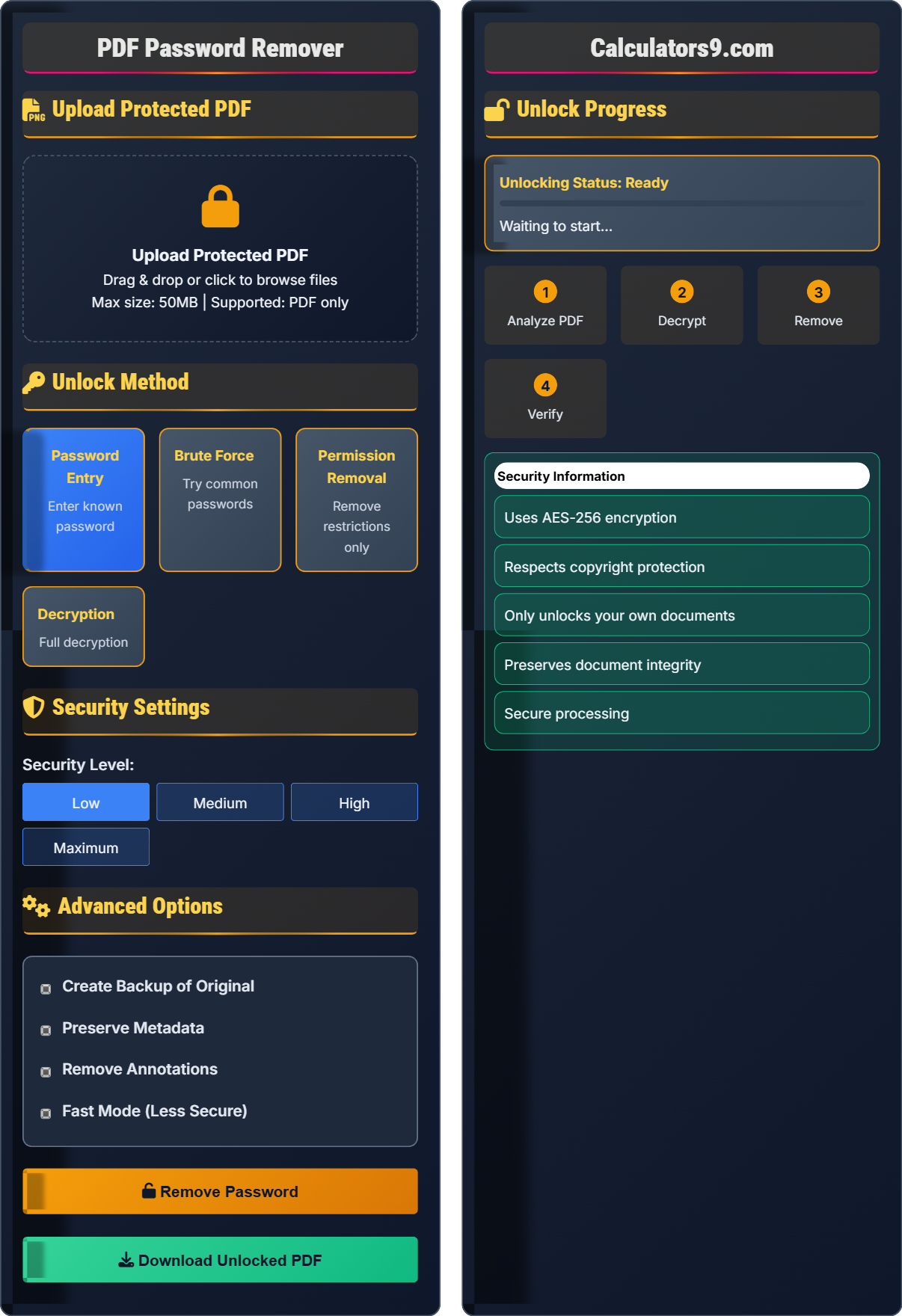
Upload Protected PDF
Upload Protected PDF
Drag & drop or click to browse files
Max size: 50MB | Supported: PDF only
Unlock Method
Security Settings
Advanced Options
Unlock Progress
- Uses AES-256 encryption
- Respects copyright protection
- Only unlocks your own documents
- Preserves document integrity
- Secure processing
Comprehensive PDF Security Guide
PDFs can be protected by two types of passwords: User (to open) and Owner (to modify). Different encryption levels (RC4, AES-128, AES-256) provide varying security strengths. Understanding the protection type is crucial for successful unlocking.
PDF security uses various encryption algorithms:
AES-128: 128-bit Advanced Encryption Standard
AES-256: 256-bit Advanced Encryption Standard
Permission Bits: Control allowed operations
Stronger encryption requires more computational power to remove.
- Know Your Rights: Only unlock documents you own
- Legal Compliance: Respect copyright and licensing
- Security First: Use trusted tools and methods
- Backup Documents: Preserve originals before modification
- Verify Results: Check document integrity after unlocking
Different PDF protection requires different removal approaches. Password entry works for known passwords, while permission removal can bypass certain restrictions without decrypting the entire document.
Security Standards
RC4, AES-128, AES-256 with varying security strengths.
Password entry, brute force, permission removal, and decryption.
- Only unlock documents you own
- Respect copyright laws
- Do not bypass DRM illegally
- Preserve document integrity
Optimization Tips
Verify ownership and backup documents before processing.
- Identify protection type
- Select appropriate method
- Preserve document integrity
- Verify results
- Use known passwords first
- Try simple methods before complex
- Create backups before processing
- Verify document after removal
PDF Security Removal Learning Quiz
What are the two main types of passwords that can protect a PDF document?
The answer is B) User and Owner passwords. PDF documents can have two distinct passwords: the User password is required to open the document, while the Owner password grants full access and control over permissions. The Owner password is typically used by document creators to set restrictions that apply even when someone knows the User password.
This question addresses the fundamental architecture of PDF security. Understanding the difference between User and Owner passwords is crucial for selecting the appropriate removal method. The User password controls access to the document, while the Owner password controls what can be done with the document once it's opened. This dual-password system provides granular control over document access and usage rights.
User Password: Required to open the protected PDF
Owner Password: Grants full access and permission control
PDF Permissions: Restrictions on printing, copying, editing
• User password opens document
• Owner password controls permissions
• Different passwords for different access levels
• Try user password first if known
• Owner password may be needed for full access
• Some documents only use owner password
• Confusing user and owner password functions
• Not understanding permission differences
• Assuming one password controls all access
Calculate the number of possible combinations for a 4-digit numeric password (using digits 0-9). Then calculate how long it would take to crack this password using a computer that can test 1 million combinations per second.
For a 4-digit numeric password:
Step 1: Calculate total possible combinations
Each digit has 10 possibilities (0-9)
Total combinations = 10^4 = 10,000 possible combinations
Step 2: Calculate cracking time
Computer speed = 1,000,000 combinations/second
Time = 10,000 ÷ 1,000,000 = 0.01 seconds
A 4-digit numeric password would take only 0.01 seconds to crack with this computer.
This calculation demonstrates the importance of password complexity. A 4-digit numeric password offers minimal security and can be cracked almost instantly. This is why modern PDF encryption uses much stronger methods like AES-256, which would take millions of years to crack with current technology. The exponential nature of password complexity (each additional character multiplies possibilities) shows why longer, more complex passwords are significantly more secure.
Combination Space: Total possible password combinations
Brute Force: Trying all possible combinations
Cracking Time: Time required to find correct password
• Complexity increases exponentially
• Each character multiplies possibilities
• Numeric passwords are weaker than alphanumeric
• Use longer passwords for better security
• Include mixed characters
• Avoid common patterns
• Underestimating cracking speed
• Not understanding exponential growth
• Using predictable patterns
A PDF is protected with an 8-character password that uses lowercase letters only (a-z). If a brute force attack can test 100,000 passwords per second, how long would it take to try all possible combinations? Assume there are 26 lowercase letters. Also, calculate the time required if the password includes uppercase letters, numbers, and symbols (total of 95 possible characters).
Case 1: Lowercase letters only (26 characters)
Total combinations = 26^8 = 208,827,064,576
Time = 208,827,064,576 ÷ 100,000 = 2,088,270.64 seconds
Time in hours = 2,088,270.64 ÷ 3,600 ≈ 580 hours or 24 days
Case 2: Mixed characters (95 characters)
Total combinations = 95^8 = 6,634,204,312,890,625
Time = 6,634,204,312,890,625 ÷ 100,000 = 66,342,043,128.9 seconds
Time in years = 66,342,043,128.9 ÷ (365 × 24 × 3600) ≈ 2,100 years
With lowercase only: ~24 days, with mixed characters: ~2,100 years.
This example dramatically illustrates how password complexity affects security. Adding uppercase letters, numbers, and symbols increases the combination space exponentially. This is why modern encryption uses complex character sets and long keys. The difference between 24 days and 2,100 years shows the massive security improvement from using complex passwords. This principle applies to all password-based security systems.
Character Set: Possible characters in password
Exponential Growth: Multiplicative increase in possibilities
Security Through Complexity: Using longer, complex passwords
• Each character adds exponentially to combinations
• Larger character sets increase security
• Longer passwords are exponentially more secure
• Use mixed character types
• Longer passwords are more secure
• Avoid dictionary words
• Underestimating exponential growth
• Using predictable patterns
• Not understanding complexity impact
A PDF document uses AES-256 encryption with a 256-bit key. Calculate the theoretical number of possible keys. If a quantum computer could test 1 billion keys per second, how long would it take to find the correct key? (Note: 2^256 is approximately 1.16 × 10^77)
Step 1: Calculate possible keys
Total possible keys = 2^256 ≈ 1.16 × 10^77
Step 2: Calculate cracking time with quantum computer
Computer speed = 1,000,000,000 keys/second = 10^9 keys/second
Time = (1.16 × 10^77) ÷ (10^9) = 1.16 × 10^68 seconds
Time in years = (1.16 × 10^68) ÷ (365 × 24 × 3600) ≈ 3.7 × 10^60 years
Even with a quantum computer testing 1 billion keys per second, it would take approximately 3.7 × 10^60 years to crack AES-256 encryption.
This calculation demonstrates why AES-256 is considered virtually unbreakable with current and foreseeable technology. The number 3.7 × 10^60 is astronomically large - it's billions of times longer than the age of the universe. This mathematical security foundation is what makes modern encryption trusted for protecting sensitive information. The exponential nature of key space ensures that even with massive computational advances, AES-256 will remain secure for decades.
AES-256: Advanced Encryption Standard with 256-bit key
Key Space: Total possible encryption keys
Quantum Computing: Next-generation computing technology
• AES-256 is currently unbreakable
• Key space grows exponentially
• Modern encryption is mathematically secure
• Trust AES-256 for sensitive data
• Understand the mathematics behind security
• Stay updated on quantum computing developments
• Underestimating the security of modern encryption
• Not understanding the mathematics
• Assuming future technology will break AES-256
Which of the following statements about PDF password removal is TRUE?
The answer is B) Password removal should only be performed on documents you own or have permission to access. PDF password removal tools should only be used ethically and legally. This means respecting copyright, intellectual property rights, and only unlocking documents that belong to you or that you have explicit permission to access. Unauthorized removal of document protection may violate copyright laws and terms of use.
This question addresses the critical ethical and legal considerations surrounding PDF password removal. Just because technology exists to remove security doesn't mean it should be used without proper authorization. Users must respect intellectual property rights, copyright laws, and the terms under which documents were distributed. Ethical use of these tools is essential for maintaining trust and legal compliance in digital document management.
Intellectual Property: Creators' rights to their work
Copyright Law: Legal protection for original works
Terms of Use: Conditions for document access and use
• Only unlock documents you own
• Respect copyright and licensing
• Obtain proper permissions
• Verify document ownership before processing
• Respect licensing agreements
• Use tools ethically and responsibly
• Assuming all security removal is legal
• Not considering copyright implications
• Using tools without proper authorization
FAQ
Q: What's the difference between AES-128 and AES-256 encryption in PDFs?
A: The key differences are:
- AES-128: Uses 128-bit key (2^128 possible combinations)
- AES-256: Uses 256-bit key (2^256 possible combinations)
- Security: AES-256 is exponentially more secure
- Performance: AES-128 is slightly faster
Both are considered secure, but AES-256 provides significantly stronger protection against brute force attacks. The 256-bit key space is so large that it's computationally infeasible to crack with current technology.
Q: Is it legal to remove passwords from PDF documents?
A: Legality depends on your relationship to the document:
- Legal: Removing passwords from your own documents
- Legal: Documents you have explicit permission to access
- Illegal: Circumventing protection on copyrighted materials without permission
- Illegal: Bypassing DRM or access controls for unauthorized access
Always ensure you have legal right to access and modify the document before attempting password removal. Respect copyright laws and licensing agreements.