Bitrate Calculator
Photography & Video Creative Tool • 2026 Edition
Bitrate Formula:
Show the calculator\( \text{Bitrate (Mbps)} = \frac{\text{Resolution (pixels)} \times \text{FPS} \times \text{Color Depth (bits)}}{1,000,000} \times \text{Compression Factor} \)
\( \text{File Size (MB)} = \frac{\text{Bitrate (Mbps)} \times \text{Duration (seconds)}}{8} \)
Where:
- Resolution = Width × Height in pixels
- FPS = Frames Per Second
- Color Depth = Bits per pixel (8, 10, 12, etc.)
- Compression Factor: 1.0 (uncompressed) to 0.01 (highly compressed)
For uncompressed video: Bitrate = Resolution × FPS × Color Depth ÷ 1,000,000
For compressed video: Apply compression factor
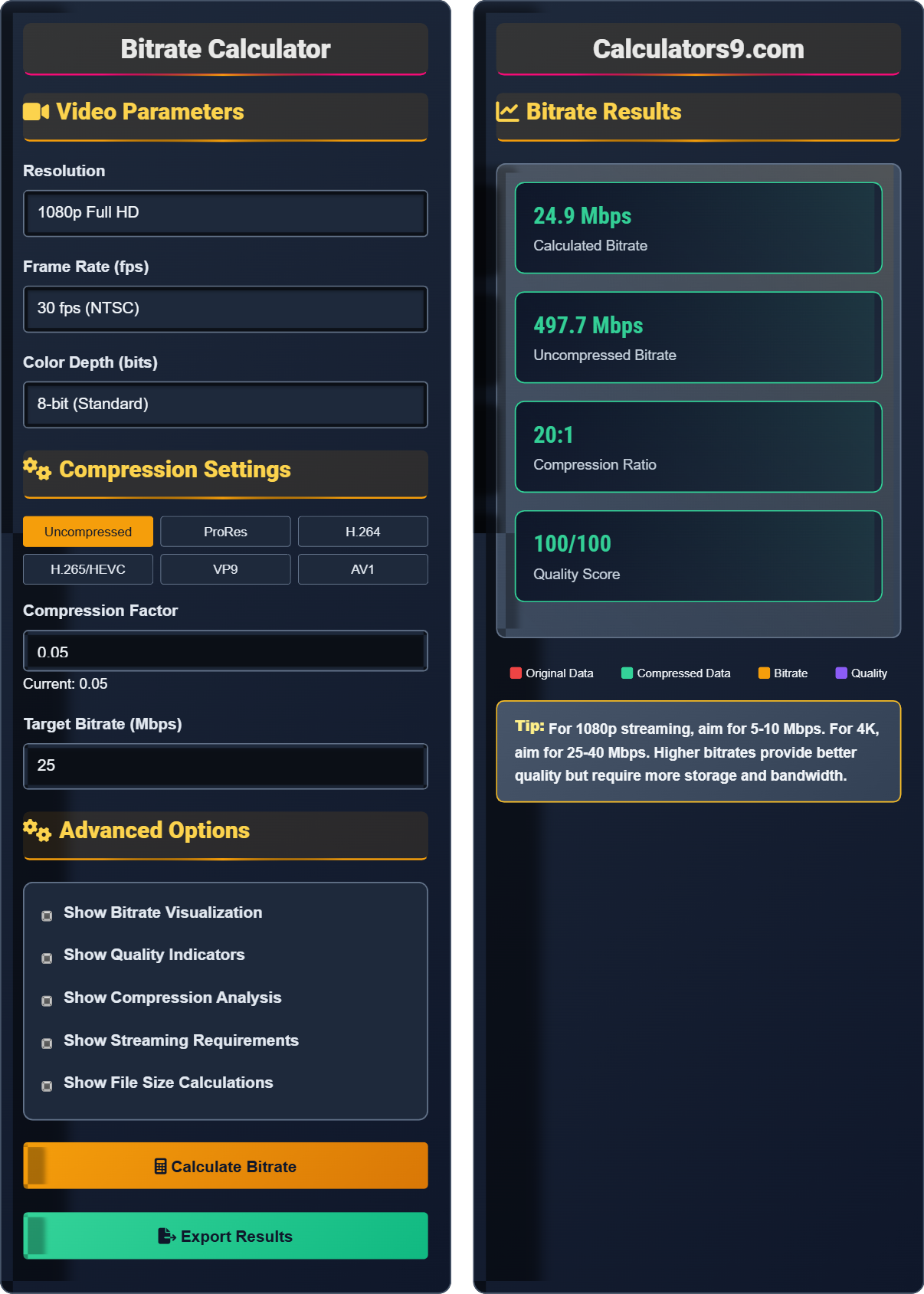
Example: 1080p video (1920×1080) at 30fps, 8-bit:
Resolution: 1920 × 1080 = 2,073,600 pixels
Uncompressed bitrate: (2,073,600 × 30 × 8) ÷ 1,000,000 = 497.6 Mbps
With H.264 compression (factor 0.05): 497.6 × 0.05 = 24.9 Mbps
Video Parameters
Compression Settings
Advanced Options
Bitrate Results
Bitrate Fundamentals
Bitrate refers to the amount of data processed per unit of time in a video or audio stream, typically measured in megabits per second (Mbps). Higher bitrates generally correspond to better quality but also result in larger file sizes and higher bandwidth requirements for streaming.
\( \text{Bitrate (Mbps)} = \frac{\text{Resolution} \times \text{FPS} \times \text{Color Depth}}{1,000,000} \times \text{Compression Factor} \)
Where Compression Factor ranges from 1.0 (uncompressed) to 0.01 (highly compressed).
- Higher resolution = higher bitrate
- Higher frame rate = higher bitrate
- More color depth = higher bitrate
- Better compression = lower bitrate
Compression & Codecs
Codecs (coder-decoder) are technologies that compress and decompress video data. Different codecs offer various trade-offs between file size, quality, compatibility, and processing requirements.
- H.264/AVC: Excellent compatibility, good compression
- H.265/HEVC: Better compression than H.264
- ProRes: High quality, larger files
- VP9: Open source, efficient compression
- AV1: Latest standard, superior efficiency
- YouTube: 15-25 Mbps for 1080p
- Netflix: 5-25 Mbps depending on content
- Twitch: 6-12 Mbps for 1080p
- Facebook: 5-15 Mbps for 1080p
Bitrate Learning Quiz
Which of the following has the greatest impact on video bitrate?
The answer is B) Video resolution. Resolution has the greatest impact on bitrate because it determines the number of pixels that need to be encoded per frame. The formula shows that bitrate is directly proportional to resolution: Bitrate = Resolution × FPS × Color Depth × Compression Factor. A 4K video (3840×2160) has 4 times more pixels than 1080p (1920×1080), requiring significantly more data to represent the same content.
Think of resolution as the number of data points in each frame. Each pixel contains color information that must be transmitted or stored. More pixels mean more data, which directly increases the bitrate. This is why upgrading from 720p to 1080p doesn't just incrementally increase bitrate—it multiplies it by a factor of approximately 1.7 (1080²/720²).
Bitrate: The amount of data processed per second, measured in Mbps
Resolution: The number of pixels in each dimension of a video frame
Compression Factor: The efficiency of the codec in reducing data
• Bitrate ∝ Resolution² (approximately)
• Bitrate ∝ Frame Rate
• Bitrate ∝ Color Depth
• Resolution has exponential impact on bitrate
• Frame rate impact is linear
• Color depth impact is linear
• Underestimating the impact of resolution
• Ignoring the multiplicative effect of multiple factors
• Confusing file format with compression efficiency
Calculate the bitrate for 4K video (3840×2160) at 60fps with 10-bit color depth. First calculate the uncompressed bitrate, then calculate with H.265 compression (factor 0.025). Show your work.
Step 1: Calculate uncompressed bitrate
Resolution: 3840 × 2160 = 8,294,400 pixels
Uncompressed bitrate = (Resolution × FPS × Color Depth) ÷ 1,000,000
Uncompressed bitrate = (8,294,400 × 60 × 10) ÷ 1,000,000
Uncompressed bitrate = 4,976,640,000 ÷ 1,000,000 = 4,976.6 Mbps
Step 2: Calculate compressed bitrate
Compression factor: 0.025 (H.265)
Compressed bitrate = 4,976.6 × 0.025 = 124.4 Mbps
Therefore, the uncompressed bitrate is 4,976.6 Mbps, and with H.265 compression, it's reduced to 124.4 Mbps.
This calculation demonstrates the dramatic impact of compression. Without compression, 4K60 video would require nearly 5 Gbps, which is impractical for most applications. H.265 compression reduces this to a manageable 124 Mbps, making 4K streaming and storage feasible.
Compression Ratio: The ratio of original size to compressed size
Lossy Compression: Compression that removes some data permanently
Lossless Compression: Compression that preserves all original data
• Uncompressed = (Resolution × FPS × Color Depth) ÷ 1,000,000
• Compressed = Uncompressed × Compression Factor
• Compression Factor < 1.0 for lossy compression
• Remember to convert bits to megabits (divide by 1,000,000)
• Always verify your units (Mbps, Mbps, etc.)
• Compression factors vary by content complexity
• Forgetting to divide by 1,000,000 for Mbps
• Misapplying compression factors
• Confusing Mbps with MBps
Sarah is live streaming a 4K gaming session at 60fps with 10-bit color. Her internet upload speed is 50 Mbps. What compression factor does she need to achieve to stay within her upload limit? Calculate the uncompressed bitrate first, then determine the required compression factor.
Step 1: Calculate uncompressed bitrate
Resolution: 3840 × 2160 = 8,294,400 pixels
Uncompressed bitrate = (8,294,400 × 60 × 10) ÷ 1,000,000 = 4,976.6 Mbps
Step 2: Calculate required compression factor
Target bitrate: 50 Mbps (upload speed)
Required compression factor = Target Bitrate / Uncompressed Bitrate
Required compression factor = 50 / 4,976.6 = 0.010
Step 3: Calculate compression ratio
Compression ratio = 1 / 0.010 = 100:1
Therefore, Sarah needs a compression factor of 0.010 (100:1 compression ratio) to stream 4K60 within her 50 Mbps upload limit.
This example shows the practical constraints of streaming. To stream 4K60 video with only 50 Mbps upload, Sarah would need extremely aggressive compression (100:1 ratio). This level of compression would likely result in visible artifacts. In practice, she might need to reduce resolution, frame rate, or use a more efficient codec.
Upload Speed: The rate at which data can be sent from your device
Streaming Constraints: Bandwidth limitations for real-time video delivery
Compression Artifacts: Visual defects caused by aggressive compression
• Target bitrate ≤ upload speed
• Extreme compression affects quality
• Consider reducing other parameters if needed
• Plan for 80% of upload speed for safety
• Use variable bitrate for better efficiency
• Consider lowering resolution or frame rate
• Not accounting for upload speed limitations
• Expecting unrealistic compression ratios
• Forgetting to consider other network traffic
David is creating content for multiple platforms: YouTube, Netflix, and Twitch. He's producing 1080p60 video. Which bitrate and codec combination would be most suitable for each platform? Consider both quality and platform-specific requirements.
Step 1: Calculate uncompressed bitrate for reference
1080p60 uncompressed: (1920 × 1080 × 60 × 8) ÷ 1,000,000 = 995.1 Mbps
Step 2: Platform-specific recommendations
YouTube: 15-25 Mbps H.264 for 1080p60
Recommended: 20 Mbps H.264 (compression factor: 20/995.1 = 0.020)
Netflix: 15-25 Mbps for 1080p content
Recommended: 20 Mbps H.264 (compression factor: 0.020)
Twitch: 6-12 Mbps for 1080p60
Recommended: 10 Mbps H.264 (compression factor: 10/995.1 = 0.010)
Step 3: Additional considerations
For high-quality archival: Use H.265 at 25 Mbps (better compression than H.264)
For live streaming: Consider using H.264 for better compatibility
Recommended approach: Encode at 20 Mbps H.264 for YouTube/Netflix, then downsample for Twitch.
This scenario illustrates how different platforms have different requirements. While all three platforms support 1080p60, Twitch requires lower bitrates due to real-time streaming constraints. YouTube and Netflix can accept higher bitrates since they use progressive download and adaptive streaming.
Adaptive Streaming: Adjusting quality based on viewer bandwidth
Progressive Download: Downloading video as it plays
Real-time Streaming: Immediate video transmission
• Twitch: 6-12 Mbps for 1080p60
• YouTube: 15-25 Mbps for 1080p60
• Netflix: 15-25 Mbps for 1080p
• Encode at the highest required bitrate, then downsample
• Use H.264 for maximum compatibility
• Consider variable bitrate for better quality
• Using same bitrate for all platforms
• Not considering platform-specific requirements
• Ignoring codec compatibility
Which of the following statements about bitrate and quality is TRUE?
The answer is C) Quality depends on bitrate, resolution, and codec efficiency. Quality is influenced by multiple factors including bitrate, resolution, frame rate, color depth, and the efficiency of the codec used. A high bitrate with an inefficient codec may produce worse quality than a moderate bitrate with a modern, efficient codec. The relationship between bitrate and quality is logarithmic, not linear.
Quality is a complex function that involves multiple variables. While bitrate is important, a 10 Mbps video encoded with AV1 (most efficient codec) will look better than a 10 Mbps video encoded with older H.264. This is why modern codecs allow for higher quality at lower bitrates. The relationship follows a logarithmic curve where each doubling of bitrate provides diminishing returns in quality.
Quality Metric: Subjective measure of visual fidelity
Logarithmic Relationship: Diminishing returns with increased bitrate
Codec Efficiency: Ability to preserve quality while reducing data
• Quality = f(Bitrate, Resolution, Codec, Content)
• Logarithmic relationship (not linear)
• Modern codecs are more efficient
• Choose modern codecs for better efficiency
• Balance bitrate with other parameters
• Test quality at different bitrates
• Assuming linear relationship between bitrate and quality
• Ignoring codec efficiency differences
• Using outdated codecs unnecessarily
Bitrate FAQ
Q: How do I choose the right bitrate for my video project?
A: Bitrate selection depends on several factors:
- Resolution: 1080p: 15-25 Mbps, 4K: 50-100 Mbps
- Distribution: Streaming: 10-20 Mbps, Archive: 50+ Mbps
- Content Type: Animation: 15-25 Mbps, Action: 30-50 Mbps
Formula: Bitrate (Mbps) = Resolution Factor × Content Factor
Where Resolution Factor is ~0.007 for 1080p, ~0.028 for 4K
Content Factor: 1.0 (simple), 2.0 (moderate), 3.0 (complex)
Q: What's the difference between bitrate and file size?
A: Bitrate and file size are related but distinct concepts:
Bitrate = Data rate per second (measured in Mbps)
File size = Total data in the file (measured in GB)
Relationship: File Size (MB) = (Bitrate (Mbps) × Duration (seconds)) / 8
For example, a 25 Mbps video for 10 minutes (600 seconds) = (25 × 600) / 8 = 1,875 MB ≈ 1.8 GB
Bitrate determines quality and compression, while file size indicates storage requirements.