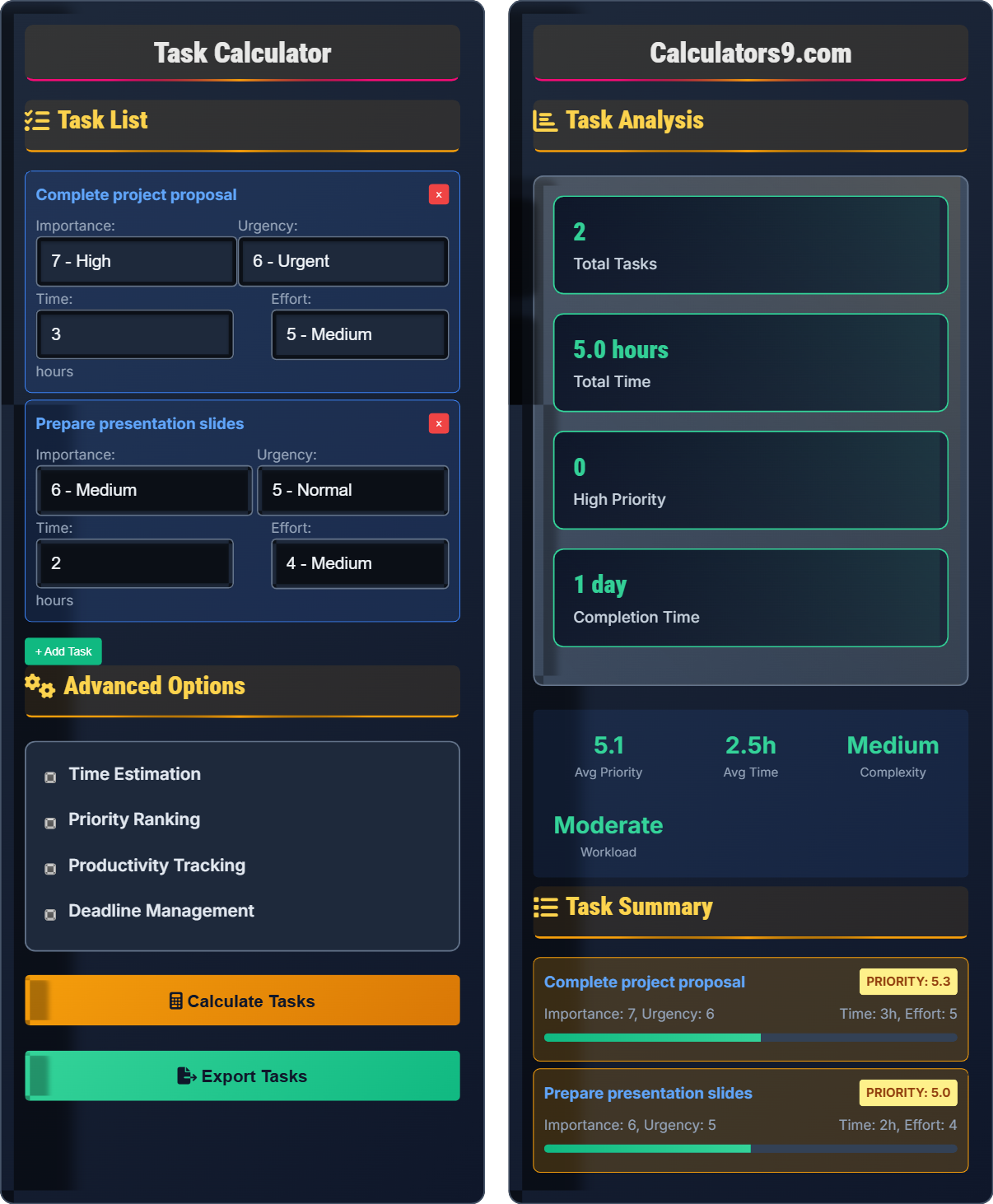
Task Calculator
Productivity task manager • 2026 edition
Task Priority Formula:
Calculate Tasks\( P = \frac{I \times U}{T + E} \)
Where:
- \( P \) = Priority Score
- \( I \) = Importance (1-10)
- \( U \) = Urgency (1-10)
- \( T \) = Time Required (hours)
- \( E \) = Effort Level (1-10)
This formula calculates the priority of tasks based on their importance, urgency, and resource requirements. Higher scores indicate higher priority tasks.
Example: For a task with importance 9 (I=9), urgency 8 (U=8), requiring 2 hours (T=2), and effort level 6 (E=6): \( P = \frac{9 \times 8}{2 + 6} = \frac{72}{8} = 9 \). Priority scores above 7 indicate high-priority tasks.
Task List
Advanced Options
Task Analysis
Task Summary
Comprehensive Task Management Guide
Task prioritization is the systematic process of ranking tasks based on their importance, urgency, and resource requirements. This methodology helps individuals and teams focus on the most critical activities first, maximizing productivity and achieving better outcomes. Effective task prioritization considers multiple factors including deadlines, impact, effort required, and available resources.
The fundamental priority calculation uses the following formula:
Where:
- \(P\) = Priority Score
- \(I\) = Importance (1-10)
- \(U\) = Urgency (1-10)
- \(T\) = Time Required (hours)
- \(E\) = Effort Level (1-10)
The Eisenhower Matrix helps categorize tasks effectively:
- Urgent + Important: Do immediately
- Not Urgent + Important: Schedule for later
- Urgent + Not Important: Delegate if possible
- Not Urgent + Not Important: Eliminate
- Time Blocking: Allocate specific time slots for different tasks
- Batch Processing: Group similar tasks together
- Regular Reviews: Reassess priorities daily or weekly
- Buffer Time: Include contingency time for unexpected issues
- Progress Tracking: Monitor completion rates and adjust approach
Task Management Basics
Method of ranking tasks based on multiple criteria.
\( P = \frac{I \times U}{T + E} \)
Where P=priority, I=importance, U=urgency, T=time, E=effort.
- Higher scores indicate higher priority
- Importance and urgency multiply together
- Time and effort add together in denominator
Strategies
Accurately predicting task completion time.
- Break tasks into smaller components
- Consider historical data
- Add buffer time for uncertainty
- Account for dependencies
- People tend to underestimate time
- Include time for interruptions
- Consider your energy levels
- Factor in learning curve
Task Management Learning Quiz
According to the Eisenhower Matrix, which type of tasks should be done immediately?
The answer is B) Urgent + Important. The Eisenhower Matrix categorizes tasks into four quadrants: 1) Urgent + Important (Do First), 2) Not Urgent + Important (Schedule), 3) Urgent + Not Important (Delegate), and 4) Not Urgent + Not Important (Eliminate). Tasks that are both urgent and important require immediate attention because they have significant consequences and time-sensitive deadlines.
The Eisenhower Matrix is a powerful tool for distinguishing between what is urgent and what is important. Urgent tasks demand immediate attention, while important tasks contribute to long-term goals. The most critical quadrant is the first one, containing tasks that are both urgent and important, as these have both time sensitivity and significant impact. This matrix helps overcome the tendency to focus on urgent tasks that may not be important.
Eisenhower Matrix: 2x2 grid for task prioritization
Urgent Tasks: Require immediate attention
Important Tasks: Contribute to long-term goals
• Focus on important tasks over merely urgent ones
• Schedule important but not urgent tasks
• Delegate urgent but not important tasks
• Use the matrix to avoid reactive mode
• Schedule quadrant 2 tasks proactively
• Minimize time spent on quadrant 3 tasks
• Confusing urgent with important
• Spending too much time on urgent but unimportant tasks
• Neglecting important but not urgent tasks
Using the priority formula \( P = \frac{I \times U}{T + E} \), calculate the priority score for a task with importance 8 (I=8), urgency 7 (U=7), requiring 2 hours (T=2), and effort level 5 (E=5). Show your work.
Using the formula: \( P = \frac{I \times U}{T + E} \)
Given:
- I = 8 (importance)
- U = 7 (urgency)
- T = 2 (time required in hours)
- E = 5 (effort level)
Step 1: Calculate the numerator (I × U)
8 × 7 = 56
Step 2: Calculate the denominator (T + E)
2 + 5 = 7
Step 3: Divide numerator by denominator
P = 56 ÷ 7 = 8
Therefore, the priority score is 8.
This calculation demonstrates how the priority formula balances importance and urgency against resource requirements. The numerator (importance × urgency) amplifies the priority based on how critical and time-sensitive the task is. The denominator (time + effort) reduces the priority if the task requires significant resources. A score of 8 indicates a high-priority task, as scores above 7 are considered high priority.
Priority Score: Numerical value indicating task importance
Resource Requirements: Time and effort needed for completion
Time Sensitivity: How critical the deadline is
• Scores above 7 indicate high priority
• Importance and urgency multiply together• Resource requirements add together in denominator
• Focus on tasks with priority scores above 7
• Consider delegation for high-resource tasks
• Use scores to create ranked to-do lists
• Not considering resource requirements
• Overestimating importance or urgency
• Underestimating time or effort needed
If a person typically completes similar tasks in 4 hours but wants to add a 25% buffer for uncertainty, how long should they estimate for the task? If they have 8 hours available in a workday, how many of these tasks can they reasonably complete?
Step 1: Calculate estimated time with buffer
Base time: 4 hours
Buffer: 4 × 0.25 = 1 hour
Estimated time: 4 + 1 = 5 hours
Step 2: Calculate number of tasks possible
Available time: 8 hours
Time per task: 5 hours
Number of tasks: 8 ÷ 5 = 1.6
Therefore, they can reasonably complete 1 task with some time to spare.
This problem demonstrates the importance of adding buffers to time estimates. Research shows that people consistently underestimate task completion time, a phenomenon known as the planning fallacy. Adding a buffer helps account for unexpected complications, interruptions, and the tendency to be overly optimistic about completion times. The example shows that with proper buffering, only 1 task can be completed in an 8-hour day instead of the initially assumed 2.
Time Buffer: Additional time added to estimates
Planning Fallacy: Tendency to underestimate task time
Capacity Planning: Matching tasks to available time
• Always add buffer time to estimates
• Consider historical performance data
• Account for interruptions and delays
• Use 20-30% buffer for new tasks
• Track actual vs. estimated times
• Adjust buffers based on experience
• Not adding any buffer time
• Underestimating the impact of interruptions
• Ignoring learning curve for new tasks
A person has three tasks: Task A (priority 9, time 2 hours), Task B (priority 7, time 1 hour), and Task C (priority 8, time 3 hours). If they have 5 hours available, which tasks should they complete to maximize priority value while staying within time limits?
First, calculate priority per hour for each task:
Task A: 9 ÷ 2 = 4.5 priority per hour
Task B: 7 ÷ 1 = 7.0 priority per hour
Task C: 8 ÷ 3 = 2.67 priority per hour
Strategy: Complete highest priority-per-hour tasks first
Option 1: Task B (1hr) + Task A (2hr) = 3 hours, total priority = 16
Option 2: Task B (1hr) + Task C (3hr) = 4 hours, total priority = 15
Option 3: Task A (2hr) + Task C (3hr) = 5 hours, total priority = 17
Option 4: Task A only (2hr) = 2 hours, total priority = 9
Best option: Task A + Task C (5 hours, total priority 17)
This example demonstrates the knapsack problem in task management. When time is limited, it's not always best to start with the highest priority task. Instead, calculating priority per unit time helps maximize overall value. The solution shows that completing the two highest-priority tasks (A and C) yields the highest total priority value within the time constraint, even though Task B has a higher priority-per-hour ratio.
Priority Per Hour: Efficiency of task completion
Knapsack Problem: Optimization with resource constraints
Task Sequencing: Ordering tasks for maximum efficiency
• Consider priority per time unit
• Optimize for total value within constraints
• Balance individual priority with efficiency
• Calculate priority per time unit for sequencing
• Consider task dependencies
• Account for energy levels throughout the day
• Only considering absolute priority values
• Not accounting for time constraints
• Ignoring task interdependencies
Which metric is most effective for measuring task completion productivity?
The answer is C) Completion rate (tasks completed / tasks attempted). This metric directly measures productivity by comparing actual accomplishments to planned activities. It provides a clear percentage that indicates how effectively tasks are being completed. While other metrics provide useful information, completion rate is the most direct measure of task execution success, showing the proportion of planned work that was actually accomplished.
Completion rate is a fundamental productivity metric because it measures actual results against intentions. Unlike hours worked, which measures time spent rather than output, completion rate focuses on results achieved. This metric helps identify patterns in task accomplishment and can reveal issues like overcommitment or underestimation of task difficulty. It's particularly valuable because it's simple to calculate and provides actionable insights into productivity.
Completion Rate: Percentage of tasks successfully finished
Productivity Metric: Measure of work output efficiency
Task Execution: Actual completion of planned activities
• Track both planned and completed tasks
• Calculate completion rate regularly
• Use rate to adjust planning accuracy
• Track completion rates weekly or monthly
• Compare planned vs. actual completion
• Use data to improve future estimates
• Measuring time spent instead of results
• Not tracking failed attempts
• Ignoring completion patterns
FAQ
Q: How can I improve my task time estimation accuracy?
A: Improve estimation accuracy with historical tracking and buffer calculations.
The estimation accuracy formula:
\( EA = \frac{\sum(T_a - T_e)}{N} \times 100 \)
Where:
- \( EA \) = Estimation Accuracy Percentage
- \( T_a \) = Actual time taken
- \( T_e \) = Estimated time
- \( N \) = Number of tasks
Research shows that tracking actual vs. estimated times over 20-30 tasks can improve accuracy by 25-40%. The key is recording both estimates and actuals, then calculating the average variance to adjust future estimates. For example, if you typically underestimate by 20%, increase future estimates by that percentage.
Q: How do I balance important long-term projects with urgent daily tasks?
A: Use time allocation based on task value and urgency.
The balance formula:
\( B = \frac{(I_l \times T_l) + (U_s \times T_s)}{T_t} \)
Where:
- \( B \) = Balance Score
- \( I_l \) = Importance of long-term tasks
- \( T_l \) = Time allocated to long-term tasks
- \( U_s \) = Urgency of short-term tasks
- \( T_s \) = Time allocated to short-term tasks
- \( T_t \) = Total available time
A successful approach allocates 70% time to urgent tasks and 30% to important long-term projects. This ensures immediate needs are met while progressing toward strategic goals. The key is protecting time for important but not urgent tasks, which often get neglected without intentional planning.