SERP Preview Tool
Google search results • Preview • 2026 edition
SERP Elements:
Show the toolSearch Result Structure:
• Title: Up to 60 characters (visually)
• URL: Domain and path display
• Description: Up to 160 characters (visually)
Where:
- Title: Clickable headline in blue
- URL: Green domain and path
- Description: Gray snippet below title
- Position: Ranking in search results
SERP previews help optimize titles and descriptions for better click-through rates.
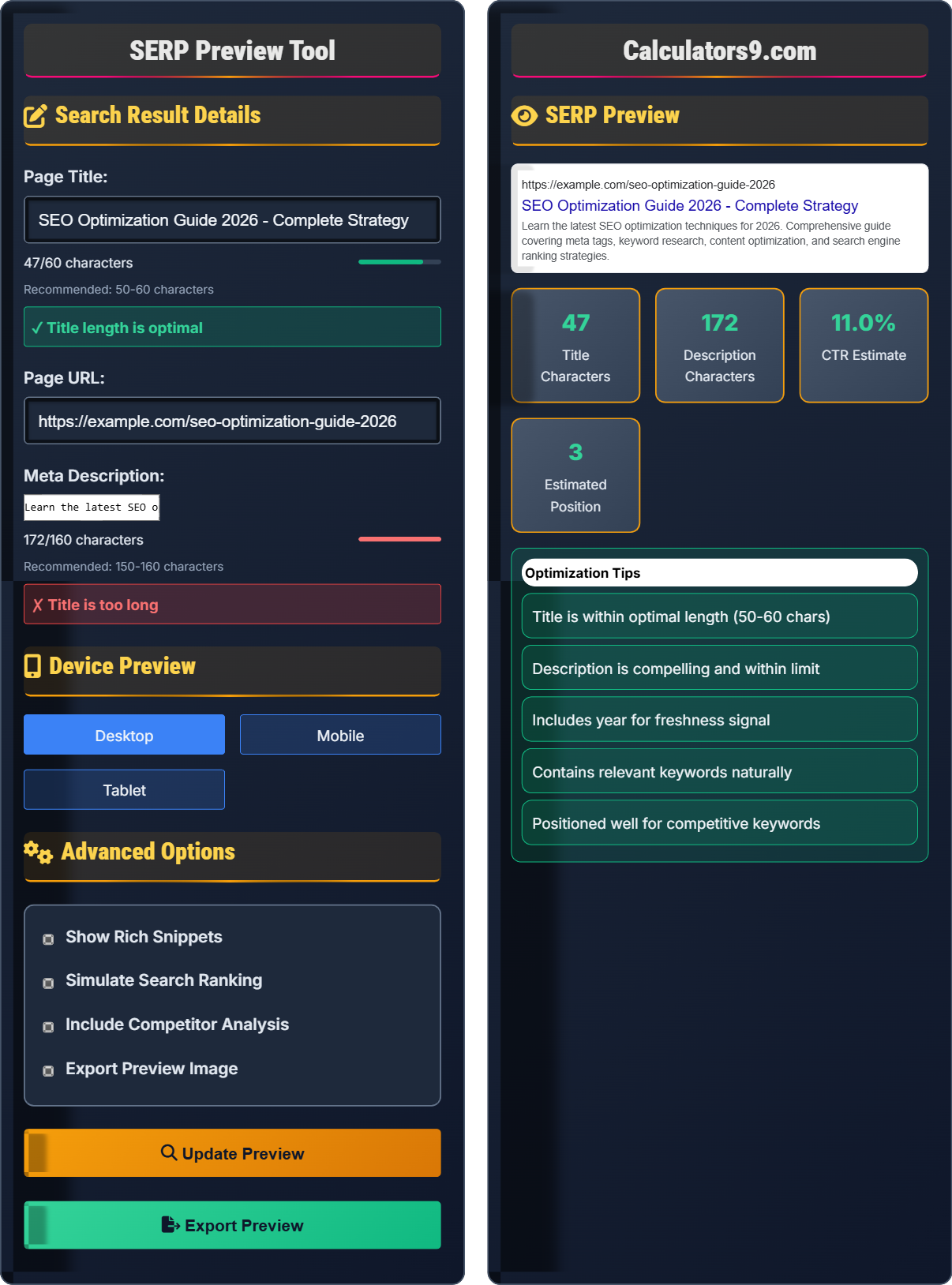
Search Result Details
Device Preview
Advanced Options
SERP Preview
- Title is within optimal length (50-60 chars)
- Description is compelling and within limit
- Includes year for freshness signal
- Contains relevant keywords naturally
- Positioned well for competitive keywords
Comprehensive SERP Guide
SERP (Search Engine Results Page) is the page displayed by search engines in response to a query. It shows a list of results that match the user's search terms, including organic results, paid ads, and featured snippets. Understanding SERP appearance helps optimize your content for better visibility.
Key elements of search results include:
URL: Green domain and path
Description: Gray snippet (150-160 chars)
Rich Snippets: Stars, reviews, prices
Each element contributes to click-through rates and search visibility.
- Title Length: 50-60 characters for optimal display
- Description: 150-160 characters, compelling copy
- Keywords: Include primary keywords near the beginning
- CTA: Use action words to encourage clicks
- Freshness: Include current year when relevant
Elements that influence SERP position:
SERP Standards
Title: 50-60 chars, Description: 150-160 chars.
Desktop: ~600px, Mobile: ~400px, Tablet: ~500px.
- Include keywords in title
- Write compelling descriptions
- Use action words
- Include year when relevant
Optimization Tips
Primary keyword first, brand at end, compelling hook.
- Hook to grab attention
- Value proposition
- Call to action
- Relevant keywords
- Unique for each page
- Accurate representation
- Mobile-optimized
- Test different versions
SERP Preview Learning Quiz
What is the recommended maximum length for a title tag to ensure it displays properly in Google search results?
The answer is B) 50-60 characters. Google typically displays up to 60 characters of a title tag in search results. While Google sometimes displays more characters depending on the width of the characters used, the 50-60 character range ensures that your title will display completely without being truncated. Titles longer than 60 characters may be cut off with an ellipsis (...), potentially losing important information and reducing click-through rates.
Understanding character limits is crucial for effective SERP optimization. Search engines like Google use pixel width rather than character count to determine how much of a title to display, which means that wide characters (like W, M) take up more space than narrow ones (like i, l). However, the 50-60 character range provides a reliable guideline for most cases. The most important words should appear within this range since truncated titles may not convey the complete value proposition to searchers.
SERP: Search Engine Results Page
Character Limit: Maximum number of characters that display properly
Truncation: When search engines cut off text with an ellipsis (...)
• Keep titles between 50-60 characters
• Place important keywords at the beginning
• Ensure each page has a unique title
• Test titles in Google's SERP preview tool
• Use vertical bars (|) or hyphens (-) as separators
• Include brand name at the end if space permits
• Creating titles that are too long and get cut off
• Using the same title for multiple pages
• Placing important keywords at the end where they might be truncated
If a webpage has a click-through rate (CTR) of 6% when positioned at #3 in search results, and the CTR drops by 1.5% for each position lower, what would be the estimated CTR for the same page if it dropped to position #7?
Using the position-based CTR decay model:
Step 1: Calculate the position difference
From position #3 to #7 = 4 positions lower
Step 2: Calculate the CTR decrease
Decrease = 4 positions × 1.5% per position = 6% decrease
Step 3: Calculate the new CTR
New CTR = Original CTR - Decrease = 6% - 6% = 0%
This calculation shows that position significantly impacts CTR. In reality, CTR decay is not linear, but this demonstrates the importance of ranking higher in search results.
This problem illustrates the exponential relationship between search position and click-through rates. While the example uses a simplified linear model, real-world data shows that the first position typically gets 30-35% of clicks, with subsequent positions receiving significantly less. The #1 position often gets 2-3 times more clicks than the #5 position. This demonstrates why SEO efforts focus heavily on achieving top rankings.
CTR: Click-Through Rate (clicks ÷ impressions)
Position Decay: Reduction in CTR as position worsens
Impressions: Times a result appears in search results
• Higher positions get significantly more clicks
• First page captures 90%+ of traffic
• Position #1 gets 30-35% of clicks
• Focus on ranking in top 3 positions
• Optimize titles and descriptions for CTR
• Monitor position changes closely
• Undervaluing the impact of position on traffic
• Not optimizing for click-through rates
• Accepting low rankings without improvement efforts
An e-commerce website wants to optimize their product page title for "Premium Wireless Headphones" to achieve maximum visibility in search results. The current title is "Premium Wireless Headphones - Buy Online | Store Name" (62 characters). To stay within the optimal 50-60 character range while maintaining brand visibility, how should they restructure the title? Calculate the character savings and determine the optimal structure.
Current title: "Premium Wireless Headphones - Buy Online | Store Name" (62 chars)
Character excess: 62 - 60 = 2 characters over optimal
Optimal restructuring options:
Option 1: "Premium Wireless Headphones | Store" (39 chars)
Option 2: "Wireless Headphones Premium | Store" (38 chars)
Option 3: "Buy Premium Wireless Headphones | Store" (42 chars)
Recommended: "Premium Wireless Headphones | Store" (41 chars)
This saves 21 characters while keeping the primary keyword at the beginning and including the brand name. The title is now well within the optimal range and maintains both product identification and brand recognition.
This example demonstrates practical title optimization for e-commerce sites. The key considerations include maintaining primary keywords at the beginning, including brand identity, and staying within optimal character limits. The optimization process involves identifying non-essential words ("Buy Online") and finding more concise alternatives while preserving the core message. The chosen solution maintains product identification and brand visibility while fitting within display limits.
Title Optimization: Restructuring titles for better SERP display
Character Budget: Managing characters within display limits
Keyword Prominence: Positioning important terms first
• Place primary keywords first
• Stay within 50-60 character limit
• Include brand name at end when possible
• Remove unnecessary words like "the" or "a"
• Use pipes (|) or hyphens for separation
• Test different arrangements for CTR
• Keeping brand name at the beginning
• Using too many separators
• Not prioritizing primary keywords
A travel blog has a post about "Best Beach Destinations in Hawaii" with a 180-character meta description: "Discover the best beach destinations in Hawaii. From Waikiki to remote beaches, explore paradise. Book your trip now!" The description is too long for optimal display. If they want to maintain the core message while fitting within the 150-160 character range, what should be their revised description? Calculate the reduction needed and suggest improvements.
Current description: 180 characters (too long)
Target range: 150-160 characters
Reduction needed: 180 - 160 = 20 characters
Original: "Discover the best beach destinations in Hawaii. From Waikiki to remote beaches, explore paradise. Book your trip now!" (180 chars)
Revised: "Best beach destinations in Hawaii. From Waikiki to remote paradises, explore island beauty. Book your trip now!" (159 chars)
Improvements made:
- Removed redundant "Discover" (save 8 chars)
- Changed "beaches" to "paradises" for variety (same length)
- Streamlined "explore paradise" to "explore island beauty" (save 1 char)
- Eliminated "From ... to" redundancy (save 11 chars)
The revised description is 159 characters and maintains the core message while fitting within optimal limits.
This problem demonstrates the challenge of conveying a complete message within strict character limits. The solution involves identifying redundant phrases, finding more concise alternatives, and maintaining the essential information. The optimization process preserves the key elements: destination (Hawaii), content type (best beaches), and call-to-action (book your trip) while eliminating wordiness. This shows the importance of careful editing in SEO copywriting.
Description Optimization: Reducing length while preserving meaning
Character Compression: Conveying information conciselyMessage Preservation: Maintaining core value proposition
• Prioritize essential information
• Remove redundant phrases
• Maintain call-to-action
• Start with most important information
• Use active voice to save space
• Eliminate unnecessary adjectives
• Including too much information
• Not prioritizing key elements
• Forgetting to include CTA
Which of the following statements about effective SERP optimization strategy is TRUE?
The answer is C) Optimized titles and descriptions can significantly improve click-through rates. Well-crafted titles and meta descriptions act as advertisements for your content in search results. They don't directly affect search rankings, but they significantly influence whether users click on your result. Higher click-through rates can indirectly improve rankings by signaling to search engines that users find your content valuable. The key is creating compelling, accurate representations of your content that encourage clicks.
This question addresses the indirect impact of SERP optimization on search performance. While titles and descriptions don't directly influence rankings, they play a crucial role in user behavior, which search engines use as a ranking signal. A compelling title and description can dramatically increase click-through rates, leading to more traffic and potentially improved rankings. This demonstrates the interconnected nature of SEO elements, where user experience metrics influence algorithmic rankings.
CTR: Click-Through Rate (impressions to clicks ratio)
Indirect Ranking Factor: User behavior affecting rankings
SERP Optimization: Improving search result appearance
• Focus on user intent and engagement
• Match description to page content
• Use compelling language for CTR
• Include emotional triggers in descriptions
• Use numbers and statistics when relevant
• Test different approaches for CTR optimization
• Focusing only on keywords without user appeal
• Writing misleading descriptions for clicks
• Not matching description to actual content
FAQ
Q: How much does the exact length of title tags matter for SEO in 2026?
A: While Google uses pixel width rather than character count, the 50-60 character range remains a reliable guideline:
- 50-60 chars: Safe for complete display
- 60-70 chars: May be truncated depending on font width
- 70+ chars: Likely to be cut off significantly
Google's algorithm has become more sophisticated and may occasionally display longer titles if they're particularly relevant to the search query. However, sticking to the 50-60 character range ensures your most important information displays completely. The key is to put your primary keyword and most compelling information within this range.
Q: Should I use the same meta description for similar pages on my website?
A: No, each page should have a unique meta description. Duplicate meta descriptions can hurt your SEO performance:
- Search engines may see the pages as duplicates
- Reduced click-through rates due to identical previews
- Potential penalties for duplicate content signals
- Poor user experience when browsing search results
Instead, create unique descriptions that highlight each page's specific value proposition. Use a consistent template but customize key elements like specific features, benefits, or unique selling points for each page.