Sitemap Generator
XML sitemap • Site structure • 2026 edition
Sitemap XML Format:
Show the generatorBasic Structure:
<?xml version="1.0" encoding="UTF-8"?>
<urlset xmlns="http://www.sitemaps.org/schemas/sitemap/0.9">
<url>
<loc>https://example.com/page</loc>
<lastmod>2026-01-15</lastmod>
<changefreq>weekly</changefreq>
<priority>0.8</priority>
</url>
</urlset>
Where:
- <loc>: The URL of the page
- <lastmod>: Last modification date
- <changefreq>: How frequently the page changes
- <priority>: Priority relative to other pages (0.0 to 1.0)
Valid sitemaps help search engines crawl and index your website more efficiently.
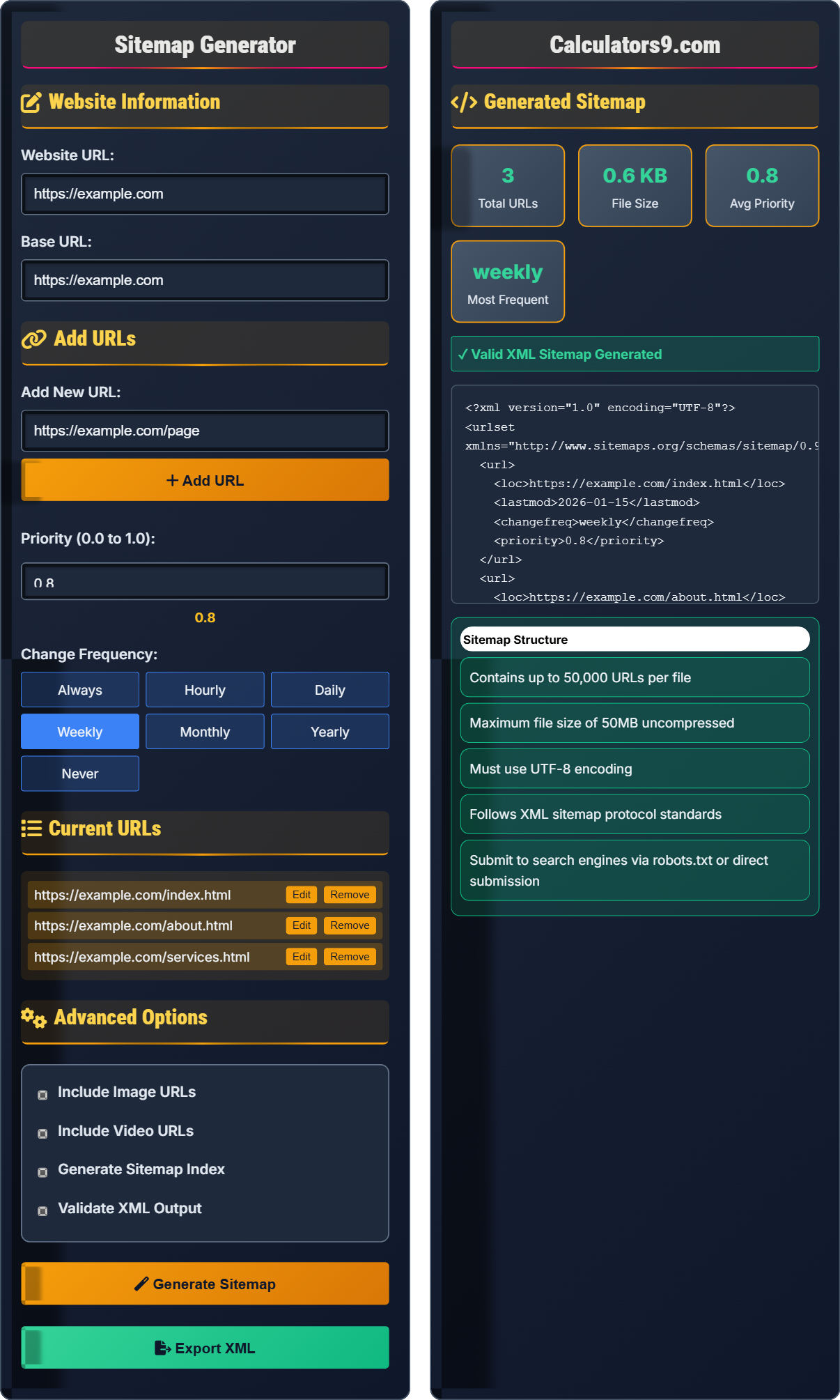
Website Information
Add URLs
Current URLs
Advanced Options
Generated Sitemap
- Contains up to 50,000 URLs per file
- Maximum file size of 50MB uncompressed
- Must use UTF-8 encoding
- Follows XML sitemap protocol standards
- Submit to search engines via robots.txt or direct submission
Comprehensive Sitemap Guide
A sitemap is an XML file that lists the important URLs for a website. It helps search engines understand the structure of your site and find all your content. Sitemaps are especially important for large websites, new websites with few external links, and websites with rich media content.
Basic XML sitemap structure includes:
<urlset xmlns="http://www.sitemaps.org/schemas/sitemap/0.9">
<url>
<loc>URL</loc>
<lastmod>YYYY-MM-DD</lastmod>
<changefreq>frequency</changefreq>
<priority>0.0-1.0</priority>
</url>
</urlset>
Each URL entry can include location, last modified date, change frequency, and priority.
- File size: Keep under 50MB and 50,000 URLs per file
- Priority: Use 0.1-1.0 scale, with homepage at 1.0
- Frequency: Match actual update frequency
- Submission: Submit to Google Search Console and Bing Webmaster Tools
- Validation: Test XML validity before deployment
Specialized sitemaps for different content types:
Sitemap Standards
Follow sitemap protocol standards with proper namespace declaration.
Maximum 50,000 URLs per file, 50MB file size limit.
- UTF-8 encoding required
- HTTPS URLs preferred
- Valid XML format
- Submit via robots.txt
Optimization Tips
Use 0.1-1.0 scale, with homepage at 1.0, important pages at 0.8-0.9.
- Always: Changes every time accessed
- Hourly/Daily: For frequently updated content
- Weekly/Monthly: For regularly updated content
- Yearly/Never: For static content
- Include only indexable URLs
- Exclude duplicate content
- Update regularly
- Test with search console
Sitemap Generation Learning Quiz
What is the maximum number of URLs allowed in a single XML sitemap file?
The answer is C) 50,000 URLs. According to the sitemap protocol standard, a single XML sitemap file can contain a maximum of 50,000 URLs. If your website has more than 50,000 URLs, you must create multiple sitemap files and use a sitemap index file to reference them all. This limitation ensures that sitemap files remain manageable and efficient for search engine crawlers to process.
Understanding sitemap limitations is crucial for proper website scaling. The 50,000 URL limit exists to ensure search engines can efficiently process sitemap files without memory or timeout issues. For websites with more than 50,000 pages, you must create multiple sitemap files and a sitemap index that references each individual sitemap. This hierarchical approach maintains optimal crawl efficiency while accommodating large websites.
Sitemap Protocol: Standard for providing URLs to search engines
Sitemap Index: A special sitemap that references other sitemap files
URL Limit: Maximum number of URLs per sitemap file
• Maximum 50,000 URLs per sitemap file
• Maximum 50MB file size (uncompressed)
• Use sitemap index for large sites
• Organize URLs by category in separate sitemaps
• Use date-based naming for easy management
• Validate sitemaps before submission
• Exceeding the 50,000 URL limit per file
• Creating sitemaps larger than 50MB
• Not using sitemap index for large sites
If a website has 1000 pages and you want to set priorities using a logarithmic scale where the homepage gets 1.0, important category pages get 0.9, and other pages get decreasing priority based on their importance ranking, what would be the priority for the 50th most important page using the formula: Priority = 1.0 - (log10(rank) × 0.1)?
Using the formula: Priority = 1.0 - (log10(rank) × 0.1)
Step 1: Calculate log10(50)
log10(50) = log10(5 × 10) = log10(5) + log10(10) = 0.699 + 1 = 1.699
Step 2: Apply the formula
Priority = 1.0 - (1.699 × 0.1) = 1.0 - 0.1699 = 0.8301
Step 3: Round to appropriate precision
Priority ≈ 0.83
The 50th most important page would have a priority of approximately 0.83.
This calculation demonstrates a systematic approach to setting sitemap priorities. Using a logarithmic scale ensures that important pages maintain high priority values while less important pages receive appropriately lower values. The logarithmic function prevents priority values from dropping too quickly, ensuring that even lower-ranked pages retain some priority. This approach provides a mathematically sound method for distributing priority values across a large website.
Sitemap Priority: Relative importance of a URL (0.0 to 1.0)
Logarithmic Scale: Mathematical scale that compresses large ranges
Importance Ranking: Ordering pages by their significance
• Priority values range from 0.0 to 1.0
• Only relative values matter, not absolute
• Homepage typically gets highest priority
• Use consistent methodology across all pages
• Consider content freshness in priority decisions
• Review and adjust priorities regularly
• Setting all pages to priority 1.0
• Using arbitrary priority values without logic
• Not considering actual page importance
A large e-commerce website has 250,000 product pages and 50,000 category pages. If each sitemap file can hold 50,000 URLs and the website wants to separate product and category pages into different sitemaps, how many total sitemap files will they need to create? How many sitemap index files would be required if each index file can reference up to 50,000 sitemap files?
Step 1: Calculate sitemap files needed for product pages
Product pages: 250,000 ÷ 50,000 = 5 sitemap files
Step 2: Calculate sitemap files needed for category pages
Category pages: 50,000 ÷ 50,000 = 1 sitemap file
Step 3: Calculate total sitemap files
Total sitemap files = 5 (products) + 1 (categories) = 6 files
Step 4: Calculate sitemap index files needed
With 6 sitemap files and each index file supporting up to 50,000 sitemap references, only 1 sitemap index file is needed.
Therefore, the website needs 6 sitemap files and 1 sitemap index file.
This problem demonstrates practical sitemap organization for large websites. Separating different types of content (products vs. categories) allows for better crawl management and maintenance. The calculation shows that even with 300,000 pages, only 6 sitemap files are needed due to the 50,000 URL limit per file. The hierarchical structure with sitemap index files makes it easy for search engines to discover all sitemap files efficiently.
Sitemap File: Contains up to 50,000 URLs
Sitemap Index: References multiple sitemap files
URL Organization: Grouping URLs by content type or importance
• 50,000 URLs max per sitemap file
• 50MB max file size
• Organize by content type for better management
• Separate different content types into different sitemaps
• Use descriptive names for sitemap files
• Update sitemap index when adding new sitemaps
• Mixing different content types in one sitemap
• Not updating sitemap index when adding files
• Creating unnecessarily complex sitemap structures
A news website publishes 50 articles daily, updates existing articles 10 times per day, and has 10,000 archived articles that are rarely modified. If they want to optimize their sitemap for search engine crawling efficiency, what should be the change frequency for new articles, updated articles, and archived articles? How would this impact crawl budget allocation?
Based on the publishing schedule and content update patterns:
New Articles (published 50/day):
- Change frequency: hourly
- Justification: Fresh content published multiple times daily
Updated Articles (updated 10/day):
- Change frequency: hourly
- Justification: Actively modified content requiring frequent checks
Archived Articles (rarely modified):
- Change frequency: yearly
- Justification: Static content that rarely changes
Impact on crawl budget:
The search engine will allocate more crawl resources to hourly content (new and updated articles) while spending minimal resources on yearly content (archived articles). This optimizes crawl efficiency by focusing on frequently changing content.
This example shows how change frequency settings directly impact search engine crawl behavior. By accurately reflecting actual update patterns, you help search engines allocate their crawl budget more efficiently. News sites benefit from frequent crawling of fresh content while minimizing wasted resources on static archival content. This strategic approach ensures that new and updated content gets indexed quickly while maintaining good crawl efficiency.
Change Frequency: How often search engines should expect changes
Crawl Budget: Search engine resources allocated to crawling your site
Crawl Efficiency: Maximizing valuable content discovery
• Match frequency to actual update patterns
• Don't overstate frequency to manipulate crawlers
• Review and adjust based on actual content changes
• Use analytics to understand actual content update patterns
• Monitor crawl stats to verify efficiency
• Segment content types by update frequency
• Setting all pages to "always" or "hourly" frequency
• Not matching frequency to actual content updates
• Ignoring the impact on crawl budget allocation
Which of the following statements about effective sitemap strategy is TRUE?
The answer is C) Sitemaps should include only indexable pages that provide value to users. Effective sitemaps focus on pages that are meant to be crawled and indexed by search engines. This includes valuable content pages while excluding things like thank-you pages, duplicate content, or pages blocked by robots.txt. Quality over quantity ensures search engines focus on your most important content.
This question highlights the importance of strategic sitemap creation. A good sitemap serves as a roadmap for search engines, directing them to your most valuable content. Including only indexable, valuable pages helps search engines understand your site structure better and allocate crawl resources more efficiently. This approach supports both search engine optimization and user experience by emphasizing content that truly serves your audience's needs.
Indexable Pages: Pages that can be crawled and indexed by search engines
Crawl Resources: Search engine capacity for discovering content
Page Value: Benefit provided to users and search engines
• Include only indexable pages in sitemaps
• Exclude duplicate or thin content
• Focus on pages that provide user value
• Audit pages before adding to sitemap
• Remove pages that are no longer relevant
• Keep sitemaps focused and organized
• Including non-indexable pages in sitemaps
• Adding pages with duplicate or thin content
• Not reviewing sitemaps for outdated entries
FAQ
Q: How often should I update my sitemap for optimal SEO performance in 2026?
A: The sitemap update frequency should match your content update pattern:
- Daily content: Update sitemap daily or use dynamic generation
- Weekly content: Update weekly
- Static content: Monthly reviews
For 2026, consider implementing automated sitemap updates that trigger when new content is published. Dynamic sitemap generation ensures search engines always have the most current information. The key is consistency with your actual content schedule rather than arbitrary timing.
Q: Should I include all pages in my sitemap, or only important ones?
A: Include only indexable pages that provide value to users. Specifically include:
- Content pages with substantial text
- Product pages with descriptions
- Category and collection pages
- Blog posts and articles
Exclude these pages from sitemaps:
- Thank you pages
- Search results pages
- Pages blocked by robots.txt
- Duplicate or thin content pages
Quality over quantity: A focused sitemap helps search engines prioritize your most important content.