Time Addition Calculator
Add Hours, Minutes, and Seconds Efficiently
Time Addition Formula:
Show the calculatorTo add time durations, convert all components to a common unit (seconds), perform the addition, then convert back to hours:minutes:seconds format.
Conversion steps:
- Convert each time to total seconds: (hours × 3600) + (minutes × 60) + seconds
- Add all seconds together
- Convert back: hours = floor(total_seconds / 3600)
- minutes = floor((total_seconds % 3600) / 60)
- seconds = total_seconds % 60
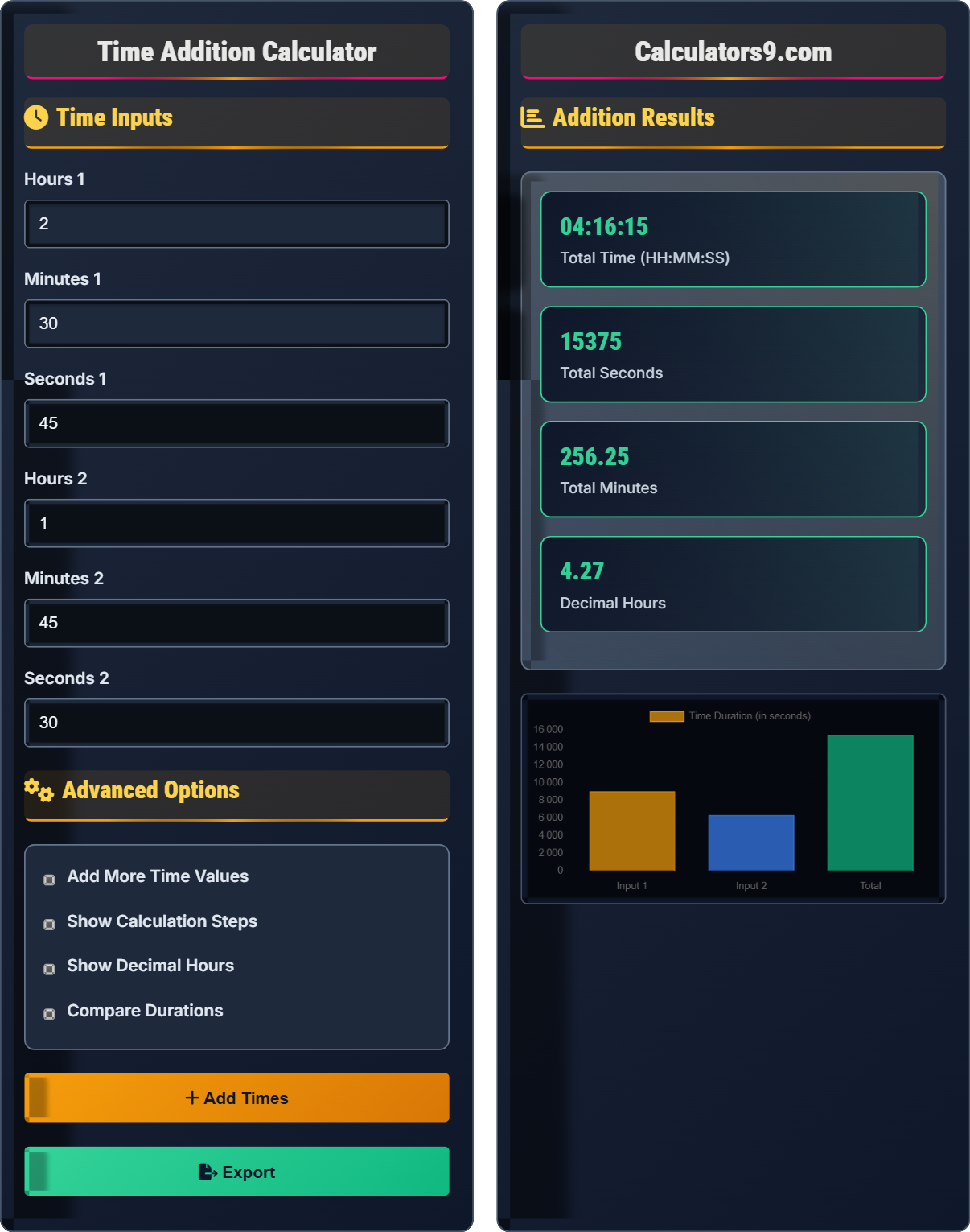
Example: Adding 2 hours 30 minutes 45 seconds to 1 hour 45 minutes 30 seconds:
First: (2×3600) + (30×60) + 45 = 7200 + 1800 + 45 = 9045 seconds
Second: (1×3600) + (45×60) + 30 = 3600 + 2700 + 30 = 6330 seconds
Total: 9045 + 6330 = 15375 seconds
Back to format: 15375 / 3600 = 4 hours, remainder 975 / 60 = 16 minutes, remainder 15 seconds
Result: 4 hours 16 minutes 15 seconds
Time Inputs
Advanced Options
Addition Results
| Component | Value |
|---|---|
| Input 1 | 2:30:45 |
| Input 2 | 1:45:30 |
| Total | 4:16:15 |
| Days | 0 |
| Hours | 4 |
| Step | Description |
|---|
Time Addition Guide
Adding time values requires careful handling of carry-over between units. When adding seconds, if the result exceeds 59, you must carry over to minutes. Similarly, when minutes exceed 59, you carry over to hours. This process continues up to days if necessary.
Time units follow a base-60 system: 60 seconds = 1 minute, 60 minutes = 1 hour, 24 hours = 1 day. When performing time addition, it's often easier to convert everything to the smallest unit (seconds), perform the addition, then convert back to the desired format.
When adding time manually, it's easy to forget to carry over units correctly. Always remember that 60 seconds equal 1 minute and 60 minutes equal 1 hour. Also, be careful when working with time across different days, as 24 hours equal 1 day.
Time Addition Basics
Process of combining two or more time durations into a total duration.
Total Seconds = (H₁×3600 + M₁×60 + S₁) + (H₂×3600 + M₂×60 + S₂)
Then convert back to H:M:S format using division and modulus operations.
- 60 seconds = 1 minute
- 60 minutes = 1 hour
- 24 hours = 1 day
- Carry over when limits exceeded
Time Management Strategies
Accurately summing time segments for effective time management.
- Track time in consistent units
- Sum regularly for reporting
- Use tools for accuracy
- Review for optimization
- Account for breaks between tasks
- Round appropriately for reporting
- Consider time zones if applicable
- Distinguish between gross and net time
Time Addition Learning Quiz
What is the result when adding 1 hour 45 minutes 30 seconds to 2 hours 30 minutes 45 seconds?
The answer is B) 4 hours 16 minutes 15 seconds. First, add each component separately: hours (1+2=3), minutes (45+30=75), seconds (30+45=75). Then convert excess: 75 seconds = 1 minute 15 seconds, and 75+1=76 minutes = 1 hour 16 minutes. So 3+1=4 hours, 16 minutes, and 15 seconds.
When adding time values, it's important to handle the carry-over between units. After adding each component (hours, minutes, seconds), you must convert any excess in smaller units to larger ones. This is similar to carrying over in regular addition when a digit exceeds 9, but with different thresholds: 60 seconds become 1 minute, and 60 minutes become 1 hour.
Time Addition: Combining time durations with proper carry-over
Carry-over: Converting excess units to the next higher unit
Base-60 System: Time uses 60 as the conversion factor between units
• 60 seconds = 1 minute
• 60 minutes = 1 hour
• Always convert excess to higher units
• Add seconds first, then minutes, then hours
• Convert immediately after each addition
• Double-check your carry-over calculations
• Forgetting to carry over from seconds to minutes
• Forgetting to carry over from minutes to hours
• Treating time like regular decimal numbers
You're planning a presentation that includes: 1 hour 25 minutes setup time, 45 minutes 30 seconds of presentation, and 20 minutes 45 seconds for Q&A. What is the total time required for the event? Show your work including all conversion steps.
Let's add these time values step by step:
Setup: 1 hour 25 minutes 0 seconds
Presentation: 0 hours 45 minutes 30 seconds
Q&A: 0 hours 20 minutes 45 seconds
Adding components: Hours = 1+0+0 = 1 hour
Minutes = 25+45+20 = 90 minutes
Seconds = 0+30+45 = 75 seconds
Now convert excess: 75 seconds = 1 minute 15 seconds
New minutes = 90+1 = 91 minutes
91 minutes = 1 hour 31 minutes
Final total = 1+1 = 2 hours 31 minutes 15 seconds
When adding multiple time values, it's best to organize the calculation systematically. First, group all hours together, all minutes together, and all seconds together. Then, starting with the smallest unit (seconds), convert any excess into the next larger unit. This systematic approach prevents errors and makes it easier to track the carry-over values.
Systematic Addition: Organizing components before adding
Carry-over Process: Converting excess to higher units
Sequential Conversion: Working from smallest to largest unit
• Group same units together first
• Convert from smallest unit upward
• Add carry-over to the next higher unit
• Use a table to organize your additions
• Always convert immediately after each step
• Verify your answer by estimating
• Forgetting to add carry-over to the final calculation
• Mixing up the order of conversion
• Not properly tracking intermediate values
FAQ
Q: How do I accurately add time values when planning a multi-day project?
A: When planning multi-day projects, consider these approaches:
1. Convert to a common unit: For large time spans, convert everything to hours or days for easier calculations.
2. Account for daily limits: Remember that productive time per day is limited (typically 6-8 hours of focused work).
3. Include buffers: Add 10-20% buffer time for unexpected delays.
4. Factor in breaks: Include lunch breaks, rest periods, and transition time.
For example, if tasks sum to 40 hours but you can only work 6 productive hours per day, the project will take 40/6 = 6.7 days minimum, likely 8-9 calendar days with buffers.
Q: What's the difference between gross time and net time in time tracking?
A: Gross time refers to the total time spent on an activity including all interruptions, breaks, and inefficiencies. Net time refers to the actual productive or focused time spent on the core task.
For example, if you spend 2 hours at your desk working on a project but spend 30 minutes checking emails, 20 minutes in meetings, and 10 minutes getting coffee, your gross time is 2 hours but your net time is only 1 hour.
Tracking both metrics helps identify productivity patterns. Gross time shows how much time you allocate to activities, while net time reveals how efficiently you use that time. For accurate project estimation, use net time calculations.