Business Calendar Calculator
Fast working days analysis • 2026 standards
Working Days Calculation Formula:
Show the calculatorBasic Formula: \( WD = TD - (WD \times \frac{2}{7}) - H \)
Where:
- \( WD \) = working days
- \( TD \) = total days
- \( H \) = holidays
Working days calculation determines business days between two dates, excluding weekends and holidays. The formula accounts for the fact that 2 days out of 7 are typically non-working days. For more precise calculations, iterate through each day and count only weekdays that aren't holidays.
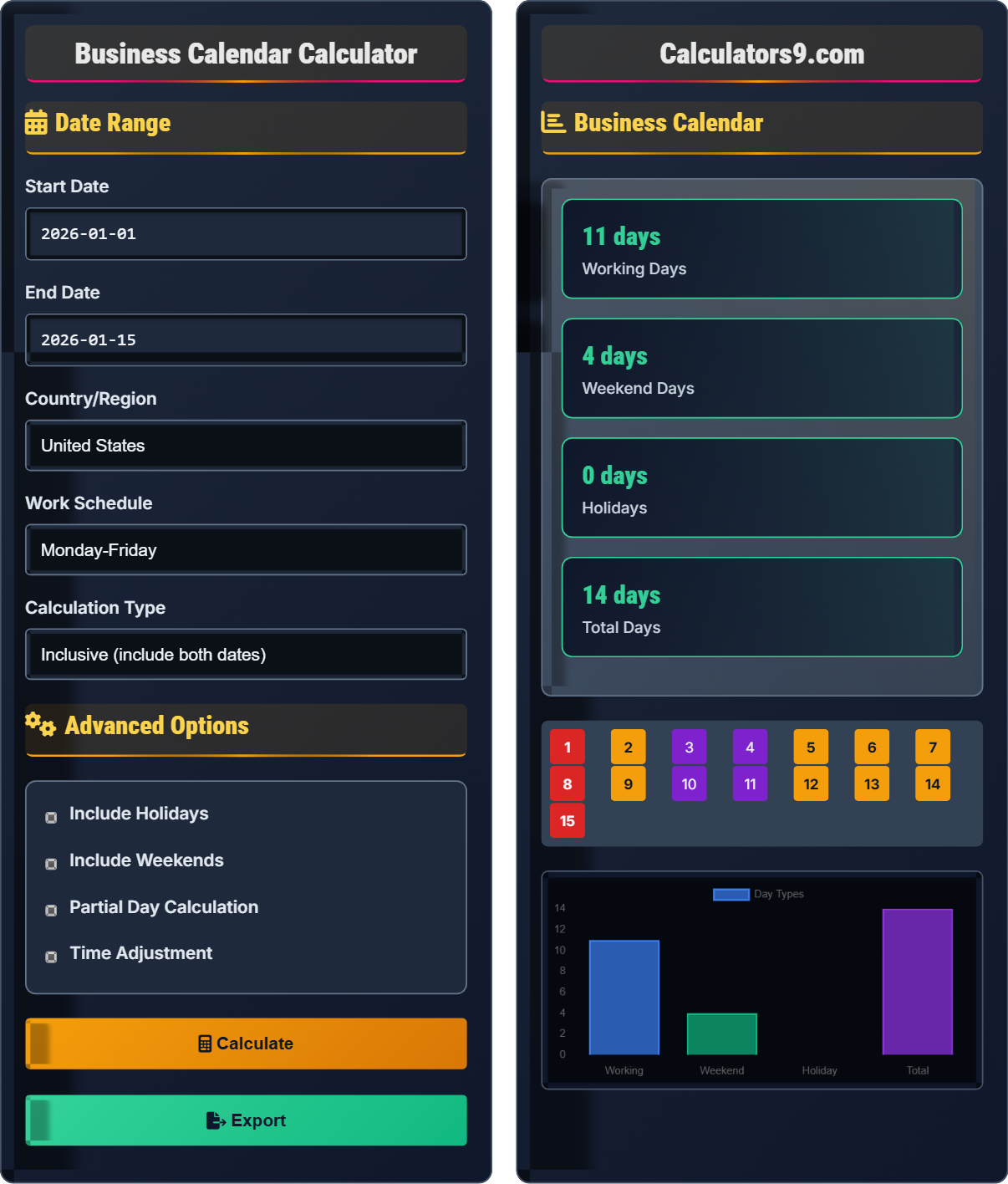
Example: Between January 1, 2026 and January 15, 2026:
Total days: 14
Weekends: 4 days (2 weekends)
Holidays: 0 days
Working days: 14 - 4 - 0 = 10 days
Thus, there are 10 working days in this period.
Date Range
Advanced Options
Business Calendar
| Category | Count | Description |
|---|---|---|
| Working Days | 10 | Business days in period |
| Weekend Days | 4 | Saturday/Sunday |
| Holidays | 0 | Public holidays |
| Total Days | 14 | Calendar days |
| Parameter | Value | Details |
|---|---|---|
| Start Date | Jan 1, 2026 | Period start |
| End Date | Jan 15, 2026 | Period end |
| Work Schedule | Mon-Fri | Working days |
| Country | US | Holiday calendar |
Comprehensive Business Calendar Guide
Working days calculation determines the number of business days between two dates, excluding weekends and holidays. It's essential for project planning, deadline tracking, and business operations. The calculation accounts for regional holidays, custom work schedules, and time zone differences to provide accurate business day counts.
Basic working days formula:
Where:
- \( WD \) = working days
- \( TD \) = total days
- \( H \) = holidays in period
This simplified formula assumes 2 weekend days per week. For precise calculations, iterate through each day and count only weekdays that aren't holidays.
Working days calculations are essential for:
- Project Management: Deadline tracking and milestone planning
- HR: Leave calculations and work schedule planning
- Finance: Interest calculations and trading days
- Logistics: Delivery time estimation
- Legal: Contract terms and compliance deadlines
- Start/End Times: Consider time components for accuracy
- Regional Holidays: Vary by country and region
- Work Schedule: May differ by location
- Daylight Saving: Affects period boundaries
- UTC Conversion: Use for consistent calculations
Business Calendar Fundamentals
Working days in a calendar period excluding weekends and holidays.
\( \text{Count each day in range and sum weekdays not in holiday list} \)
This method provides exact results but requires more computation.
- Standard work week is 5 days (Mon-Fri)
- Weekends are Saturday and Sunday
- Holidays are non-working days
- Time zones affect date boundaries
Scheduling Applications
Patterns of working and non-working days in an organization.
- Define working days (e.g., Mon-Wed-Fri)
- Iterate through date range
- Count days matching work schedule
- Exclude holidays
- Define weekend days clearly
- Account for regional holiday differences
- Consider shift work patterns
- Handle DST transitions
Business Calendar Learning Quiz
How many working days are there between Monday, January 5, 2026 and Friday, January 16, 2026 (inclusive), assuming no holidays?
The answer is C) 10. Counting inclusively from January 5 to January 16:
Jan 5-6-7-8-9 (Mon-Fri) = 5 days
Jan 12-13-14-15-16 (Mon-Fri) = 5 days
Total = 10 business days
(Jan 10-11 are weekend days)
This problem demonstrates the importance of inclusive counting and identifying weekends. When calculating business days, we count only weekdays (Mon-Fri) unless otherwise specified. The inclusion of both start and end dates affects the total count.
Business Days: Working days excluding weekends and holidays
Inclusive: Including both start and end dates
Weekend: Saturday and Sunday in standard schedules
• Standard work week is Mon-Fri
• Count inclusively unless specified otherwise
• Exclude weekends from business day counts
• Use calendar view to visualize date ranges
• Count weekdays systematically
• Remember that 5 business days = 1 work week
• Including weekends in business day counts
• Misunderstanding inclusive vs exclusive counting
• Forgetting to account for holidays
A company operates Monday through Friday. If July 4, 2026 falls on a Saturday, how does this affect the working days calculation between June 29, 2026 and July 8, 2026?
Since July 4, 2026 is a Saturday, it's already a non-working day. Therefore, the federal holiday doesn't change the business day count. Counting from June 29 to July 8:
June 29-30 (Tue-Wed) = 2 days
July 1-2-3 (Thu-Fri-Mon) = 3 days
July 4 (Sat) = 0 days (weekend)
July 5-8 (Sun-Mon-Tue-Wed) = 3 days
Total = 8 business days
If July 4 were a weekday, it would reduce the count by 1 day.
This demonstrates how holiday timing affects business day calculations. When a holiday falls on a weekend, it doesn't reduce the business day count since the day was already non-working. However, when holidays fall on weekdays, they reduce the business day count by one.
Federal Holiday: Nationally recognized non-working day
Observed Holiday: When holiday is moved to adjacent workday
Compensatory Day: Alternative day off for moved holidays
• Holiday on weekend = no effect on business days
• Holiday on weekday = reduces business days by 1
• Observed holidays may shift to adjacent weekdays
• Check if holidays fall on weekends
• Verify observed holiday dates
• Use official holiday calendars
• Treating weekend holidays as business day reductions
• Forgetting to account for observed holidays
• Assuming all holidays are observed on same date
FAQ
Q: How do I calculate business days across different time zones?
A: For accurate business day calculations across time zones:
1. Convert to UTC: Perform all calculations in UTC time
2. Apply Local Calendars: Use appropriate holiday calendar for each team
3. Consider Work Hours: Account for overlapping business hours
4. Adjust for DST: Handle daylight saving time transitions
Example: For a US team (EST) and EU team (CET), calculate business days separately using each region's calendar, then find overlapping work days for collaborative tasks.
Q: What's the difference between business days and calendar days?
A: Calendar days include all days of the week (7 days), while business days only include working days (typically 5 days Mon-Fri). For example:
Between Jan 1-5: 5 calendar days = 5 business days
Between Jan 1-8: 8 calendar days = 5 business days
Between Jan 1-15: 15 calendar days = 11 business days
Business days exclude weekends and holidays, making them more relevant for work planning.