DNS Lookup Simulator
Network tool • 2026 standards
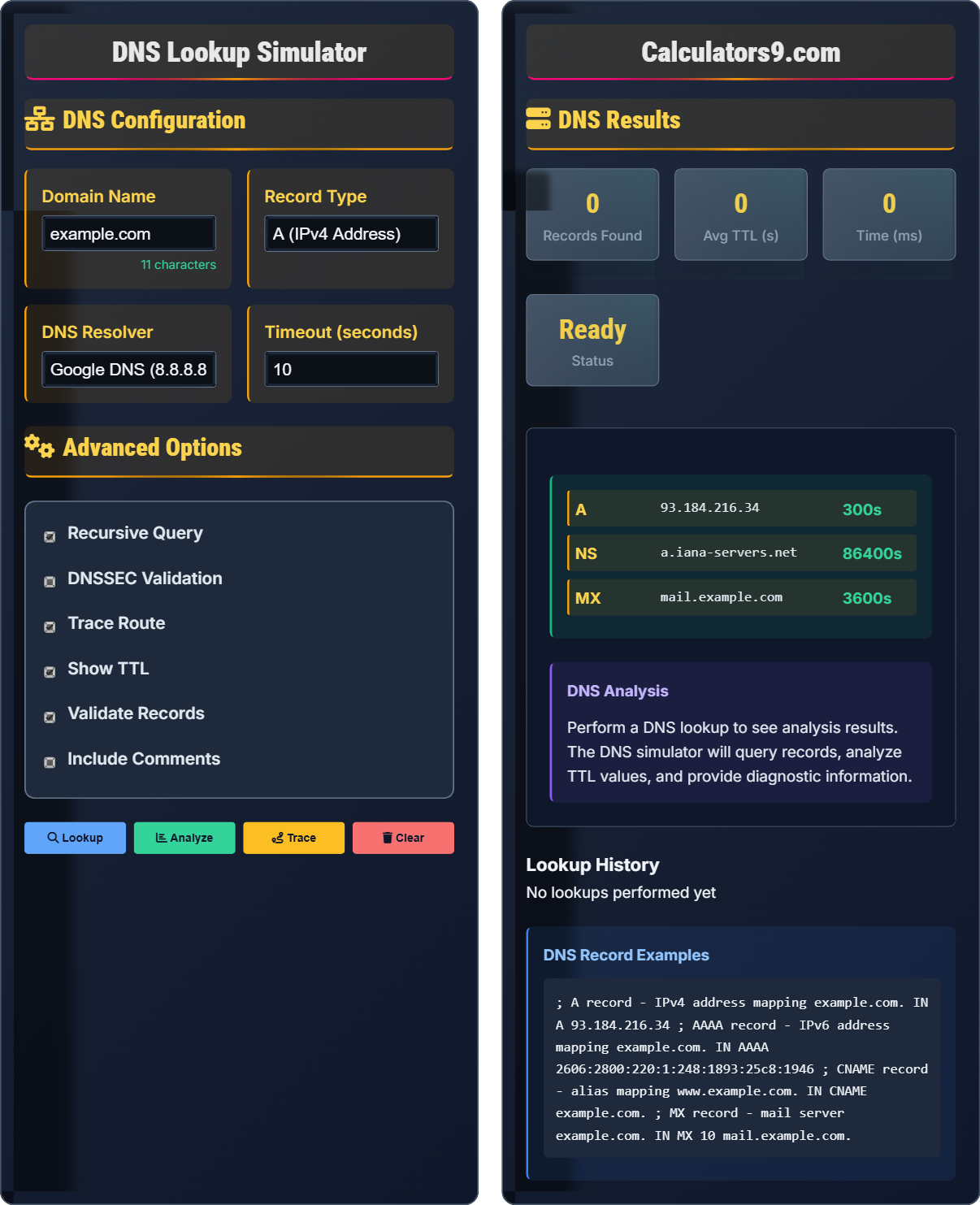
DNS Record Types:
Lookup RecordsA: IPv4 Address Record
AAAA: IPv6 Address Record
CNAME: Canonical Name Record
MX: Mail Exchange Record
TXT: Text Record
NS: Nameserver Record
TTL: Time To Live (seconds)
DNS (Domain Name System) translates human-readable domain names to IP addresses. DNS lookup is essential for network diagnostics, troubleshooting, and understanding domain configurations.
Best Practices:
- Check TTL values for propagation
- Verify MX records for email
- Use authoritative nameservers
- Monitor DNS resolution times
- Validate DNSSEC signatures
- Test with multiple resolvers
Impact: Proper DNS configuration improves network performance, ensures reliable domain resolution, and enhances security.
DNS Configuration
Advanced Options
DNS Results
Lookup History
DNS Fundamentals
DNS (Domain Name System) translates human-readable domain names to IP addresses. DNS records store information about domains and are essential for internet functionality.
A: Maps domain to IPv4 address
AAAA: Maps domain to IPv6 address
CNAME: Creates alias for another domain
MX: Specifies mail server priority
TXT: Stores text information
NS: Delegates domain to nameservers
Each record type serves specific purposes in domain configuration.
- Check TTL values for propagation
- Verify MX records for email
- Use authoritative nameservers
- Monitor DNS resolution times
- Validate DNSSEC signatures
- Test with multiple resolvers
Network Performance Impact
Proper DNS configuration improves network performance, ensures reliable domain resolution, enhances security, reduces latency, and provides better user experience across networks.
- Slow resolution times
- Incorrect record configurations
- Propagation delays
- Security vulnerabilities
- DNS cache poisoning
- Resolver failures
- Incorrect TTL values
- Missing MX records
- Propagation delays
- Security misconfigurations
DNS Lookup Learning Quiz
What is the primary purpose of DNS (Domain Name System)?
The answer is B) To translate domain names to IP addresses. DNS maps human-readable domain names like "example.com" to machine-readable IP addresses like "93.184.216.34", enabling computers to locate and connect to web servers.
Without DNS, users would need to remember complex IP addresses for every website. DNS acts as a phonebook for the internet, translating memorable domain names into the numerical addresses computers use to communicate.
DNS: Domain Name System
IP Address: Internet Protocol address
Domain Name: Human-readable website address
• Translates names to addresses
• Enables human-readable domains
• Critical internet infrastructure
• Hierarchical system
• Remember: DNS = Phonebook
• Names to numbers
• Hierarchical structure
• Confusing with encryption
• Thinking it's just caching
• Not understanding translation role
Which DNS record type is used to specify mail server information?
The answer is B) MX record. MX (Mail Exchange) records specify the mail server responsible for receiving email on behalf of a domain. They include priority values to determine which server to try first.
MX records are crucial for email delivery. They tell sending mail servers where to send emails for a domain. The priority number indicates preference, with lower numbers having higher priority.
MX Record: Mail Exchange record
Priority: Preference order for mail servers
Email Routing: Direction of email traffic
• MX records for email
• Includes priority values
• Lower priority = higher preference
• Critical for email delivery
• MX = Mail Exchange
• Priority: lower = higher priority
• Check for email issues
• Confusing with A records
• Not understanding priority
• Forgetting MX for email
A DNS administrator sets a TTL value of 300 seconds for an A record. What does this mean, and why might they choose this value?
A TTL (Time To Live) value of 300 seconds means that DNS resolvers will cache the record for 5 minutes before querying again. The administrator likely chose this value to:
- Allow for faster propagation when changes are made (shorter cache time)
- Reduce the load on authoritative DNS servers compared to very short TTLs
- Balance between responsiveness and performance
Lower TTL values enable faster updates but increase DNS query load; higher values reduce load but slow propagation.
TTL is a trade-off between update speed and performance. Short TTLs allow quick changes but increase DNS traffic. Long TTLs improve performance but delay propagation of changes.
TTL: Time To Live (caching duration)
Propagation: Distribution of DNS changes
Caching: Storing DNS information locally
• TTL controls caching duration
• Lower values = faster updates
• Higher values = better performance
• Balance based on needs
• Use short TTL before changes
• Default to 300-86400
• Consider your update needs
• Not adjusting TTL before changes
• Using extreme values
• Not understanding propagation
A user reports they can't access a website but can ping the IP address directly. What DNS-related issue could be causing this, and how would you troubleshoot it?
The issue is likely a DNS resolution problem. The user can reach the IP address, confirming network connectivity, but cannot resolve the domain name. Troubleshooting steps:
- Check DNS server settings on the client
- Test DNS resolution with nslookup or dig
- Verify the A record exists for the domain
- Check for DNS cache issues
- Try alternate DNS resolvers
Common causes include misconfigured DNS servers, failed DNS resolution, or issues with the domain's A record.
Since ping works with IP addresses but not domain names, the issue is between domain name and IP address resolution. This isolates the problem to DNS rather than network connectivity.
DNS Resolution: Converting domain to IP
Connectivity: Network access capability
Troubleshooting: Problem identification
• Isolate DNS vs network issues
• Verify DNS configuration
• Check record existence
• Use nslookup/dig
• Test with multiple resolvers
• Clear DNS cache
• Assuming network issue
• Not testing IP directly
• Skipping DNS checks
Which DNS security extension provides authentication for DNS responses?
The answer is B) DNSSEC. DNS Security Extensions (DNSSEC) provides authentication and integrity for DNS responses using digital signatures. It helps prevent DNS spoofing and cache poisoning attacks.
DNSSEC adds cryptographic signatures to DNS records, allowing resolvers to verify the authenticity of responses. This prevents attackers from injecting fake DNS records into the resolution process.
DNSSEC: DNS Security Extensions
Authentication: Verifying source
Integrity: Ensuring data hasn't changed
• DNSSEC provides authentication
• Uses digital signatures
• Prevents spoofing
• Validates response integrity
• Enable DNSSEC validation
• Verify DNSSEC support
• Check signatures
• Confusing with other DNS types
• Not understanding security role
• Ignoring validation
FAQ
Q: What's the difference between recursive and iterative DNS queries?
A: The key differences are:
Recursive Query:
- DNS server resolves the query completely
- Server contacts other DNS servers if needed
- Returns final answer or error to client
- Typically used between client and local DNS server
Iterative Query:
- DNS server returns best answer it knows
- If not authoritative, returns referral to another server
- Client continues querying referrals
- Typically used between DNS servers
Most client queries are recursive, while server-to-server queries are usually iterative.
Q: How do I troubleshoot DNS propagation issues?
A: Steps to troubleshoot DNS propagation:
1. Check TTL Values:
- Verify TTL values are appropriate
- Lower TTL before making changes
- Wait for TTL duration after changes
2. Use Multiple Resolvers:
- Test with Google DNS (8.8.8.8)
- Test with Cloudflare DNS (1.1.1.1)
- Compare results
3. Check Authoritative Servers:
- Query nameservers directly
- Verify records are correct
- Check for errors
4. Monitor Progress:
- Use online DNS checkers
- Check from different locations
- Allow up to 48 hours for full propagation
Remember that DNS changes can take time to propagate globally.