URL Parser Encoder
Network tool • 2026 standards
URL Structure:
Parse URLProtocol: https://
Subdomain: www.
Domain: example.com
Port: :8080
Path: /path/to/resource
Query: ?param1=value1¶m2=value2
Fragment: #section
URL parsing and encoding are essential for web development, API communication, and network programming. Proper URL handling ensures data integrity, prevents security vulnerabilities, and enables correct resource identification.
Best Practices:
- Always encode special characters in URLs
- Validate URLs before processing
- Handle query string parameters safely
- Use proper encoding for different contexts
- Sanitize URLs to prevent injection attacks
Impact: Proper URL handling improves application security, enhances API reliability, and ensures correct data transmission across networks.
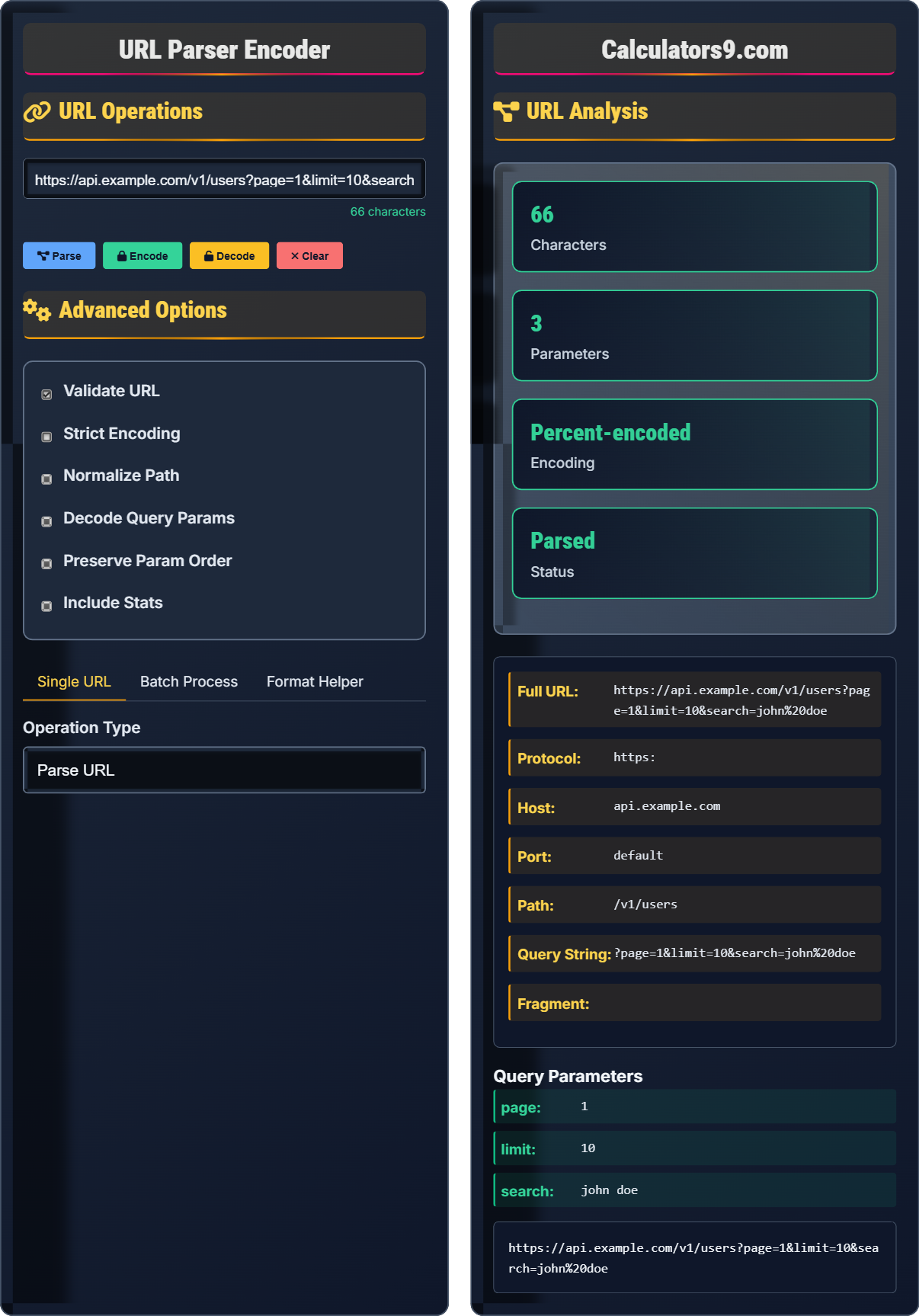
URL Operations
Advanced Options
URL Analysis
Query Parameters
URL Structure Fundamentals
A Uniform Resource Locator (URL) consists of several components that define how to locate a resource on the internet. Understanding these components is essential for web development and network programming.
Protocol: Method used to access the resource (http, https, ftp)
Host: Domain name or IP address of the server
Port: Network port (optional, defaults to protocol standard)
Path: Location of the resource on the server
Query: Key-value pairs for parameters
Fragment: Section identifier within the resource
Each component plays a specific role in resource identification and access.
- URLs must follow RFC 3986 standards
- Special characters require percent-encoding
- Query parameters use & separator
- URLs are case-sensitive for paths
- Validate URLs before processing
Encoding & Decoding Impact
Proper URL encoding and decoding improves application security, enhances API reliability, prevents injection attacks, ensures correct data transmission, and maintains data integrity across networks.
- Space: %20
- Plus: %2B
- Hash: %23
- Ampersand: %26
- Equals: %3D
- Question Mark: %3F
- Improper character encoding
- Double encoding
- Missing validation
- Security vulnerabilities
URL Parsing & Encoding Learning Quiz
In the URL "https://api.example.com/v1/users?search=john%20doe&page=1", what does the "%20" represent?
The answer is B) Space character. The "%20" is the percent-encoded representation of a space character in URLs. When URLs contain special characters like spaces, they must be encoded to ensure proper transmission and interpretation.
Percent-encoding is a mechanism to encode special characters in URLs. Each character is represented by a "%" followed by two hexadecimal digits. This ensures that URLs remain valid and interpretable by web browsers and servers.
Percent-Encoding: Encoding method using % and hex digits
Special Characters: Characters that have reserved meanings
URL Safety: Ensuring characters don't interfere with parsing
• Spaces must be encoded as %20
• Some systems accept + for spaces
• Always encode special characters
• Use encodeURIComponent() in JavaScript
• Remember: %20 = space
• %2B = plus sign
• Test encoding before sending
• Not encoding special characters
• Double encoding
• Forgetting to decode on server
In the URL "https://www.example.com:8080/api/v1/users?limit=10&offset=20#results", what is the fragment component?
The answer is D) #results. The fragment component is everything after the "#" symbol in a URL. It identifies a specific section within the resource and is typically used for client-side navigation without server communication.
URLs are structured with distinct components separated by specific delimiters. The fragment component (also called anchor) is denoted by the "#" symbol and is used to reference a portion of the document. Unlike other components, fragments are not sent to the server.
Fragment: Component after #, client-side reference
Query String: Component after ?, key-value pairs
Path: Location of resource on server
• Fragment starts with #
• Not sent to server
• Used for client-side navigation
• Case-sensitive
• Fragments are client-side only
• Use for page sections
• Don't include in server requests
• Confusing fragment with query
• Sending fragments to server
• Not handling fragments properly
You receive a URL with the query string "?name=John+Doe&age=30&city=New%20York". How should you properly parse and decode these parameters to extract the correct values?
To properly parse and decode the query string:
- Split the query string by "&" to get individual parameters
- Split each parameter by "=" to separate key and value
- Decode each value using URL decoding (percent-decoding)
- Note: "+" signs in query strings represent spaces
Result:
- name: "John Doe" (from "John+Doe")
- age: "30"
- city: "New York" (from "New%20York")
Many programming languages provide built-in functions for this, such as JavaScript's URLSearchParams or Python's urllib.parse.
Query string parsing requires understanding that "+" represents spaces in query strings, while "%20" represents spaces in general URL encoding. Different contexts may require different handling approaches.
Query String: Parameters appended to URL after ?
Parameter: Key-value pair in query string
URL Decoding: Converting encoded characters back
• Split by & for parameters
• Split by = for key-value
• Decode %XX sequences
• Handle + as space in query
• Use built-in URL parsers
• Be careful with + vs %20
• Validate decoded values
• Not handling + as space
• Improper percent-decoding
• Not validating input
When processing user-submitted URLs, what security measures should you implement to prevent URL-based attacks?
Essential security measures for URL processing:
- URL Validation: Verify URLs follow proper format and protocol
- Whitelist Protocols: Only allow safe protocols (http, https)
- Input Sanitization: Clean and validate all URL components
- Path Traversal Prevention: Block directory traversal attempts
- Length Limits: Enforce reasonable URL length limits
- Domain Restrictions: Validate allowed domains when appropriate
Example attack prevention: Prevent URLs like "javascript:alert('xss')" or "file:///etc/passwd" which could lead to security vulnerabilities.
URLs can be vectors for various attacks including XSS, open redirects, and server-side request forgery. Proper validation and sanitization are crucial for security.
URL Validation: Checking URL format and safety
Path Traversal: Attempting to access unauthorized files
Open Redirect: Using URL to redirect to malicious site
• Always validate user input
• Restrict allowed protocols
• Sanitize before processing
• Implement proper error handling
• Use regex for basic validation
• Implement domain whitelisting
• Log suspicious URLs
• Not validating URLs
• Accepting dangerous protocols
• Not sanitizing input
Which encoding method should be used for encoding individual parameter values in a URL query string?
The answer is B) encodeURIComponent(). This function encodes all special characters that have meaning in URLs, including those that are reserved in query strings like &, =, ?, and #. It's specifically designed for encoding individual parameter values.
Different JavaScript functions have different purposes: encodeURI() preserves URL structure, while encodeURIComponent() encodes all special characters. For query parameters, use encodeURIComponent() to ensure proper encoding.
encodeURIComponent(): Encodes all special characters
encodeURI(): Preserves URL structure
Query Parameter: Individual key-value pair
• Use encodeURIComponent() for params
• Use encodeURI() for full URLs
• Don't use deprecated escape()
• Always encode user input
• encodeURIComponent() for values
• encodeURI() for complete URLs
• Always validate after encoding
• Using encodeURI() for parameters
• Not encoding user input
• Using deprecated functions
FAQ
Q: What's the difference between encodeURI() and encodeURIComponent()?
A: The key difference lies in what characters they encode:
encodeURI(): Preserves the structure of a complete URI by not encoding certain characters that are essential for URI syntax (like :, /, ?, #, etc.). Use this when encoding an entire URI.
encodeURIComponent(): Encodes all special characters that have meaning in URIs, including those that are reserved in query strings (like &, =, ?, #, +, etc.). Use this for encoding individual parameter values.
Example:
- encodeURI("https://example.com/path?param=value") - Preserves structure
- encodeURIComponent("param=value") - Encodes = and other special chars
For query parameters, always use encodeURIComponent() to ensure proper encoding.
Q: How should I handle URL validation to prevent security issues?
A: Implement comprehensive URL validation with these steps:
1. Basic Format: Use regex or built-in URL parsers to verify proper structure
2. Protocol Whitelist: Only allow safe protocols (http, https)
3. Domain Validation: If appropriate, restrict to trusted domains
4. Path Traversal: Check for ../ patterns that could access unauthorized files
5. Length Limits: Enforce reasonable maximum lengths
6. Character Validation: Sanitize for dangerous characters
Example validation pattern:
^https?:\/\/(?:[-\w.])+(?:\:[0-9]+)?(?:\/(?:[\w\/_.])*)?(?:\?(?:[\w&=%.])*)?(?:\#(?:[\w.])*)?$
Remember: Never trust user input, always validate and sanitize URLs before processing.