Database Index Size Estimator
Performance optimization • Storage planning • Index analysis
Database Index Size & Storage Calculation
Estimate Index SizeDatabase indexes require additional storage space for performance gains.
Key factors affecting index size:
- Row Count: Number of records in the table
- Column Size: Data type and length of indexed columns
- Index Type: B-tree, Hash, Full-text, Spatial
- Storage Overhead: Metadata, padding, fragmentation
- Database Engine: Implementation-specific overhead
General Rule: Indexes typically require 10-30% of table size.
Proper index sizing optimizes performance while managing storage costs.
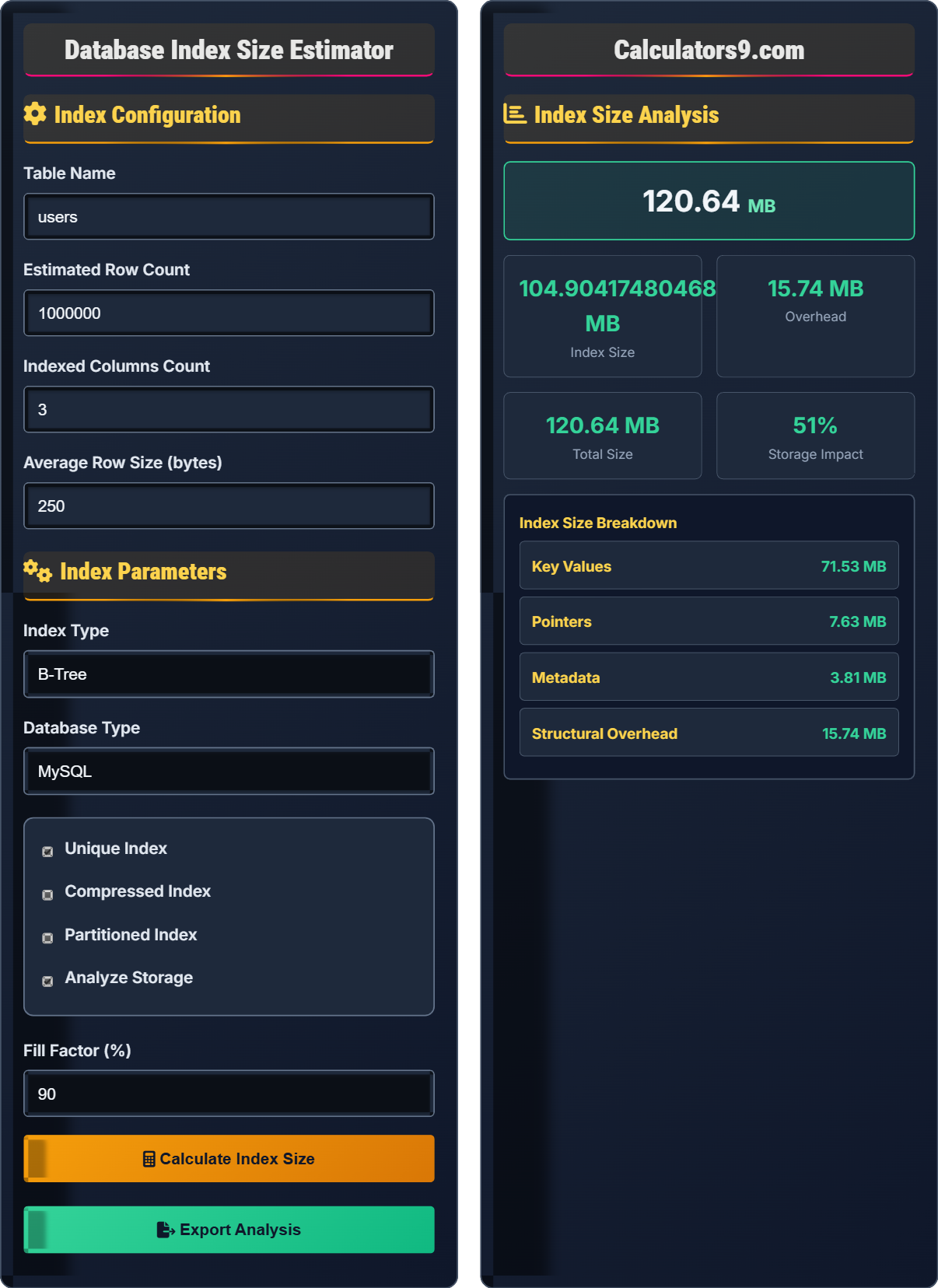
Index Configuration
Index Parameters
Index Size Analysis
Database Indexing & Storage Optimization Guide
Factors affecting index size:
Performance considerations:
- Query Speed: Indexes accelerate SELECT operations
- Insert/Update Cost: Indexes slow down data modifications
- Storage Requirements: Additional disk space needed
- Memory Usage: Indexes consume buffer pool space
- Maintenance Overhead: Index rebuilding and optimization
Effective optimization approaches:
- Composite Indexes: Combine multiple columns
- Partial Indexes: Index subsets of data
- Index Compression: Reduce storage footprint
- Regular Maintenance: Rebuild fragmented indexes
- Monitoring: Track index usage and effectiveness
- Capacity Planning: Account for index storage needs
- Performance Budgeting: Balance speed vs. storage
- Cost Optimization: Evaluate ROI of each index
- Scalability Planning: Consider growth projections
- Backup Strategy: Include index storage in backups
Index Size Fundamentals
Storage space required by database indexes.
Index Size ≈ (Row Count × Index Entry Size) + Overhead
Entry size includes key values and pointers.
- Indexes require additional storage space
- Size grows with row count
- Complex indexes require more space
- Consider maintenance overhead
Performance Analysis
Balance between speed and storage requirements.
- Estimate index size requirements
- Calculate performance gains
- Assess storage costs
- Evaluate maintenance overhead
- Determine ROI
- Indexes should improve query performance
- Storage overhead should be justified
- Maintenance costs should be manageable
- Overall system performance should improve
Database Indexing Learning Quiz
Which of the following typically requires the most storage space in a B-tree index?
The correct answer is B) Key values. In a B-tree index, the majority of storage space is consumed by the actual key values stored in the leaf nodes. The key values are the indexed column data that enable fast lookups. While pointers and metadata are important, they typically consume less space than the actual indexed data values.
This question highlights the primary storage component of B-tree indexes. The key values are the essential data that makes indexing effective, and their size directly correlates with the storage requirements. Understanding this helps in estimating index sizes based on the data types and lengths of the indexed columns.
B-tree: Self-balancing tree data structure
Leaf Nodes: Bottom-level nodes containing actual data
Key Values: Indexed column values
• Key values dominate index storage
• Data type affects storage requirements
• Larger keys mean larger indexes
• Shorter data types require less storage
• Consider key compression for large values
• Monitor key size impact
• Underestimating key value storage needs
• Not considering data type impact
• Ignoring index entry overhead
A table has 1 million rows with a VARCHAR(50) column indexed. If each character requires 1 byte and there's 20 bytes of overhead per index entry, what is the approximate index size?
Calculation:
Row count: 1,000,000
Key size: 50 bytes (VARCHAR(50))
Overhead per entry: 20 bytes
Total per entry: 50 + 20 = 70 bytes
Index size: 1,000,000 × 70 = 70,000,000 bytes
Convert to MB: 70,000,000 ÷ (1024²) ≈ 66.7 MB
Approximate index size: 67 MB
This calculation demonstrates how to estimate index size by considering both the key values and the overhead associated with each index entry. The overhead includes pointers, metadata, and structural elements needed for the index to function properly.
Index Entry: Single record in index structure
Overhead: Additional storage for index structure
Storage Calculation: Mathematical estimation
• Include both key and overhead in calculations
• Consider data type storage requirements
• Account for structural overhead
• Estimate 20-30% overhead for B-tree indexes
• Use actual average key size for accuracy
• Consider database-specific overhead
• Forgetting index entry overhead
• Using maximum instead of average key size
• Not converting units properly
A database administrator notices that adding an index on a large table improved SELECT query performance by 80% but decreased INSERT performance by 25%. The index requires 150MB of storage. Analyze the trade-offs and determine if this index is beneficial for a read-heavy application.
Trade-off analysis:
Performance benefits:
- 80% improvement in SELECT operations
- Significant query time reduction
Performance costs:
- 25% decrease in INSERT operations
- Additional 150MB storage required
For read-heavy application:
- Benefits outweigh costs if reads are frequent
- Storage cost is reasonable for performance gain
- INSERT impact may be acceptable if infrequent
Recommendation: Index is beneficial for read-heavy workload with predominantly SELECT operations.
This demonstrates the classic read-write performance trade-off in indexing. The decision depends on the application's usage patterns. Read-heavy applications benefit significantly from indexes, while write-heavy applications may suffer from the maintenance overhead.
Read-Heavy: Predominantly SELECT operations
Write-Heavy: Predominantly INSERT/UPDATE/DELETE
Trade-off: Performance balance consideration
• Consider application workload patterns
• Weigh performance gains vs. costs
• Evaluate storage vs. performance trade-offs
• Analyze query patterns before indexing
• Monitor both read and write performance
• Consider application priorities
• Adding indexes without considering workload
• Not measuring both read and write impact
• Ignoring storage costs
A composite index on (country, city, zip_code) is consuming excessive storage. The table has 2 million rows with VARCHAR(50) for country, VARCHAR(100) for city, and VARCHAR(10) for zip_code. Suggest optimization strategies to reduce storage while maintaining query performance.
Optimization strategies:
1. Reorder columns: Place most selective column first (zip_code, country, city)
2. Use prefix indexing: INDEX(country(3), city(10), zip_code)
3. Consider separate indexes: Individual indexes for each column
4. Implement index compression if supported
5. Evaluate partial indexes for common query patterns
6. Normalize lookup tables for country/city data
These strategies can significantly reduce storage requirements while maintaining query performance for common access patterns.
This demonstrates optimization techniques for composite indexes. Column ordering affects index efficiency, and prefix indexing can dramatically reduce storage for string columns. The goal is to maintain performance while minimizing storage costs.
Composite Index: Index on multiple columns
Prefix Indexing: Index only first N characters
Column Selectivity: Uniqueness of column values
• Order columns by selectivity
• Consider prefix indexing for long strings
• Balance storage vs. performance
• Place most selective columns first
• Use prefix indexing for long strings
• Monitor index usage statistics
• Not considering column order impact
• Indexing unnecessarily long strings
• Not using prefix indexing when appropriate
Which index type typically requires the most storage space relative to the data being indexed?
The answer is C) Full-text. Full-text indexes typically require the most storage space because they store additional information like word positions, frequencies, and linguistic transformations. They create inverted indices that map words to document locations, requiring significantly more storage than simple B-tree or Hash indexes.
Full-text indexes are specialized structures designed for text searching. They store complex mappings between words and their occurrences in documents, including position information and linguistic variations. This makes them much larger than simple value-to-pointer mappings in B-tree indexes.
Full-text Index: Index for text searching
Inverted Index: Maps values to locations
Storage Overhead: Additional space requirements
• Full-text indexes require significant storage
• Different index types have different overhead
• Consider storage cost for each index type
• Reserve significant space for full-text indexes
• Consider compression for text indexes
• Evaluate necessity of full-text features
• Underestimating full-text index storage needs
• Not considering index type differences
• Assuming all indexes have similar overhead
FAQ
Q: How does index compression affect both storage and performance?
A: Index compression effects:
- Storage: Reduces disk space by 20-80% depending on data patterns
- Performance: May improve I/O performance due to smaller index size
- CPU: Slightly increases CPU usage for compression/decompression
- Reads: Generally faster due to reduced I/O
- Writes: Slightly slower due to compression overhead
The net effect is usually positive for read-heavy workloads.
Q: What's the difference between clustered and non-clustered indexes in terms of storage requirements?
A: Storage differences:
- Clustered: Data is physically stored in index order; only one per table
- Non-Clustered: Separate structure with pointers to actual data
- Size: Clustered index equals table size; non-clustered adds additional storage
- Impact: Clustered affects all other indexes (they use row locators)
Clustered indexes don't add storage beyond the table itself, while non-clustered indexes add additional storage requirements.