Regex Tester & Builder
Pattern matching tool • 2026 code development
Regular Expression Syntax:
Show Builder\( /pattern/flags \)
\( /\\d+/g \) - matches one or more digits globally
\( /(abc)/ \) - captures group containing "abc"
Where:
- \( pattern \) = regular expression pattern to match
- \( flags \) = modifiers (g, i, m, s, u, y)
- \( \\d \) = digit character class
- \( + \) = one or more quantifier
- \( () \) = capturing group
Regular expressions are patterns used to match character combinations in strings. They are essential for validation, parsing, and manipulation of text data.
Example: Email validation pattern:
\( /^[a-zA-Z0-9._%+-]+@[a-zA-Z0-9.-]+\\.[a-zA-Z]{2,}$/ \)
This matches valid email addresses with proper structure.
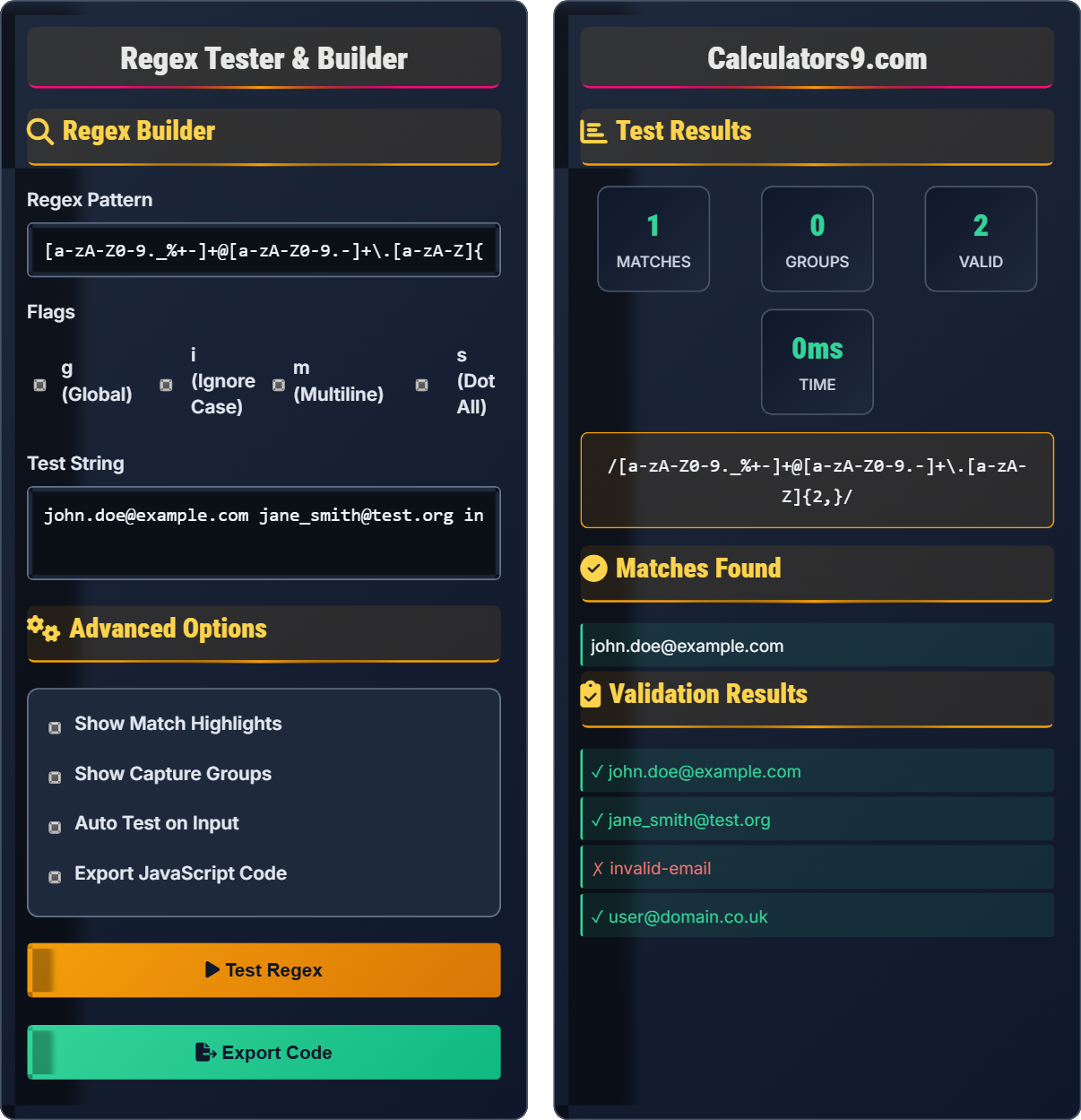
Regex Builder
Advanced Options
Test Results
Matches Found
Validation Results
Regex Builder
Regular expressions (regex) are sequences of characters that define search patterns. They are used for string matching, validation, and text manipulation. Regex patterns consist of literal characters and metacharacters that have special meanings.
The fundamental components of regular expressions include:
Where:
- \( literals \) = actual characters to match
- \( metacharacters \) = special characters with meaning (. ^ $ * + ? { } [ ] \ | ( ))
- \( quantifiers \) = specify repetition (* + ? {n,m})
Regular expressions are most effective for:
- Validation: Email, phone number, password validation
- Extraction: Parsing log files, extracting data from text
- Replacement: Find and replace operations with complex patterns
- Routing: URL pattern matching in web frameworks
- Keep Simple: Complex regex can be hard to maintain
- Test Thoroughly: Edge cases can cause unexpected behavior
- Use Descriptive Comments: Document complex patterns
- Consider Performance: Complex patterns can be slow on large texts
Regex Fundamentals
Metacharacters have special meaning, literals match themselves.
\( /pattern/flags \) where pattern=matching rules, flags=modifiers.
Common flags: g (global), i (case-insensitive), m (multiline).
- Escape special characters when literal
- Use anchors for exact matches
- Group for capture or alternation
JavaScript Integration
JavaScript provides multiple regex methods for different use cases.
- String.match() - find matches
- String.replace() - replace matches
- String.search() - find position
- String.split() - split on pattern
- Performance on large strings
- Browser compatibility
- Error handling
- Security implications
JavaScript Regex Examples
Common Regex Patterns
Regex Learning Quiz
What does the regex pattern [a-z]+ match?
The answer is B) One or more lowercase letters. The brackets [a-z] define a character class that matches any single lowercase letter, and the + quantifier means "one or more". So [a-z]+ matches one or more consecutive lowercase letters.
Understanding character classes and quantifiers is fundamental to regex. The square brackets [] create a character class that matches any single character within the range. The + quantifier modifies the preceding element to match one or more occurrences. This combination is commonly used for matching words or sequences of similar characters.
Character Class: Set of characters to match
Quantifier: Specifies repetition count
Range: Defined by hyphen in character class
• [a-z] matches single lowercase letter
• + means one or more
• Quantifiers apply to preceding element
• [A-Z] for uppercase, [0-9] for digits
• Use * for zero or more occurrences
• ? for zero or one occurrence
• Confusing single character with repeated
• Forgetting case sensitivity
• Misunderstanding quantifier scope
Analyze this regex pattern: ^[A-Za-z0-9._%+-]+@[A-Za-z0-9.-]+\.[A-Za-z]{2,}$
This is an email validation pattern that breaks down as:
- ^ - Start of string anchor
- [A-Za-z0-9._%+-]+ - One or more allowed characters for username
- @ - Literal @ symbol
- [A-Za-z0-9.-]+ - One or more allowed characters for domain
- \. - Literal dot (escaped)
- [A-Za-z]{2,} - Two or more letters for TLD
- $ - End of string anchor
This pattern validates email addresses with proper structure.
This complex pattern demonstrates multiple regex concepts: anchors for exact matching, character classes for allowed characters, quantifiers for repetition requirements, and escaping for literal dots. The ^ and $ anchors ensure the entire string matches the pattern, preventing partial matches.
Anchors: Position markers (^, $)
Escaping: \ to treat metacharacter literally
Quantifier Range: {n,m} for specific counts
• Anchors ensure full string match
• Escape special characters when literal
• Use ranges for specific counts
• Test with various email formats
• Consider international domains
• Anchor patterns for validation
• Forgetting to escape the dot
• Not anchoring the pattern
• Too restrictive or too lenient
A developer needs to extract all URLs from a text document. URLs start with http:// or https:// and continue until a space or punctuation. Write a regex pattern that would accomplish this and explain the components.
Pattern: https?://[^\s]+
Components:
- https? - Matches "http" followed by optional "s"
- :// - Literal "://" characters
- [^\s]+ - One or more non-whitespace characters
This pattern matches both HTTP and HTTPS URLs and continues until a whitespace character is encountered.
The [^\s] character class is crucial here - it matches any character that is NOT a whitespace character. The ^ inside square brackets creates a negated character class. The ? quantifier makes the "s" optional, allowing both http and https protocols. This demonstrates how regex can efficiently extract structured data from unstructured text.
Negated Class: [^...] matches anything not listed
Optional Character: ? makes preceding element optional
Protocol: http or https in URLs
• Use negated classes to stop at delimiters
• ? makes characters optional
• Consider all possible variations
• Test with various URL formats
• Consider edge cases (trailing punctuation)
• Use global flag for multiple matches
• Not handling both HTTP and HTTPS
• Including trailing punctuation
• Not stopping at appropriate delimiters
A system needs to extract product codes from inventory strings. Product codes follow the pattern: 2 uppercase letters, 3 digits, 1 letter, 2 digits (e.g., AB123C45). Write a regex with capture groups to extract each component separately.
Pattern: ([A-Z]{2})([0-9]{3})([A-Z])([0-9]{2})
Capture groups:
- Group 1: ([A-Z]{2}) - 2 uppercase letters
- Group 2: ([0-9]{3}) - 3 digits
- Group 3: ([A-Z]) - 1 uppercase letter
- Group 4: ([0-9]{2}) - 2 digits
For "AB123C45": Group 1="AB", Group 2="123", Group 3="C", Group 4="45"
Capture groups using parentheses () allow you to extract specific parts of a match. Each pair of parentheses creates a numbered group that can be referenced later. The {n} quantifier specifies exactly n occurrences, making it perfect for fixed-length components like product codes. This approach is essential for parsing structured data.
Capture Group: () creates numbered reference
Exact Quantifier: {n} matches exactly n times
Structured Data: Predictable format
• Parentheses create capture groups
• Groups are numbered left to right
• Use {n} for exact counts
• Number groups for easy reference
• Use non-capturing groups (?:) when not needed
• Test with various valid formats
• Forgetting to escape special characters
• Not considering all format variations
• Creating unnecessary capture groups
Which of the following represents the best practice for writing complex regex patterns?
The answer is B) Break into multiple lines with comments. Complex regex patterns should be documented and formatted for readability. This makes them easier to understand, debug, and maintain. Many regex engines support extended syntax with whitespace and comments to improve readability.
Complex regex patterns can become very difficult to read and maintain. Best practices include adding comments to explain each component, using extended syntax when available, and breaking complex patterns into logical sections. This improves code quality and reduces the likelihood of errors during maintenance.
Extended Syntax: Whitespace and comments allowed
Documentation: Explaining pattern components
Maintainability: Easy to update and fix
• Document complex patterns
• Use meaningful variable names
• Test thoroughly with edge cases
• Use regex builders for complex patterns
• Test with diverse input data
• Consider performance implications
• Writing unmaintainable one-liners
• Not testing edge cases
• Overcomplicating simple tasks
FAQ
Q: What's the difference between .match() and .test() in JavaScript regex?
A: The key differences are:
- .test(): Returns boolean (true/false) indicating match
- .match(): Returns array of matches or null
Example:
const text = "Hello world";
const regex = /world/;
text.test(regex); // true
text.match(regex); // ["world"]
Use .test() for validation, .match() for extraction.
Q: How do I handle special characters in regex patterns?
A: Special characters need escaping with backslash:
- Literal dot: Use \\. instead of .
- Literal asterisk: Use \\* instead of *
- Literal plus: Use \\+ instead of +
Special characters: . ^ $ * + ? { } [ ] \ | ( )
Inside character classes [], only \\, ], and ^ (at start) need escaping.