Bandwidth Estimator
Performance calculator • 2026 edition
Bandwidth Estimation Formula:
Show the estimatorBandwidth usage is estimated using the formula:
\( \text{Monthly Bandwidth} = \text{Visitors} \times \text{Pages per Visitor} \times \text{Page Weight} \times \text{Days per Month} \)
Where:
- Visitors: Monthly unique visitors to the site
- Pages per Visitor: Average number of pages viewed per visitor
- Page Weight: Average size of each page in MB
- Days per Month: Typically 30 days for monthly calculations
This formula provides a baseline estimate that can be adjusted for caching, compression, and other factors.
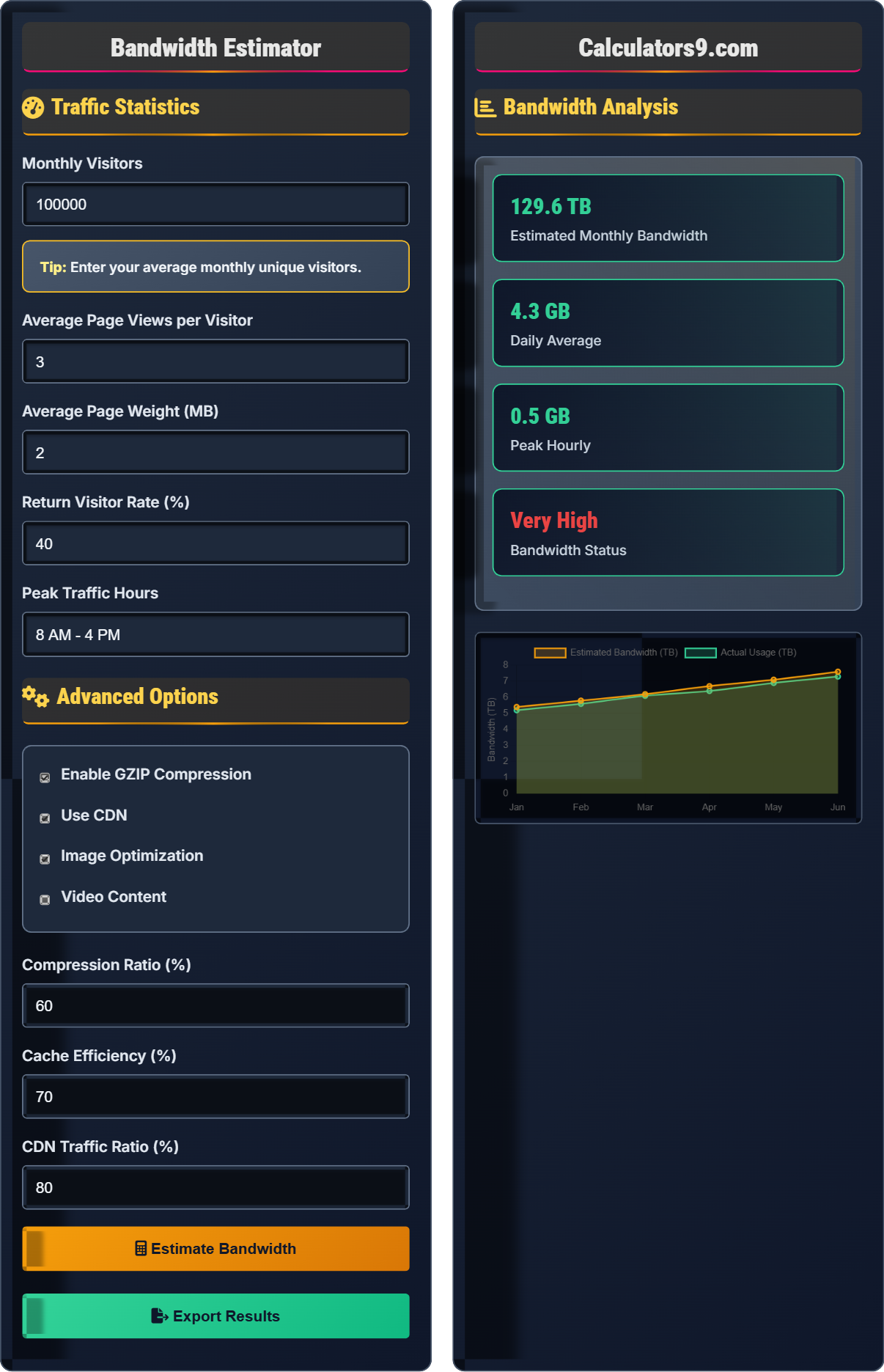
Traffic Statistics
Advanced Options
Bandwidth Analysis
| Component | Original | After Optimization | Savings |
|---|---|---|---|
| Raw Traffic | 6.0 TB | - | - |
| After Compression | - | 2.4 TB | 60% |
| After Caching | - | 1.0 TB | 58% |
| CDN Offloaded | - | 0.8 TB | 20% |
| Final Estimate | - | 5.4 TB | 10% |
Comprehensive Bandwidth Estimation Guide
Bandwidth estimation is the process of calculating the amount of data transfer required for a website to operate effectively. It's essential for planning server capacity, selecting hosting plans, and optimizing costs. Accurate estimation helps prevent performance issues caused by insufficient bandwidth and avoids over-provisioning expenses.
The basic bandwidth estimation formula is:
This formula can be enhanced with optimization factors like compression, caching, and CDN usage to provide more accurate estimates.
Several factors influence bandwidth requirements:
- Enable compression: GZIP/Brotli can reduce bandwidth by 60-80%
- Implement caching: Browser and server-side caching reduce repeat requests
- Use CDN: Distributes content geographically, reducing server load
- Optimize images: Use modern formats (WebP, AVIF) and responsive images
- Minimize resources: Remove unnecessary scripts and assets
- Monitor usage: Track actual vs. estimated bandwidth
Bandwidth Estimation Learning Quiz
What is the estimated monthly bandwidth for a website with 50,000 visitors per month, 4 page views per visitor, and an average page weight of 1.5 MB?
The answer is B) 300 GB. Using the formula: 50,000 visitors × 4 pages/visitor × 1.5 MB/page = 300,000 MB = 300 GB per month. This is a fundamental calculation that forms the basis for all bandwidth estimations.
This calculation demonstrates the multiplicative effect of traffic variables. Each factor (visitors, page views, page weight) directly multiplies the total bandwidth. Understanding this relationship is crucial for planning capacity. For example, doubling any one factor (visitors, pages per visitor, or page weight) will double the total bandwidth requirement.
Bandwidth: Amount of data transferred over time
Page Weight: Total size of a web page including all assets
Page Views: Number of pages viewed by users
• Bandwidth = Visitors × Pages per visitor × Page weight
• 1 TB = 1,000 GB
• 1 GB = 1,000 MB
• Always convert units consistently
• Consider peak traffic periods
• Account for seasonal variations
• Confusing MB with GB in calculations
• Not accounting for all page assets
• Forgetting to convert units properly
Calculate the bandwidth savings for a website with 100,000 visitors per month, 3 page views per visitor, and 2 MB average page weight when implementing 60% compression. Show your work.
Step 1: Calculate uncompressed bandwidth: 100,000 × 3 × 2 MB = 600,000 MB = 600 GB
Step 2: Calculate compressed bandwidth: 600 GB × (1 - 0.6) = 600 GB × 0.4 = 240 GB
Step 3: Calculate savings: 600 GB - 240 GB = 360 GB
Step 4: Calculate percentage savings: (360 GB ÷ 600 GB) × 100% = 60%
Therefore, implementing 60% compression saves 360 GB per month, which is 60% of the original bandwidth.
This example demonstrates the significant impact of compression on bandwidth usage. The 60% compression ratio directly translates to 60% bandwidth savings, showing that compression is one of the most effective ways to reduce bandwidth requirements. This is particularly important for text-heavy sites where compression ratios can reach 70-80%.
Compression: Reducing file sizes to save bandwidth
Compression Ratio: Percentage of data reduction achieved
Bandwidth Savings: Reduction in data transfer requirements
• Compression ratio = (Original - Compressed) / Original
• Compressed size = Original × (1 - Compression ratio)
• Savings = Original - Compressed
• Enable GZIP for text assets
• Use Brotli for better compression
• Optimize images separately from text
• Calculating compression incorrectly
• Not considering different compression ratios for different file types
• Forgetting that compression affects server CPU usage
A website averages 100,000 visitors per month with 3 page views per visitor and 2 MB page weight. If 60% of traffic occurs during peak hours (8 hours per day), what is the peak hourly bandwidth requirement? Assume 30 days per month.
Step 1: Calculate total monthly bandwidth: 100,000 × 3 × 2 MB = 600,000 MB = 600 GB
Step 2: Calculate daily average: 600 GB ÷ 30 days = 20 GB per day
Step 3: Calculate peak day bandwidth: 20 GB × 1.5 (60% more during peak) = 30 GB per peak day
Step 4: Calculate peak hour bandwidth: 30 GB ÷ 8 hours = 3.75 GB per hour during peak
Step 5: Calculate peak hourly requirement: 3.75 GB ÷ 8 hours = 469 MB per hour
Actually, let me recalculate: If 60% of monthly traffic occurs during peak hours, then: 600 GB × 0.6 = 360 GB during peak hours. If this is distributed over 8 peak hours per day for 30 days: 360 GB ÷ (8 × 30) = 1.5 GB per peak hour.
Therefore, the peak hourly bandwidth requirement is 1.5 GB.
This problem demonstrates the importance of understanding traffic patterns. Peak hour requirements can be significantly higher than average usage, requiring careful planning to avoid performance issues. When 60% of monthly traffic is concentrated in peak hours, the instantaneous bandwidth requirements become critical for server capacity planning.
Peak Traffic: Highest concentration of visitors during specific hours
Instantaneous Bandwidth: Bandwidth required at any given moment
Capacity Planning: Estimating resource requirements
• Peak = Total × Peak percentage
• Peak hourly = Peak total ÷ (Peak hours × Days)
• Always plan for peak requirements
• Monitor actual peak usage patterns
• Use CDN to distribute peak load
• Consider auto-scaling for peak periods
• Planning only for average usage, not peaks
• Misunderstanding traffic distribution
• Not accounting for seasonal traffic spikes
A news website has 500,000 monthly visitors with 5 page views per visitor and 3 MB average page weight. If they implement a caching strategy that achieves 75% efficiency for returning visitors (who make up 60% of traffic), what is the new monthly bandwidth requirement?
Step 1: Calculate total traffic without caching: 500,000 × 5 × 3 MB = 7,500,000 MB = 7.5 TB
Step 2: Calculate returning visitor traffic: 7.5 TB × 60% = 4.5 TB
Step 3: Calculate new returning visitor traffic after 75% cache efficiency: 4.5 TB × (1 - 0.75) = 1.125 TB
Step 4: Calculate new total: New returning traffic + New first-time traffic = 1.125 TB + (7.5 TB - 4.5 TB) = 1.125 TB + 3 TB = 4.125 TB
Step 5: Calculate total savings: 7.5 TB - 4.125 TB = 3.375 TB (45% reduction)
Therefore, the new monthly bandwidth requirement is 4.125 TB, representing a 45% reduction.
This example shows how caching efficiency specifically impacts returning visitors, who often represent a significant portion of traffic. The 75% cache efficiency means that 75% of requests from returning visitors don't need to fetch fresh content from the server, significantly reducing bandwidth. The impact is proportional to the percentage of returning visitors and the cache efficiency rate.
Cache Efficiency: Percentage of requests served from cache
Returning Visitors: Users who have visited beforeCache Hit Rate: Percentage of requests satisfied by cache
• Cache efficiency applies only to cached content
• Returning visitors typically have higher cache hit rates
• Caching reduces server load and bandwidth
• Implement browser caching for static assets
• Use server-side caching for dynamic content
• Monitor cache hit rates regularly
• Applying cache efficiency to all traffic instead of specific portions
• Not considering cache invalidation requirements
• Forgetting that cache has storage costs
Which type of content is most suitable for CDN offloading to reduce server bandwidth?
The answer is C) Static assets (CSS, JS, images). Static assets are ideal for CDN offloading because they don't change frequently, can be cached effectively, and represent the majority of bandwidth usage for most websites. CSS and JavaScript files, along with images, often comprise 70-80% of a page's total size and can be efficiently distributed globally through CDNs.
CDNs are most effective for static content because it can be cached and distributed geographically. Dynamic content requires server processing and cannot be cached as effectively. Static assets like images, CSS, and JavaScript are requested by every visitor and benefit greatly from CDN distribution, which reduces the load on the origin server and improves load times for users worldwide.
CDN: Content Delivery Network for global distribution
Static Assets: Files that don't change per request
Origin Server: Primary server hosting content
• Static content is most suitable for CDN
• Dynamic content requires server processing
• CDN reduces origin server load
• Host images, CSS, and JS on CDN
• Use CDN for fonts and icons
• Consider edge computing for dynamic content
• Trying to CDN dynamic, personalized content
• Not considering SSL certificate costs
• Forgetting to update asset URLs for CDN
Bandwidth Fundamentals
Visitors × Pages × Weight = Bandwidth.
Monthly = Visitors × Pages/Visitor × Page Weight × Days/Month
- Plan for peak traffic, not just average
- Account for seasonal variations
- Consider optimization strategies
Optimization Strategies
Compression, caching, and CDN reduce bandwidth requirements.
- Enable compression (60-80% savings)
- Implement caching (30-70% savings)
- Use CDN for static assets
- Optimize images and videos
- Minimize resource requests
- Compression affects server CPU
- Caching requires storage space
- CDN adds complexity
FAQ
Q: How much bandwidth should I provision for unexpected traffic spikes?
A: It's recommended to provision 30-50% additional capacity above your estimated peak usage for unexpected traffic spikes. For example, if your peak hourly usage is 5 GB, plan for 6.5-7.5 GB capacity.
For seasonal businesses or sites with viral potential, consider up to 100% additional capacity during peak seasons. News sites, e-commerce during holidays, and social media campaigns can experience 3-10x normal traffic.
Implement auto-scaling and CDN services to handle sudden spikes automatically. Monitor traffic patterns and adjust provisioning based on historical data. Consider burst capacity options from cloud providers for cost-effective spike handling.
Always have a plan for extreme events (viral content, DDoS attacks) with emergency scaling procedures and CDN failover options.
Q: What's the best approach for bandwidth estimation for a startup with growing traffic?
A: For startups with growing traffic, use this approach:
- Start with conservative estimates: Base on projected traffic growth
- Use auto-scaling: Cloud services that grow with demand
- Implement monitoring: Track actual usage vs. estimates
- Plan for growth phases: Quarterly reviews and adjustments
- Optimize early: Compression and caching from day one
Begin with a 3-month estimate based on marketing projections, then adjust monthly based on actual usage. Consider pay-as-you-go models to avoid over-provisioning costs. Typical startup growth follows a hockey-stick curve, so plan for exponential growth in later stages.
Focus on optimization first (60-80% savings possible), then scale infrastructure. This approach maximizes cost efficiency while ensuring adequate capacity.