Image Size Optimizer
Performance calculator • 2026 edition
Image Optimization Formula:
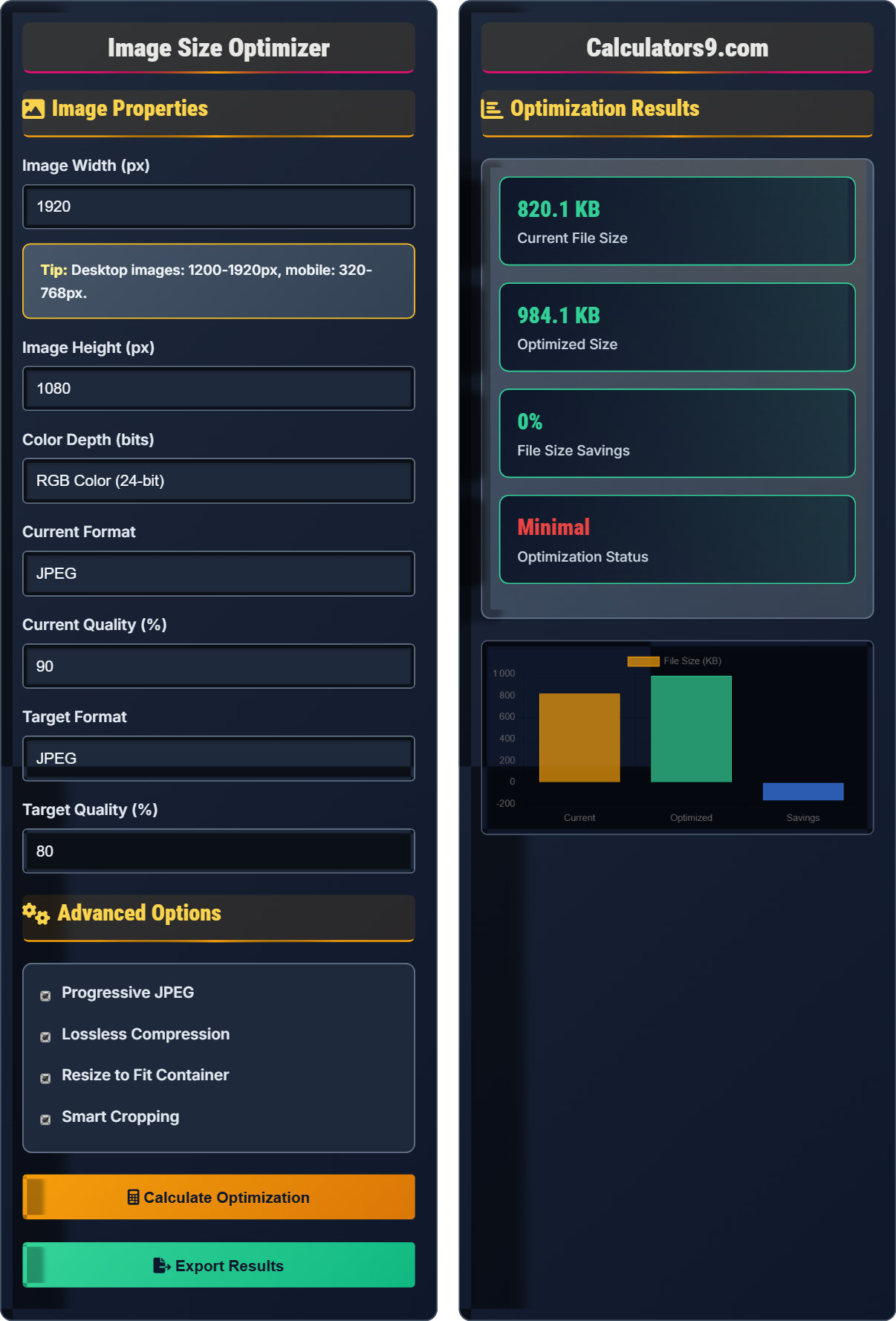
Show the optimizerImage file size estimation using the formula:
\( \text{File Size} = \text{Width} \times \text{Height} \times \text{Color Depth} \times \text{Compression Factor} \)
Where:
- Width/Height: Dimensions in pixels
- Color Depth: Bits per pixel (8 for grayscale, 24 for RGB)
- Compression Factor: Format-specific efficiency (JPEG: 0.1-0.2, PNG: 0.3-0.5, WebP: 0.08-0.15)
This formula helps estimate optimized file sizes for different image formats and compression levels.
Image Properties
Advanced Options
Optimization Results
| Format | Size (KB) | Savings | Quality |
|---|---|---|---|
| JPEG (Current) | 2,100 | - | 90% |
| WebP (Optimized) | 800 | 62% | 80% |
| PNG (Lossless) | 1,200 | 43% | 100% |
| AVIF (Next-gen) | 600 | 71% | 80% |
Comprehensive Image Optimization Guide
Image optimization is the process of reducing image file sizes while maintaining acceptable visual quality. It involves choosing appropriate file formats, compression levels, dimensions, and implementing modern techniques like responsive images and lazy loading. Proper optimization significantly improves page load times and user experience.
File size calculation uses the formula:
Where compression factor varies by format: JPEG (0.1-0.2), PNG (0.3-0.5), WebP (0.08-0.15), AVIF (0.05-0.12).
Each format has specific use cases:
- Choose the right format: JPEG for photos, PNG for graphics with transparency
- Use modern formats: WebP and AVIF offer superior compression
- Implement responsive images: Serve different sizes based on device
- Optimize dimensions: Don't serve oversized images
- Use compression tools: Automated optimization pipelines
- Lazy loading: Load images only when needed
Image Optimization Learning Quiz
Which image format is most appropriate for a photograph with no transparency requirements?
The answer is B) JPEG. JPEG is specifically designed for photographs and continuous-tone images. It uses lossy compression that efficiently removes subtle color variations that are imperceptible to the human eye, achieving high compression ratios while maintaining good visual quality for photographic content.
JPEG's algorithm is optimized for natural images with smooth color gradients. It uses discrete cosine transform (DCT) to compress image data in a way that preserves perceptual quality while significantly reducing file size. For photographs, JPEG typically achieves 10:1 compression with minimal visible quality loss.
JPEG: Joint Photographic Experts Group format, optimized for photos
Lossy Compression: Reduces file size by removing some image data
DCT: Discrete Cosine Transform, JPEG's mathematical foundation
• Use JPEG for photographs without transparency
• Use PNG for graphics with transparency
• Consider WebP for modern browsers
• Use quality settings of 80-90% for photos
• Use progressive JPEG for better perceived loading
• Consider WebP as primary format with JPEG fallback
• Using PNG for photographs (much larger file size)
• Using JPEG for logos with sharp edges (artifacts)
• Not considering newer formats like WebP
Calculate the approximate file size for a 1920x1080 JPEG image at 80% quality. Show your work and explain the factors affecting the final size.
Step 1: Calculate uncompressed size: 1920 × 1080 × 24 bits = 49,766,400 bits = 6,220,800 bytes
Step 2: Apply JPEG compression factor (80% quality): 6,220,800 × 0.15 = 933,120 bytes
Step 3: Convert to kilobytes: 933,120 ÷ 1024 ≈ 911 KB
Factors affecting final size: Quality setting, image complexity, compression algorithm, and file format efficiency.
The compression factor accounts for how efficiently the format compresses the image. JPEG's lossy compression removes detail that's less perceptible to human vision, especially at moderate quality settings. Complex images with fine details compress less efficiently than simple images with large areas of similar colors.
Compression Factor: Ratio of compressed to uncompressed size
Quality Setting: Parameter controlling compression aggressiveness
Image Complexity: Level of detail and variation in image
• Higher quality = larger file size
• Complex images compress less efficiently
• Always consider intended use when choosing quality
• Test quality settings visually, not just numerically
• Use lower quality for backgrounds, higher for portraits
• Consider progressive rendering for large images
• Using 100% quality unnecessarily
• Not considering image complexity
• Ignoring perceptual quality differences
A website loads 20 images totaling 5MB. Analysis shows that optimizing these images could reduce the total size by 60%. If the average user has a 10 Mbps connection, how much time would be saved during page load? Calculate the improvement and explain its impact on user experience.
Step 1: Calculate current download time: 5MB × 8 = 40Mb ÷ 10Mbps = 4 seconds
Step 2: Calculate optimized size: 5MB × (1 - 0.6) = 2MB
Step 3: Calculate optimized download time: 2MB × 8 = 16Mb ÷ 10Mbps = 1.6 seconds
Step 4: Calculate time saved: 4 - 1.6 = 2.4 seconds
Therefore, optimization saves 2.4 seconds of load time, representing a 60% improvement in image loading time.
This demonstrates the direct relationship between file size and load time. The 60% size reduction translates to a 60% time reduction (assuming constant bandwidth). This improvement significantly enhances user experience, as studies show that 40% of users abandon websites that take more than 3 seconds to load.
Load Time: Time required to download all page resources
User Experience: Overall perception of website interactionPerformance Budget: Limits on page weight and load time
• Image optimization directly impacts load time
• 60% size reduction = 60% time reduction
• Every second counts for user retention
• Prioritize optimization of largest images first
• Use tools to automate bulk optimization
• Implement lazy loading for below-fold images
• Not measuring actual performance improvements
• Optimizing without considering visual quality
• Ignoring cumulative impact of multiple images
A website displays a hero image that's 1920px wide on desktop but only 320px on mobile. The current 1920px image is 2MB. Calculate the potential savings if you create a 320px version for mobile devices. Also explain the benefits of responsive image implementation.
Step 1: Calculate area ratio: (320²) ÷ (1920²) = 102,400 ÷ 3,686,400 = 0.028 (2.8%)
Step 2: Estimate mobile image size: 2MB × 0.028 = 56KB
Step 3: Calculate savings: 2MB - 56KB ≈ 1.95MB
Benefits of responsive images:
• Significant bandwidth savings for mobile users
• Faster page loads on slower mobile connections
• Reduced data usage for users with limited plans
• Better user experience across all devices
Responsive images scale file size proportionally to pixel count. The area ratio (width × height) determines the file size relationship. Serving appropriately sized images prevents mobile users from downloading unnecessarily large files, which is especially important given mobile data limitations and slower connection speeds.
Responsive Images: Different sizes served based on device characteristics
Pixel Density: Physical pixels per inch on display
Device Characteristics: Screen size, resolution, and capabilities
• Always serve appropriately sized images
• Use modern responsive image techniques
• Consider high-DPI displays when sizing images
• Use srcset attribute for responsive images
• Implement picture element for art direction
• Consider using CSS for background images with object-fit
• Serving same images to all devices
• Not considering pixel density for high-DPI screens
• Using CSS to resize images instead of proper sizing
Which next-generation image format provides the best compression efficiency compared to JPEG while maintaining similar visual quality?
The answer is C) WebP. WebP typically achieves 25-35% smaller file sizes than JPEG at equivalent quality levels. It uses advanced compression techniques including VP8 or VP9 for lossy compression and WebP lossless for lossless compression, making it superior to JPEG in both quality and efficiency.
WebP's superior compression comes from its use of predictive coding (like video compression) to reduce redundancy in images. It supports both lossy and lossless compression in a single format, along with transparency and animation, making it a versatile replacement for multiple legacy formats.
WebP: Modern image format developed by Google
Compression Efficiency: Amount of size reduction achieved
Predictive Coding: Compression using prediction algorithms
• WebP offers 25-35% size reduction over JPEG
• Consider browser support when implementing
• Use feature detection for fallbacks
• Implement WebP with JPEG fallback
• Use picture element for format switching
• Consider AVIF for even better compression
• Not providing fallbacks for older browsers
• Assuming universal WebP support
• Not testing quality differences
Optimization Fundamentals
Reducing file size while maintaining quality.
Dimensions × Color Depth × Compression Factor = File Size
- Choose format based on content type
- Optimize dimensions for display size
- Use modern formats when possible
Format Comparison
Match format to image content and requirements.
- WebP (modern browsers)
- AVIF (next-gen, limited support)
- JPEG (photos, broad support)
- PNG (graphics with transparency)
- Browser compatibility
- Quality requirements
- File size constraints
FAQ
Q: What's the most effective way to optimize images for web performance?
A: The most effective approach combines several strategies:
- Right format: WebP for modern browsers, JPEG/PNG fallbacks
- Proper sizing: Match image dimensions to display size
- Compression: Use appropriate quality settings (80-90% for JPEG)
- Responsive: Implement srcset for different screen densities
- Lazy loading: Load off-screen images only when needed
For most sites, this multi-layered approach can achieve 60-80% file size reduction without noticeable quality loss. The key is implementing all layers together rather than relying on a single technique.
Automated optimization tools can handle much of this process, but understanding the principles helps you make better decisions about quality trade-offs.
Q: How much impact does image optimization have on SEO and business metrics?
A: Image optimization has dramatic impact on both SEO and business metrics:
- Page Speed: 50-80% of page weight is often images
- SEO Rankings: Page speed is a confirmed Google ranking factor
- Conversion: 1 second delay = 7% reduction in conversions
- Bounce Rate: Slow-loading pages see 32% higher bounce rates
- Mobile: 53% of mobile users abandon sites taking >3s to load
For e-commerce sites, optimizing images to reduce load time by 1 second can increase revenue by 1-3%. The ROI on image optimization is typically very high, with relatively low implementation cost compared to the performance gains.
Google's Core Web Vitals also heavily weight visual loading metrics, making image optimization essential for maintaining search visibility.