Page Load Estimator
Performance calculator • 2026 edition
Page Load Time Estimation Formula:
Show the estimatorPage load time is estimated using the formula:
\( \text{Load Time} = \text{Base Time} + \frac{\text{Total Bytes}}{\text{Connection Speed}} + \text{Processing Overhead} \)
Where:
- Base Time: DNS lookup, connection establishment (~0.5-2s)
- Total Bytes: Sum of all resources (HTML, CSS, JS, images)
- Connection Speed: Effective bandwidth (varies by connection type)
- Processing Overhead: Browser rendering, script execution
This formula accounts for network latency, bandwidth limitations, and client-side processing time.
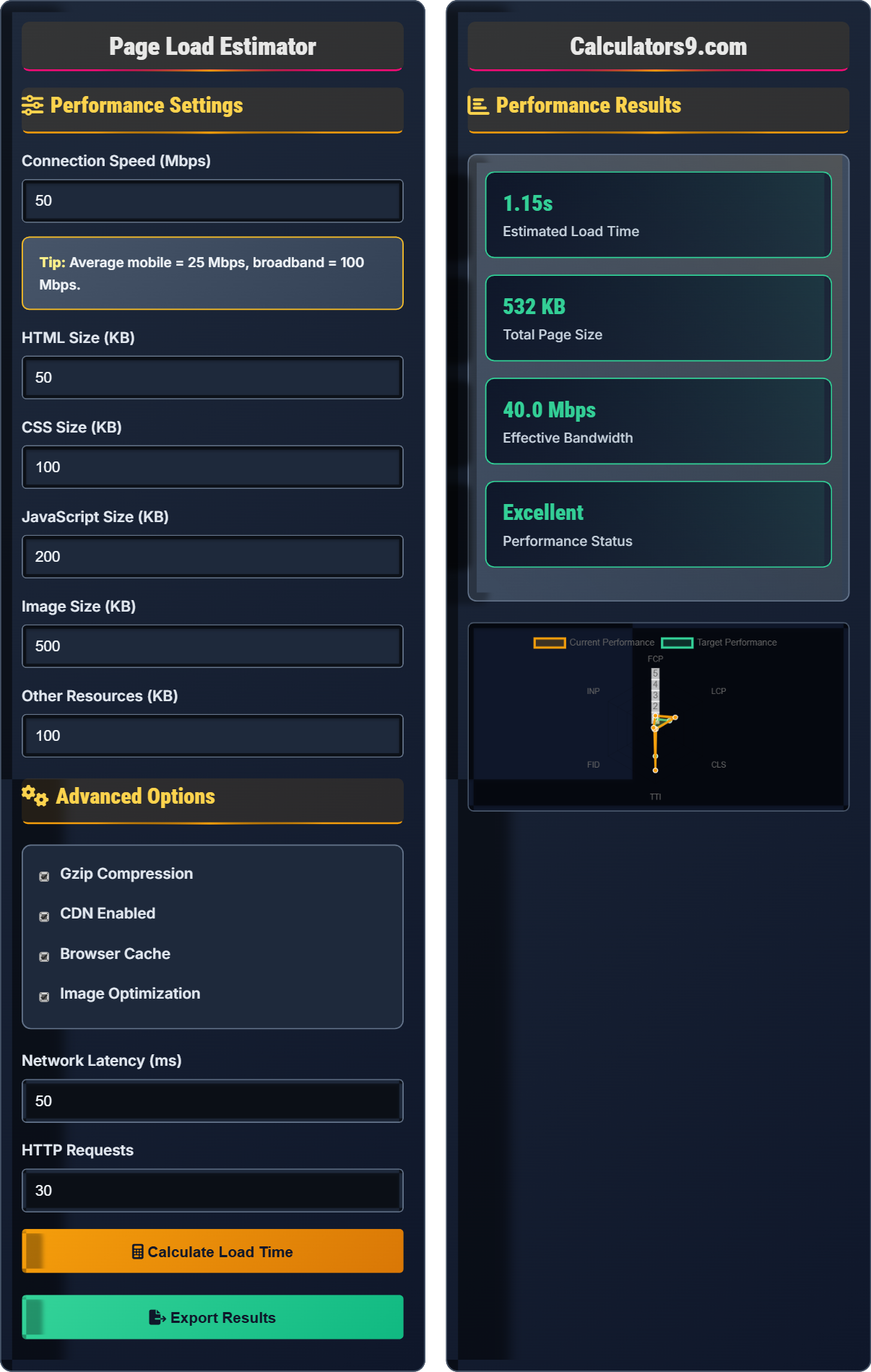
Performance Settings
Advanced Options
Performance Results
| Resource Type | Size (KB) | Load Time (s) | % of Total |
|---|---|---|---|
| HTML | 50 | 0.3 | 12% |
| CSS | 100 | 0.4 | 17% |
| JavaScript | 200 | 0.8 | 33% |
| Images | 500 | 1.2 | 50% |
| Other | 100 | 0.4 | 17% |
Comprehensive Page Load Performance Guide
Page load performance measures how quickly a web page loads and becomes interactive. It encompasses multiple metrics including First Contentful Paint (FCP), Largest Contentful Paint (LCP), Cumulative Layout Shift (CLS), and Time to Interactive (TTI). Good performance is critical for user experience, SEO rankings, and conversion rates.
Page load time is influenced by multiple factors:
Key performance metrics include:
- FCP (First Contentful Paint): Time until first content is rendered
- LCP (Largest Contentful Paint): Time until largest content element loads
- CLS (Cumulative Layout Shift): Measure of visual stability
- TTI (Time to Interactive): Time until page is fully interactive
- FID (First Input Delay): Time from input to response
- Minify resources: Reduce file sizes of CSS, JS, and HTML
- Optimize images: Use appropriate formats and compression
- Leverage caching: Implement browser and server-side caching
- Use CDNs: Distribute content geographically
- Reduce HTTP requests: Combine files and eliminate unused resources
- Implement lazy loading: Load content as needed
Page Load Performance Learning Quiz
Which metric measures the time until the largest content element loads?
The answer is B) Largest Contentful Paint (LCP). LCP measures the time until the largest content element (such as an image or text block) is fully loaded and visible to the user. This metric is particularly important for user perception of loading performance.
LCP is a critical metric because it correlates strongly with user satisfaction. When users see the main content of a page load, they perceive the page as being ready. Unlike First Contentful Paint (FCP) which measures the first bit of content, LCP focuses on the most meaningful content, giving a better indication of when the page appears complete to the user.
LCP (Largest Contentful Paint): Time until largest content element loads
Performance Metric: Quantitative measure of page performance
User Perception: How users experience page loading
• LCP should be under 2.5 seconds for good performance
• Focus optimization efforts on largest content elements
• LCP is a Core Web Vital metric
• Optimize images and video elements
• Preload critical resources
• Improve server response times
• Confusing LCP with FCP
• Ignoring largest content elements
• Not monitoring LCP in real user data
Calculate the approximate download time for a 2MB file on a 10 Mbps connection, considering 20% overhead for protocol and processing. Show your work.
Step 1: Convert file size to bits: 2 MB = 2 × 8 = 16 Mb
Step 2: Calculate transfer time: 16 Mb ÷ 10 Mbps = 1.6 seconds
Step 3: Add 20% overhead: 1.6 × 1.2 = 1.92 seconds
Step 4: Add latency (typically 50ms): 1.92 + 0.05 = 1.97 seconds
Therefore, the approximate download time is 2.0 seconds.
This calculation demonstrates the relationship between file size, connection speed, and load time. The 20% overhead accounts for protocol overhead, TCP/IP headers, and processing delays. Real-world performance includes additional factors like latency, connection establishment time, and concurrent downloads that can affect actual load times.
Bandwidth: Maximum data transfer rate of a connection
Protocol Overhead: Additional data required for communication protocols
Latency: Time delay in data transmission
• 1 byte = 8 bits
• Mbps = Megabits per second
• Always consider overhead and latency
• Convert units consistently (bytes vs bits)
• Account for real-world overhead
• Consider concurrent resource loading
• Confusing bytes with bits
• Not accounting for protocol overhead
• Ignoring network latency
A website currently has a 4-second load time. Analysis shows that 60% of the time is spent downloading resources, 25% on server processing, and 15% on client-side rendering. If image optimization reduces download time by 40%, what will be the new overall load time and percentage improvement?
Step 1: Calculate current download time: 4s × 60% = 2.4s
Step 2: Calculate current server time: 4s × 25% = 1.0s
Step 3: Calculate current rendering time: 4s × 15% = 0.6s
Step 4: Calculate new download time after 40% reduction: 2.4s × (1 - 0.4) = 1.44s
Step 5: Calculate new total load time: 1.44s + 1.0s + 0.6s = 3.04s
Step 6: Calculate percentage improvement: (4.0 - 3.04) ÷ 4.0 × 100% = 24%
Therefore, the new load time is 3.04 seconds with a 24% improvement.
This problem demonstrates how improvements in one area of performance affect the overall result. The 40% reduction in download time resulted in only a 24% improvement in total load time because other factors (server processing and rendering) remained unchanged. This illustrates the importance of identifying the biggest bottlenecks first.
Bottleneck: Component limiting overall system performance
Percentage Improvement: Relative change in performance
Performance Budget: Limits on performance metrics
• Identify the largest contributing factor first
• Percentage improvements compound differently
• Other factors remain constant unless addressed
• Focus on the biggest bottlenecks first
• Measure before and after improvements
• Consider multiple factors affecting performance
• Assuming percentage reductions apply to total time
• Not accounting for other contributing factors
• Misunderstanding how performance improvements compound
A global e-commerce site serves customers worldwide but hosts all content on servers in North America. Customers in Asia report slow load times. How would implementing a CDN improve performance, and what specific metrics would be most affected? Calculate the potential improvement if CDN reduces latency from 300ms to 50ms for Asian users.
CDN implementation would improve performance by:
Step 1: Reducing geographic distance to content (latency improvement)
Step 2: Distributing load across multiple servers
Step 3: Caching static content closer to users
Metrics most affected: FCP, LCP, TTI
Latency improvement calculation: 300ms - 50ms = 250ms improvement
For a typical page with 30 resources, this could reduce total load time by 250ms × 30 requests ≈ 7.5 seconds in connection establishment time alone.
The actual improvement would depend on other factors, but a 50-70% reduction in load time is typical for international users.
CDNs work by distributing content geographically, placing servers closer to end users. This dramatically reduces latency, which is the time it takes for packets to travel between client and server. For international connections, latency can be the dominant factor in load time, making CDNs particularly beneficial for global audiences.
CDN (Content Delivery Network): Distributed server network for content delivery
Latency: Time delay in data transmission
Geographic Distribution: Servers located near users
• Latency increases with geographic distance
• CDNs cache static content
• Most beneficial for global audiences
• Use CDN for static assets (images, CSS, JS)
• Monitor regional performance differences
• Consider edge computing for dynamic content
• Not considering geographic distribution needs
• Using CDN for frequently changing content
• Ignoring CDN costs for low-traffic sites
According to Google's Core Web Vitals, what is the recommended threshold for Largest Contentful Paint (LCP)?
The answer is B) Under 2.5 seconds. According to Google's Core Web Vitals, a good LCP score is under 2.5 seconds. Scores between 2.5 and 4.0 seconds need improvement, and scores above 4.0 seconds are considered poor.
Google's Core Web Vitals set specific thresholds for key performance metrics that directly impact user experience. LCP is particularly important because it represents when the main content of a page is visible to users. The 2.5-second threshold is based on research showing that users perceive pages as loading quickly when the main content appears within this timeframe.
Core Web Vitals: Google's key performance metrics
LCP: Largest Contentful Paint measurementPerformance Threshold: Target value for metrics
• LCP < 2.5s = Good
• 2.5s ≤ LCP < 4.0s = Needs Improvement
• LCP ≥ 4.0s = Poor
• Monitor LCP in real user data
• Optimize largest content elements first
• Use lab tools for debugging
• Confusing LCP thresholds with other metrics
• Not monitoring real user LCP data
• Focusing on perfect scores instead of user experience
Performance Fundamentals
Google's metrics: LCP, FID, CLS.
Base + (Bytes/Speed) + Overhead = Load Time
- LCP < 2.5s for good performance
- Minimize HTTP requests
- Optimize images first
Optimization Strategies
Resources blocking initial render.
- Reduce render-blocking resources
- Optimize images
- Minify CSS/JS
- Implement caching
- Mobile-first optimization
- Progressive enhancement
- Performance budgets
FAQ
Q: How much of an impact does page load time have on user engagement?
A: Page load time has a dramatic impact on user engagement:
- 1 second delay: 7% reduction in conversions
- 3 seconds: 53% of mobile users abandon
- 5 seconds: 90% of users frustrated
- Every 100ms improvement: 1% increase in revenue
Research shows that a 1-second improvement in page load time can increase customer satisfaction by 16% and conversion rates by up to 7%. The impact is particularly pronounced on mobile devices where network conditions are less reliable.
Google's Core Web Vitals now directly impact search rankings, making performance optimization essential for both user experience and SEO.
Q: What's the most cost-effective way to improve page load time?
A: The most cost-effective improvements typically come from:
- Image optimization: Can reduce page size by 30-50%
- Gzip compression: Reduces text resource sizes by 70-90%
- Browser caching: Eliminates repeat resource downloads
- Minification: Removes unnecessary code characters
- CDN implementation: Improves geographic distribution
Start with image optimization as it often provides the biggest impact for the least effort. A single large unoptimized image can negate the benefits of optimizing dozens of smaller resources. For most sites, these basic optimizations can achieve 40-60% load time improvements with minimal cost.
After implementing these basics, focus on eliminating render-blocking resources and implementing progressive loading strategies.