Robots.txt Generator
SEO optimization tool • 2026 standards
Robots.txt Directives:
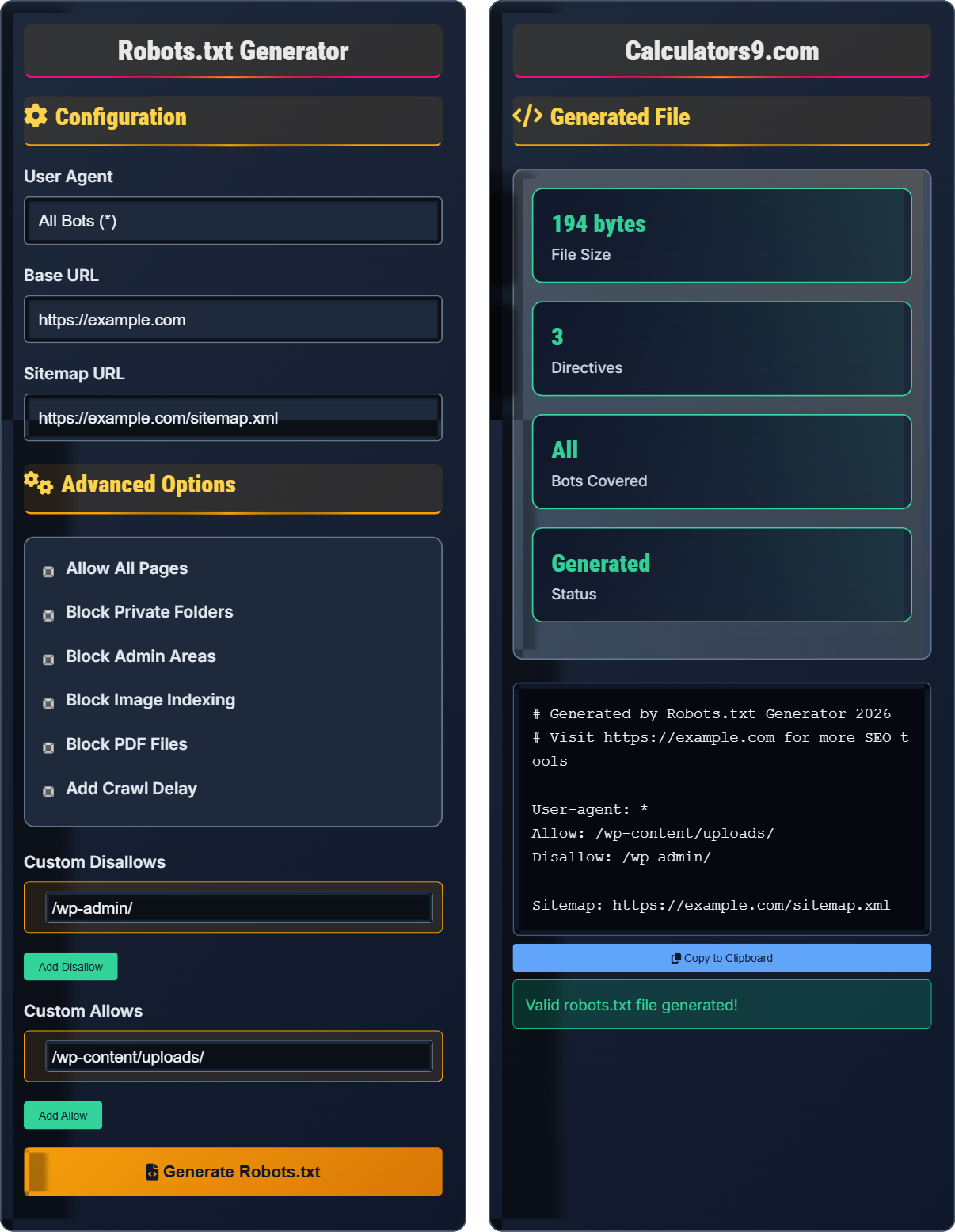
Generate FileUser-agent: *
Disallow: /private/
Allow: /public/
Sitemap: https://example.com/sitemap.xml
Robots.txt is a text file that tells search engine crawlers which pages or files the crawler can or can't request from your site. It uses simple directives to control access to specific areas of your website.
Key Directives:
- User-agent: Specifies which crawler the rule applies to
- Disallow: Blocks access to specific paths
- Allow: Explicitly allows access to specific paths
- Sitemap: Points to your XML sitemap location
- Crawl-delay: Sets delay between requests (non-standard)
Best Practice: Keep your robots.txt simple and test regularly to ensure search engines can properly crawl your site.
Configuration
Advanced Options
Generated File
Robots.txt Fundamentals
Robots.txt is a text file that tells search engine crawlers which pages or files the crawler can or can't request from your site. It uses simple directives to control access to specific areas of your website.
User-agent: [crawler-name]
Disallow: [path-to-block]
Allow: [path-to-allow]
Sitemap: [sitemap-url]
Where User-agent specifies which crawler, Disallow blocks paths, Allow permits access, and Sitemap points to your XML sitemap.
- Place robots.txt in your root directory
- Case-sensitive: /Private/ ≠ /private/
- Wildcards allowed: /folder/*/file.html
- Order matters: Allow precedes Disallow
- Not legally binding - use other security measures
SEO Strategies
Properly configured robots.txt helps search engines crawl your site efficiently, prevents indexing of duplicate content, and guides bots to important pages.
- Keep file small (under 500KB)
- Test with Google Search Console
- Update when site structure changes
- Block non-essential resources
- Always include your sitemap
- Doesn't prevent indexing if linked elsewhere
- Use meta robots tags for page-level control
- Can block entire directories effectively
- Helps manage crawl budget
Robots.txt Learning Quiz
What is the primary purpose of a robots.txt file?
The answer is B) To direct search engine crawlers. A robots.txt file is a text file that tells search engine crawlers which pages or files they can or cannot request from your site. It uses simple directives to control access to specific areas of your website.
Understanding the purpose of robots.txt is fundamental to SEO. It acts as a set of instructions for web crawlers, helping them navigate your site efficiently. It's important to note that robots.txt is not a security measure—it's a polite request that respectful bots follow.
Robots.txt: A text file that provides instructions to web robots about which pages to crawl
Web Crawler: A program that systematically browses the internet to index content
Directive: An instruction in robots.txt that tells bots what to do
• Robots.txt is a recommendation, not a command
• Place it in your website's root directory
• Uses simple text-based instructions
• Helps manage crawl budget efficiently
• Always test your robots.txt in Google Search Console
• Keep the file under 500KB
• Use wildcards for pattern matching
• Assuming it provides security (it doesn't)
• Blocking important pages accidentally
• Forgetting to update when site structure changes
Which of the following robots.txt directives would block all bots from accessing the admin folder?
The answer is A) User-agent: * Disallow: /admin/. This directive tells all user agents (*) to disallow access to the /admin/ path. The asterisk (*) is a wildcard that represents all web crawlers.
This question tests understanding of the syntax and meaning of robots.txt directives. The User-agent line specifies which bots the rule applies to, and the Disallow line specifies what paths to block. The asterisk (*) is crucial as it means "all bots".
User-agent: Specifies which web crawler the rule applies to
Disallow: Blocks access to specified paths
Wildcard (*): Represents all possible values
• User-agent: * applies to all crawlers
• Disallow: /path/ blocks the entire path
• Order matters when Allow and Disallow conflict
• Paths are case-sensitive
• Use specific paths like /admin/ to block entire directories
• Remember that trailing slashes matter
• Test with different user agents if needed
• Forgetting the colon after User-agent
• Using incorrect syntax like missing spaces
• Confusing Allow and Disallow purposes
You have a website at https://example.com with a sitemap located at https://example.com/sitemap.xml. Which robots.txt directive would correctly point search engines to your sitemap?
The correct directive is: Sitemap: https://example.com/sitemap.xml
This directive tells search engines where to find your XML sitemap, which contains a list of all the pages you want indexed. The Sitemap directive is placed at the root level of the robots.txt file and can appear multiple times if you have multiple sitemaps.
Sitemaps and robots.txt work together to help search engines discover and index your content. While robots.txt controls what bots can crawl, sitemaps help them discover what content exists. Including your sitemap in robots.txt is considered a best practice.
XML Sitemap: A file listing all pages you want search engines to index
Sitemap Directive: Points crawlers to your sitemap location
Crawl Budget: The number of pages a bot will crawl on your site
• Sitemap directive is independent of User-agent
• Can have multiple Sitemap lines for different sitemaps
• Must use absolute URLs
• Place at root level of robots.txt
• Include your main sitemap in robots.txt
• Use separate sitemaps for different content types
• Keep sitemaps updated with new content
• Using relative URLs instead of absolute URLs
• Forgetting to update sitemap locations
• Not including the sitemap directive at all
You want to block Googlebot from crawling your images directory but allow all other bots to access it. How would you configure your robots.txt to achieve this?
You would use separate User-agent sections:
User-agent: Googlebot
Disallow: /images/
User-agent: *
Allow: /images/
This configuration specifically blocks Googlebot from accessing the /images/ directory while allowing all other bots to access it. Note that the order matters when dealing with conflicting directives.
This demonstrates how to create targeted rules for specific search engine bots. Different search engines may have different capabilities or policies, so you might want to treat them differently. The key is understanding that each User-agent section is independent.
Targeted Blocking: Applying rules to specific bots rather than all bots
Independent Sections: Each User-agent section applies only to that specific bot
Conflict Resolution: Specific bot rules override general rules
• Each User-agent section is independent
• Specific bot rules take precedence over general rules
• Order within a section matters for conflicting directives
• Multiple User-agent lines can refer to the same bot
• Test specific bot configurations separately
• Use Google Search Console to verify settings
• Document special configurations for team awareness
• Mixing directives from different User-agent sections
• Assuming general rules override specific ones
• Forgetting that each section is independent
Which statement about robots.txt security is TRUE?
The answer is C) It's a polite request that respectful bots follow. Robots.txt is not a security mechanism—it's simply a set of instructions that well-behaved search engine crawlers typically respect. Malicious bots can ignore robots.txt entirely, so it should never be used as a security measure.
This is a critical concept for web developers and SEO professionals. Many people mistakenly believe robots.txt provides security, but it's only a guideline for ethical crawlers. For actual security, you need server-level authentication, password protection, or other secure methods.
Polite Request: A guideline that ethical bots follow voluntarily
Security Measure: Actual protection that prevents access
Well-Behaved Bots: Crawlers that respect robots.txt guidelines
• Robots.txt is not a security feature
• Malicious bots can ignore it completely
• Use proper authentication for sensitive content
• It only affects search engine crawling
• Never rely on robots.txt for privacy
• Use .htaccess or server configs for access control
• Combine with meta robots tags for better control
• Using robots.txt as a security measure
• Expecting it to hide sensitive information
• Confusing crawling restrictions with access control
FAQ
Q: How do I validate my robots.txt file is working correctly?
A: The best way to validate your robots.txt file is using Google Search Console's robots.txt Tester tool. This tool allows you to test specific URLs against your robots.txt file to see if they would be blocked.
Additionally, you can use the URL Inspection tool to see how Google views your robots.txt. For other search engines, many provide similar testing tools. You can also use online validators that check for syntax errors.
Remember to test both allowed and blocked URLs to ensure your directives are working as intended. The validation process checks the syntax and logic of your robots.txt directives against the URL patterns.
Q: Should I include a sitemap in my robots.txt file?
A: Yes, it's highly recommended to include your sitemap in your robots.txt file. Adding a Sitemap directive helps search engines discover your XML sitemap more easily.
Example: Sitemap: https://yoursite.com/sitemap.xml
This directive tells search engines exactly where to find your sitemap, which contains a list of all the pages you want indexed. While search engines can often find sitemaps through other means, including it in robots.txt ensures they're aware of it.
For sites with multiple sitemaps (for different content types), you can include multiple Sitemap lines in your robots.txt file.